Tomoshi Japanese Dictionary is an education app developed by Yuanyi Zhang.
User Ratings
The app has no ratings yet.
App Information
Tomoshi Japanese Dictionary is freely available from the App Store. The app size is 20.90 MB. The latest version available is 1.2.1. The last update was on October 31, 2026.
Technical Requirements
The app has a content rating of Medium Maturity. The app has been available on the App Store since September 2026.
Description by Yuanyi Zhang(from the App Store)
Tomoshi is a Japanese-English dictionary built for producing Japanese, not just decoding it. It helps you say it and write it right.
■ Lookup · Type Japanese, kana, romaji or English; candidates appear as you type · 210,000+ entries, with English-to-Japanese reverse lookup for when you know the word in English and need the Japanese · Results follow the spelling you searched, so 「明」 does not surface entries that look unrelated
■ Definitions you can use · English definitions and part-of-speech tags · Reading, pitch accent and a pitch-accent curve · Conjugation table at a glance · Example sentences with furigana that follows the entry you are reading
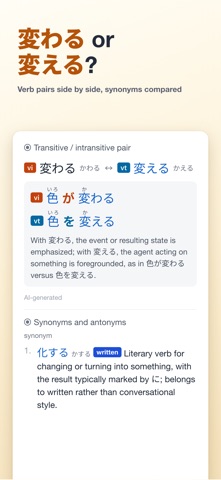
■ Help with producing Japanese · Transitive / intransitive pairs: 「開く/開ける」-style verb pairs shown side by side with matching example sentences · Near-synonym notes: how similar words differ and which one fits which situation · Kanji spelling notes: what each spelling of the same word is used for
■ Remember it · Save any entry to the wordbook and review it on an FSRS spaced-repetition schedule · Listen-only drills: hear the word without seeing it and train your ear to react · A small red dot appears when words are due; after a session you see your review streak · One-tap export to Anki: card backs carry full definitions, furigana on examples and a pitch-accent curve; open the file in AnkiMobile via the Files app, and re-exporting updates the same notes · Export and import the whole wordbook, or back it up daily to your own iCloud Drive · Sign in and your wordbook and review progress sync between your phone and desktop, merging changes from each device instead of overwriting them
■ AI explanations · Paste a whole sentence for a grammar breakdown with furigana; every word in the reading is tappable · Expressions the dictionary does not cover are handed to AI, so you are never stuck at "no results" · When the model is not sure, it says so instead of inventing a plausible-sounding explanation
■ Reading · Public-domain classics from Aozora Bunko, graded by difficulty, with a furigana toggle — tap any word to look it up
■ Audio · Entries, example sentences and whole sentences can be read aloud with cloud-synthesised voices
■ Privacy · No account needed for anything; sign in with an email code (no password) only if you want the wordbook to sync across devices — no name or phone number collected · Lookup history stays on your device — I cannot see it; the wordbook, review progress and reading position stay local too (with your own iCloud backup) until you sign in, and deleting your account removes the cloud copy · No ads, no third-party analytics · Crash reports are sent by default, can be turned off in Settings, and never include what you searched · Full policy: tomoshi.app/privacy/en
■ Connectivity · The first launch downloads the dictionary data once; after that, core lookup works offline · AI explanations and speech are the two features that need a connection
■ Free Looking words up is free forever: the complete dictionary data, offline lookup and the error-reporting feature are free now and will stay free. Cloud features such as AI explanations and cloud speech are free to use today, within a daily quota. Every call to them has a real server cost behind it, which I cover myself for now; if a growing user base pushes server and AI costs beyond what I can carry, they may become paid to balance them. I would rather state the rule from day one.
■ Where the data comes from · Entries are based on JMdict / EDRDG and other open dictionary projects; example sentences partly from Tatoeba · Verb pairs, nuance notes and reverse lookup are AI-assisted and cross-checked by multiple models · Pronunciation and pitch accent are human-verified · Full attribution in the app under Me → Settings → Open-source licences
■ Other platforms Desktop versions for Windows and macOS are at tomoshi.app, with a select-to-look-up browser extension.
Each subscription will automatically renew 3 days before the expiration date for
the same time period. Subscriptions can be cancelled at any time before the renewal.