

Tone Generator: Frequency Hz
Tone Generator: Frequency Hz is made and published by extensions.ee. AppBrain is an independent app data site and isn't affiliated with extensions.ee. The app name, icon, screenshots and description belong to extensions.ee and are shown as published on the App Store.
AppBrain's verdict
- Last updated
- April 9, 2026
- Size
- 5.00 MB
User feedback
Ratings and reviews on the App StoreComments on Tone Generator: Frequency Hz for iOS
We don't have enough comments to show example comments. Please check back later.
Store listing
By extensions.ee, from the App Store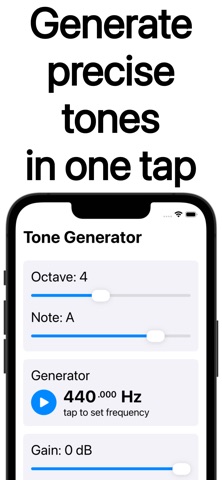
Description by extensions.ee Written by the developer, not by AppBrain. Click to read.
Tone Generator is intentionally focused: no accounts, no ads, and it works offline. Use it like a tuning fork when you just need a reliable pitch, or use it as a frequency generator when you need repeatable, numeric precision.
What you can do with Tone Generator
- Tune instruments with a stable reference note
- Run a fast sound test on speakers, headphones, and interfaces
- Practice ear training with consistent tones and intervals
- Demonstrate wave basics, resonance, and generation frequency in class
- Save favorites for quick access
Common ways people use Tone Generator
1. Match a note while tuning guitar, bass, violin, voice, or synth
2. Sweep slowly with a test tone generator to find rattles and distortion
3. Train pitch recognition with a pure tone generator for intervals
4. Support a tuning fork auditory test routine with a consistent reference
5. Set exact targets for repeatable sessions using tone generator hz control
Simple controls that stay out of your way
▸ Note mode for quick musical references and a music tone generator workflow
▸ Hz mode for a precise frequency tone generator value
▸ Smooth volume control for safe listening
▸ Favorites and recent tones for one-click access
▸ Clean playback that behaves like a sine tone generator
When you need quick diagnostics, it can act as a sound tone generator with instant start and stop. When you need numbers, it becomes a hertz tone generator you can trust. And when you need a dependable signal for gear checks, it works as an audio tone generator without extra setup.
Useful presets and shortcuts
• Concert A and other common tuning references
• Practical ranges for speaker checks and headphone tests
• Fast access to the last used frequency
Tuning with Tone Generator feels straightforward
1. Pick a note and start playback
2. Listen for beating as you get close
3. Adjust your instrument until the beating disappears
Troubleshooting workflows that work well
▸ Check left and right channels using the same reference tone
▸ Compare two devices with the exact same Hz setting
▸ Sweep a range to spot harsh peaks, nulls, or cabinet buzz
▸ Confirm smooth volume changes without sudden jumps
Audio checks that feel effortless
- Play a fixed tone to confirm an interface or cable is working
- Use short bursts to test for speaker rub or room resonances
- Repeat the same setting across sessions for consistent comparisons
Best practices
- Start low, then raise volume gradually during any sound test
- Avoid long exposure to high frequencies at high volume
- For tuning, listen for beating and adjust until it settles
- Use headphones carefully and keep levels comfortable
Why Tone Generator stays simple
Tone Generator is a straightforward tone generator app who want a single tool that opens fast and does the job. Tone Generator is useful in rehearsal, at a desk, in a studio, or in a classroom.
Who Tone Generator is for
1. Musicians who want a tuning fork style reference that is always available
2. Creators who need an audio frequency generator for repeatable checks
3. Teachers who want clear examples with stable tones
4. Anyone who wants a frequency generator app that works offline
Tone Generator opens quickly and remembers the last tone. Keep Tone Generator in your Dock so Tone Generator is always ready.
Tone Generator can also serve as a frequency sound generator or a sound frequency generator when you’re verifying speakers, interfaces, or room response. Set it once, hit play, and get a clean, consistent tone with Tone Generator.
Terms of Use: https://www.apple.com/legal/internet-services/itunes/dev/stdeula/
Safety and technology
Found in the app by AppBrain- Price
- Free
- App size
- 5.00 MB
- Content rating
- Everyone
Technologies used by Tone Generator: Frequency Hz
Releases
Updates seen on the App Store- Version
- 1.0.1
- Launched
- February 2026
No changelog data
Alternatives
Similar apps and more from extensions.eeMore from extensions.ee


Rankings
App Store top chartsApp Store Rankings for Tone Generator: Frequency Hz
About the app and developer
About Tone Generator: Frequency Hz
Tone Generator: Frequency Hz is a music app developed by extensions.ee.
User Ratings
The app has no ratings yet.
App Information
Tone Generator: Frequency Hz is freely available from the App Store. The app size is 5.00 MB. The latest version available is 1.0.1. The last update was on April 9, 2026.
Technical Requirements
The app has a content rating of Everyone. The app has been available on the App Store since February 2026.
Developer information for extensions.ee
Address: