

ToneAtlas is made and published by Ferhat Yigen. AppBrain is an independent app data site and isn't affiliated with Ferhat Yigen. The app name, icon, screenshots and description belong to Ferhat Yigen and are shown as published on the App Store.
AppBrain's verdict
- Last updated
- October 21, 2026
- Size
- 4.76 MB
User feedback
Ratings and reviews on the App StoreComments on ToneAtlas for iOS
We don't have enough comments to show example comments. Please check back later.
Store listing
By Ferhat Yigen, from the App Store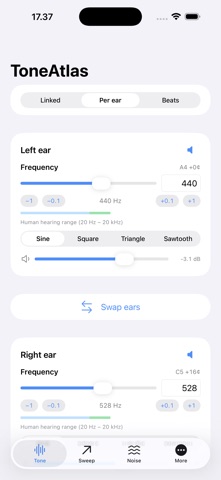


Screenshots by Ferhat Yigen, from the the App Store listing
Description by Ferhat Yigen Written by the developer, not by AppBrain. Click to read.
ToneAtlas is a precision tone generator built around one idea: you have two ears — control them independently.
PER-EAR CONTROL
Play one frequency in your left ear and another in your right. Independent waveform, volume and mute controls, with one-tap swap. Invert or phase-shift the right channel to explore stereo imaging and speaker wiring.
FREQUENCY CONTROL
Choose frequencies from 0.1 Hz to 100 kHz. Actual synthesis is limited by the output sample rate and hardware; the app displays the current digital limit. Normal output requests 48 kHz. Optional high-resolution output requests up to 192 kHz on compatible equipment. Speaker and headphone response may be lower.
BEATS AND SESSIONS
Explore binaural beats with Delta, Theta, Alpha, Beta and Gamma presets, plus monaural and isochronic modes. Adaptive sessions change the beat frequency over time. A sleep timer gradually fades playback before stopping. These presets do not guarantee sleep, focus or health benefits.
SOUND TOOLKIT
- Logarithmic and linear sweeps for speaker and headphone testing
- White, pink and brown noise, including different colors per ear
- Up to three harmonic layers alongside the main oscillator
- Anti-aliased square, saw and triangle waveforms
- Stereo WAV export at 44.1, 48 or 96 kHz, with progress and cancellation
- Bass haptics for supported devices
PRESETS AND SHARING
Save complete tone, sweep and noise setups. Favorite or rename your presets, and share them using links or QR codes. Shared presets require confirmation before import and do not start playback automatically.
HEARING TOOLS
- Informational tinnitus frequency matching
- Ear balance comparison with CSV export
- Left/right channel check and low-frequency speaker test
- Library of reference frequencies
AND MORE
Siri Shortcuts, background playback, waveform preview and controls for deleting local presets, settings and temporary export files. Files saved in other apps are not deleted.
Free for 30 days, then a single lifetime purchase. No subscription. No ads. No data collection.
ToneAtlas is not a medical device. Hearing and tinnitus tools are informational and do not provide a diagnosis or replace professional care. Keep volume comfortable; digital gain is not a measurement of sound pressure at your ear. Headphones are required for per-ear and binaural features.
PER-EAR CONTROL
Play one frequency in your left ear and another in your right. Independent waveform, volume and mute controls, with one-tap swap. Invert or phase-shift the right channel to explore stereo imaging and speaker wiring.
FREQUENCY CONTROL
Choose frequencies from 0.1 Hz to 100 kHz. Actual synthesis is limited by the output sample rate and hardware; the app displays the current digital limit. Normal output requests 48 kHz. Optional high-resolution output requests up to 192 kHz on compatible equipment. Speaker and headphone response may be lower.
BEATS AND SESSIONS
Explore binaural beats with Delta, Theta, Alpha, Beta and Gamma presets, plus monaural and isochronic modes. Adaptive sessions change the beat frequency over time. A sleep timer gradually fades playback before stopping. These presets do not guarantee sleep, focus or health benefits.
SOUND TOOLKIT
- Logarithmic and linear sweeps for speaker and headphone testing
- White, pink and brown noise, including different colors per ear
- Up to three harmonic layers alongside the main oscillator
- Anti-aliased square, saw and triangle waveforms
- Stereo WAV export at 44.1, 48 or 96 kHz, with progress and cancellation
- Bass haptics for supported devices
PRESETS AND SHARING
Save complete tone, sweep and noise setups. Favorite or rename your presets, and share them using links or QR codes. Shared presets require confirmation before import and do not start playback automatically.
HEARING TOOLS
- Informational tinnitus frequency matching
- Ear balance comparison with CSV export
- Left/right channel check and low-frequency speaker test
- Library of reference frequencies
AND MORE
Siri Shortcuts, background playback, waveform preview and controls for deleting local presets, settings and temporary export files. Files saved in other apps are not deleted.
Free for 30 days, then a single lifetime purchase. No subscription. No ads. No data collection.
ToneAtlas is not a medical device. Hearing and tinnitus tools are informational and do not provide a diagnosis or replace professional care. Keep volume comfortable; digital gain is not a measurement of sound pressure at your ear. Headphones are required for per-ear and binaural features.
Safety and technology
Found in the app by AppBrain- Price
- Free
- App size
- 4.76 MB
- Content rating
- Medium
Technologies used by ToneAtlas
Releases
Updates seen on the App Store- Version
- 1.1.2
- Launched
- July 2026
No changelog data
Alternatives
Similar apps and more from Ferhat YigenAlternatives to ToneAtlas


More from Ferhat Yigen


Rankings
App Store top chartsApp Store Rankings for ToneAtlas
This app is not ranked
About the app and developer
About ToneAtlas
ToneAtlas is an utilities app developed by Ferhat Yigen.
What is the rating of ToneAtlas?
ToneAtlas has no ratings yet.
Is ToneAtlas free?
ToneAtlas is free. The app size is 4.76 MB. The latest version available is 1.1.2. The last update was on October 21, 2026.
What are the requirements for ToneAtlas?
The app has a content rating of Medium Maturity. The app has been available on the App Store since July 2026.
Developer information for Ferhat Yigen
Address: