

ToolkitX is made and published by Joerg Mueller. AppBrain is an independent app data site and isn't affiliated with Joerg Mueller. The app name, icon, screenshots and description belong to Joerg Mueller and are shown as published on the App Store.
AppBrain's verdict
- Last updated
- October 22, 2026
Rankings
App Store top chartsApp Store Rankings for ToolkitX
Competitors
Similar apps and more from Joerg MuellerAlternatives to ToolkitX


Releases
Updates seen on the App Store- Version
- 6.0.1
- Launched
- March 2019
No changelog data
User feedback
Ratings and reviews on the App StoreComments on ToolkitX for iOS
We don't have enough comments to show example comments. Please check back later.
Technology
Found in the app by AppBrain- Price
- Free
- App size
- 68.1 MB
- Content rating
- Everyone
Technologies used by ToolkitX
About the app and developer
About ToolkitX
ToolkitX is a business app developed by Joerg Mueller.
User Ratings
The app has no ratings yet.
App Information
ToolkitX is freely available from the App Store. The app size is 68.08 MB. The latest version available is 6.0.1. The last update was on October 22, 2026.
Technical Requirements
The app has a content rating of Everyone. The app has been available on the App Store since March 2019.
Developer information for Joerg Mueller
Address:
Frequently asked questions about ToolkitX
Is ToolkitX free?
Yes. ToolkitX is free on the App Store.
Is ToolkitX still available?
Yes. ToolkitX is on the App Store, and the last update we saw was on October 22, 2026.
How large is ToolkitX?
ToolkitX is 68.08 MB.
Is ToolkitX suitable for children?
App Store rates the content of ToolkitX as suitable for everyone.
Who made ToolkitX?
ToolkitX was developed by Joerg Mueller. It is listed in the business category on the App Store.
What are the best alternatives to ToolkitX?
People looking at ToolkitX also look at these business apps: Windpulse, Dobiquity: Checklist App, Hours Tracker - Salarybook, winSIM Servicewelt, ComfortDelGro Driving Centre.
Store listing
By Joerg Mueller, from the App Store





Description by Joerg Mueller Written by the developer, not by AppBrain. Click to read.
Main features of the app include:
Time and Expenses
Mobile management of time and expenses allows your workers to directly manage their time sheet in the mobile app. Logging time and overtime, as well as creating easy reports and overviews for the management of your employees. If required this can be combined with the GPS functions in order to make the tool work similar to an attendance recorder. Also travel claims and expenses can be managed directly in the phone app and sent in for approval.
Permit to Work
Mobile Permit to Work System to create for a safe working environment. Control and manage all work activities in your infrastructure by creating and controlling work permits for your own people, subcontractors and suppliers.
Health and Safety
For any HSE department this tool provides features for Incident Reporting, HSE Auditing, Safety Notices and automated generation of your KPI’s. Be informed in real time of any incident which requires your attention. Automated reports and instant generation of KPI’s are part of our standard features.
Quality Management
With our Quality Management functions, you can easily track and report all Quality Issues within your organisations. Create reports directly from your mobile phone, track them, define countermeasures and assign them for implementation. The tool also supports easy KPI and report generations.
Checklist
Checklists are useful for all kind of applications. From day to day operations, quality controls, to the management of non-automated functions. With our tool you can easily design and create checklists to collect any kind of information (text, pictures, values, readings, etc.) you would like to retrieve. Easily assign the checklist to anybody in your organisation. Set deadlines and see your overdues. The tool is useful for any kind of business.
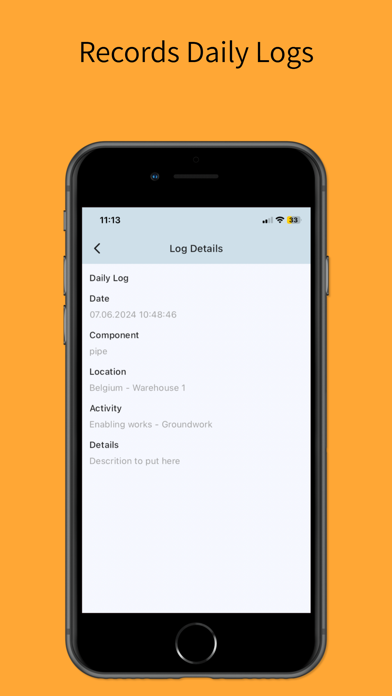
Log Book and Daily Progress Reporting
Our generic log book app let’s you generate as many log books as you need. Keep up to date with daily events and monitor progress as it happens. Our activity tracking allows you to benchmark specific activities by logging the respective start and end time. This allows you to benchmark teams and equipment performance and made better decisions in the future. It also comes with an automated Daily Progress Report (DPR) function which gives you an instant overview of activities
GPS Tracking
We can track anything! From people and mobile phones, to cars, assets, ships and planes. Our tailored tracking solution start in this app but we can also provide tailored hardware for your individual tracking needs. We also support geo-fencing and alarming as well as history values, yet with full privacy options.
Asset and Work Order Management
Our mobile Asset and Work Order Management let’s you manage and assign Work Orders directly to your field crews. Track ongoing activities and follow the hours and costs spend on your work orders. The tool also helps you to manage your assets and plan your maintenance activities. By working on the same data as your field crew you can dispatch activities in real time and get immediate feedback.
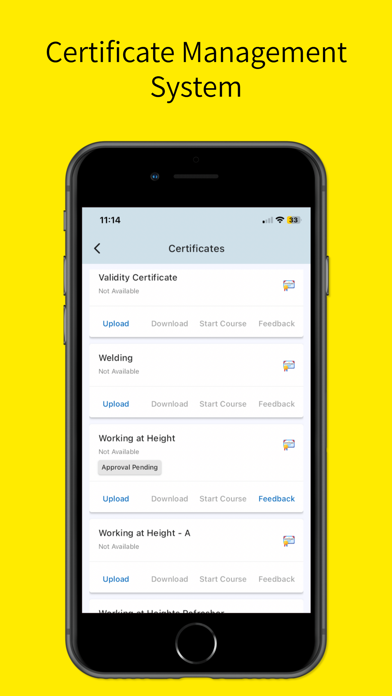
Certificate Management
Our self-service certificate management allows your staff to upload their work certificate and manage them directly on the mobile app. A build in approval process verifies that all certificates are in place when certain work activities are performed in order to ensure that only qualified personal can conduct works which needs special skills.