

TOP SIM Brastel: Data in Japan
TOP SIM Brastel: Data in Japan is made and published by Brastel Co.,Ltd. AppBrain is an independent app data site and isn't affiliated with Brastel Co.,Ltd. The app name, icon, screenshots and description belong to Brastel Co.,Ltd. and are shown as published on the App Store.
AppBrain's verdict
- Last updated
- September 30, 2026
Rankings
App Store top chartsApp Store Rankings for TOP SIM Brastel: Data in Japan
Competitors
Similar apps and more from Brastel Co.,Ltd.Alternatives to TOP SIM Brastel: Data in Japan


More from Brastel Co.,Ltd.


Also available on Google Play

Releases
Updates seen on the App Store- Version
- 2.10.0
- Launched
- January 2025
No changelog data
User feedback
Ratings and reviews on the App StoreComments on TOP SIM Brastel: Data in Japan for iOS
We don't have enough comments to show example comments. Please check back later.
Technology
Found in the app by AppBrain- Price
- Free
- App size
- 52.3 MB
- Content rating
- Everyone
Technologies used by TOP SIM Brastel: Data in Japan
About the app and developer
About TOP SIM Brastel: Data in Japan
TOP SIM Brastel: Data in Japan is an utilities app developed by Brastel Co.,Ltd.
User Ratings
The app has no ratings yet.
App Information
TOP SIM Brastel: Data in Japan is freely available from the App Store. The app size is 52.34 MB. The latest version available is 2.10.0. The last update was on September 30, 2026.
Technical Requirements
The app has a content rating of Everyone. The app has been available on the App Store since January 2025.
Developer information for Brastel Co.,Ltd.
Address:
Frequently asked questions about TOP SIM Brastel: Data in Japan
Is TOP SIM Brastel: Data in Japan free?
Yes. TOP SIM Brastel: Data in Japan is free on the App Store.
Is TOP SIM Brastel: Data in Japan still available?
Yes. TOP SIM Brastel: Data in Japan is on the App Store, and the last update we saw was on September 30, 2026.
How large is TOP SIM Brastel: Data in Japan?
TOP SIM Brastel: Data in Japan is 52.34 MB.
Is TOP SIM Brastel: Data in Japan suitable for children?
App Store rates the content of TOP SIM Brastel: Data in Japan as suitable for everyone.
Who made TOP SIM Brastel: Data in Japan?
TOP SIM Brastel: Data in Japan was developed by Brastel Co.,Ltd. It is listed in the utilities category on the App Store.
What are the best alternatives to TOP SIM Brastel: Data in Japan?
People looking at TOP SIM Brastel: Data in Japan also look at these utilities apps: Japan Plus, My au(マイエーユー)-料金・ギガ残量の確認アプリ, 7-Eleven Multicopy, MynaApp (formerly Mynaportal), Japan train card balance check.
Store listing
By Brastel Co.,Ltd., from the App Store
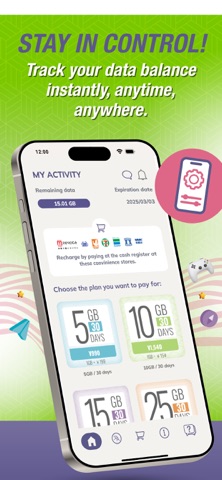
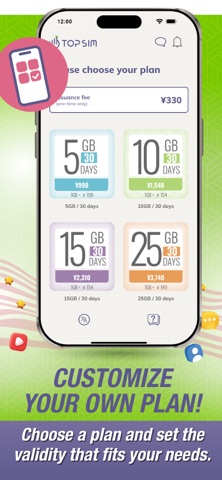
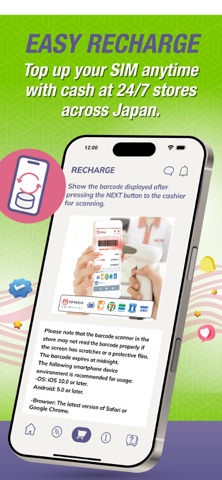
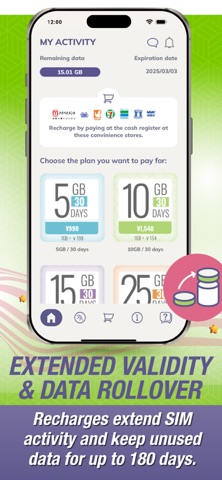
Description by Brastel Co.,Ltd. Written by the developer, not by AppBrain. Click to read.
TOP SIM is a simple app that activates and manages your prepaid data SIM card and supports eSIM as well!
Whether you're a tourist, on a business trip, or living in Japan, TOP SIM makes sure you have fast and reliable internet whenever you need it.
Why Choose TOP SIM?
- No Registration Needed: No eKYC, bank account, or credit card required.
- Quick Activation: Start using your prepaid data SIM in just a few steps.
- Flexible Plans: Pick a plan that works for you - great for short and long stays.
- Real-Time Tracking: Check your data balance anytime.
- Easy Recharge: Top up your SIM with cash at 24/7 convenience stores across Japan, or online with your credit card from the comfort of your home.
- Extended Validity: Each recharge extends your SIM’s validity.
- Data Rollover: Save unused data for up to 180 days.
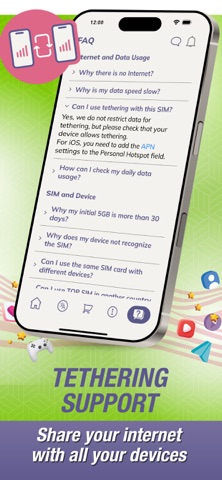
- Tethering Support: Share your connection with other devices.
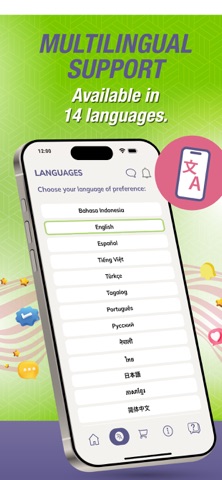
- Multilingual Support: Available in English, Japanese, Chinese, Portuguese, Thai, Vietnamese, and more!
- Stable Network: Enjoy fast and reliable internet through Japan’s top carriers.
How to Activate the TOP SIM (Physical SIM)
1. Insert the SIM, set up the APN, and reboot your phone.
2. Download the TOP SIM app, open it, and scan the barcode from the back of your SIM.
3. Done! Make sure airplane mode is OFF, and mobile data is ON.
How to Recharge the TOP SIM
1. Open the TOP SIM app and choose your preferred plan.
2. Choose your preferred payment method: convenience store or credit card.
3. Complete your payment — and you’re all set!
How to get and activate TOP SIM eSIM
1. Download the app and follow the on-screen steps to select and purchase a data plan.
2. Complete your payment.
3. Receive your QR code / activation code for the eSIM profile directly in the app.
4. Install the eSIM on your smartphone by following the instructions shown in the app.
Additional information
- No SMS or voice service available.
- If you forget to recharge within the validity period, you still have 7 days to recharge and extend your SIM while connected to WiFi before it becomes invalid.
- eSIM is only compatible with unlocked smartphones that support eSIM functionality.
Official website: shop.brastel.com
Download Now:
Get the TOP SIM app today and enjoy stress-free internet access!