

toPhonetics Converter
toPhonetics Converter is made and published by Mu-sonic. AppBrain is an independent app data site and isn't affiliated with Mu-sonic. The app name, icon, screenshots and description belong to Mu-sonic and are shown as published on the App Store.
AppBrain's verdict
Established- Rating on App Store
- 4.40
- 92 ratings
- Last updated
- June 5, 2026
It doesn't have enough ratings yet to judge what users think.
Rankings
App Store top chartsApp Store Rankings for toPhonetics Converter
Competitors
Similar apps and more from Mu-sonicAlternatives to toPhonetics Converter





More from Mu-sonic



Releases
Updates seen on the App Store- Version
- 3.1
- Launched
- January 2014
No changelog data
User feedback
Ratings and reviews on the App StoreComments on toPhonetics Converter for iOS
We don't have enough comments to show example comments. Please check back later.
Technology
Found in the app by AppBrain- Price
- $3.99
- App size
- 12.6 MB
- Content rating
- Everyone
Technologies used by toPhonetics Converter
About the app and developer
About toPhonetics Converter
toPhonetics Converter is an education app developed by Mu-sonic.
What is the rating of toPhonetics Converter?
toPhonetics Converter is rated 4.40 out of 5 stars, based on 92 ratings.
Is toPhonetics Converter free?
toPhonetics Converter costs $3.99. The app size is 12.63 MB. The latest version available is 3.1. The last update was on June 5, 2026.
What are the requirements for toPhonetics Converter?
The app has a content rating of Everyone. The app has been available on the App Store since January 2014.
Developer information for Mu-sonic
Address:
Frequently asked questions about toPhonetics Converter
Is toPhonetics Converter free?
No. toPhonetics Converter costs $3.99 on the App Store.
Is toPhonetics Converter still available?
Yes. toPhonetics Converter is on the App Store, and the last update we saw was on June 5, 2026.
How large is toPhonetics Converter?
toPhonetics Converter is 12.63 MB.
Is toPhonetics Converter suitable for children?
App Store rates the content of toPhonetics Converter as suitable for everyone.
How do people rate toPhonetics Converter?
toPhonetics Converter scores 4.40 out of 5 stars, from 92 ratings on the App Store.
Who made toPhonetics Converter?
toPhonetics Converter was developed by Mu-sonic. It is listed in the education category on the App Store.
What are the best alternatives to toPhonetics Converter?
People looking at toPhonetics Converter also look at these education apps: AV Phonetics, IPA Scribe: IPA Transcriptions, Sounds of Speech, English Phonetic Symbols IPA, English IPA Keyboard.
Store listing
By Mu-sonic, from the App Store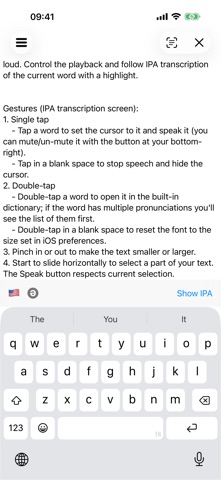



Description by Mu-sonic Written by the developer, not by AppBrain. Click to read.
• to listen to it read aloud visually, following the narration with a cursor,
• to quickly check the translation of individual words or selected fragments (requires iOS 18+),
• to export and share the transcription results in various formats including PDF (via the Print option),
• to export the audio of the text read using your chosen voice and speech rate.
And much more:
- See phonetic transcription of the whole text, not just the dictionary forms of separate words.
- Choose between British and American* pronunciation. When British dialect is selected the [r] sound at the end of the word is only voiced if followed by a vowel, which follows British phonetic convention.
- International Phonetic Alphabet (IPA) symbols used.
- The structure of the text and sentences in it (line breaks, punctuation marks, etc.) is preserved in phonetic transcription output making it easier to read.
- You can output the text and its phonetic transcription along each other line-by-line to make back-reference to the original text easier.
- An option to vary pronunciation depending on whether words are in stressed or weak position in the sentence, as in connected speech. Weak forms are italicized in the output.
- Words in CAPS are interpreted as acronyms if the word is not found in the database. Acronym transcriptions will be shown with hyphens between letters.
- In addition to commonly used vocabulary the database contains a very substantial amount of place names (including names of countries, their capitals, US states, UK counties), nationalities and popular names.
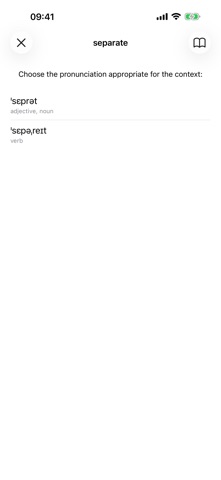
- Where a word has a number of possible pronunciations (highlighted in blue in the output) you can select the one that agrees with the context by tapping on it.
- Print out the output results, share via email or copy to pasteboard.
- Let the built-in speech synthesiser read your text out loud. Control the playback and follow IPA transcription of the current word with a highlight. Speech audio can be exported as a file.
- Custom URL scheme to open toPhonetics from 3rd-party apps.
Gestures (IPA transcription screen):
1. Single tap
- Tap a word to set the cursor to it and speak it (you can mute/un-mute it with the button at your bottom-right).
- Tap in a blank space to stop speech and hide the cursor.
2. Double-tap
- Double-tap a word to open it in the built-in dictionary; if the word has multiple pronunciations you'll see the list of them first.
- Double-tap in a blank space to reset the font to the size set in iOS preferences.
3. Pinch in or out to make the text smaller or larger.
4. Start to slide horizontally to select a part of your text. The Speak button respects current selection.
*) American transcriptions are based on the open Carnegie Mellon University Pronouncing Dictionary.