

ToyCam! is made and published by Jahyeon Ko. AppBrain is an independent app data site and isn't affiliated with Jahyeon Ko. The app name, icon, screenshots and description belong to Jahyeon Ko and are shown as published on the App Store.
AppBrain's verdict
- Last updated
- July 30, 2026
Rankings
App Store top chartsApp Store Rankings for ToyCam!
Competitors
Similar apps and more from Jahyeon KoMore from Jahyeon Ko





Releases
Updates seen on the App Store- Version
- 1.0
- Launched
- July 2026
No changelog data
User feedback
Ratings and reviews on the App StoreComments on ToyCam! for iOS
We don't have enough comments to show example comments. Please check back later.
Technology
Found in the app by AppBrain- Price
- Free
- App size
- 4.50 MB
- Content rating
- Everyone
Technologies used by ToyCam!
About the app and developer
About ToyCam!
ToyCam! is a photo & video app developed by Jahyeon Ko.
User Ratings
The app has no ratings yet.
App Information
ToyCam! is freely available from the App Store. The app size is 4.50 MB. The latest version available is 1.0. The last update was on July 30, 2026.
Technical Requirements
The app has a content rating of Everyone. The app has been available on the App Store since July 2026.
Developer information for Jahyeon Ko
Address:
Frequently asked questions about ToyCam!
Is ToyCam! free?
Yes. ToyCam! is free on the App Store.
Is ToyCam! still available?
Yes. ToyCam! is on the App Store, and the last update we saw was on July 30, 2026.
How large is ToyCam!?
ToyCam! is 4.50 MB.
Is ToyCam! suitable for children?
App Store rates the content of ToyCam! as suitable for everyone.
Who made ToyCam!?
ToyCam! was developed by Jahyeon Ko. It is listed in the photo & video category on the App Store.
Store listing
By Jahyeon Ko, from the App Store
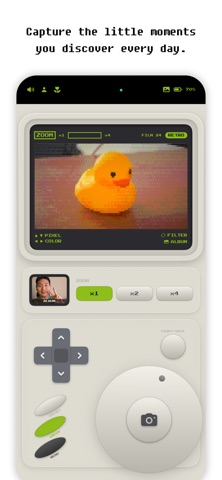


Description by Jahyeon Ko Written by the developer, not by AppBrain. Click to read.
ToyCam is a tiny toy camera that fits right in your hand.
Spin the click wheel and feel satisfying clicks with subtle haptic feedback. Press the shutter, and a pixel-art masterpiece is created instantly—right on the spot.
# 24 Filters Controlled by the Click Wheel
Game Boy Green, Noir, Sepia, Amber, Virtual Boy, Neon, Pastel, Thermal, Night Vision, CGA 4-Color, Famicom 8-Color, Vaporwave, Cross Process, and many more.
Simply spin the wheel to browse filters, then fine-tune pixel size and color depth using the D-pad.
# An LCD Album
Your photos and videos are stored in a nostalgic 3×3 grid on the green LCD screen.
Browse them with the D-pad and click wheel, or delete unwanted shots instantly without leaving the camera.
# Record Pixel Videos
Press and hold the shutter button to record video with your selected filter applied in real time.
No editing required—your recording is pixel art from the moment it's captured.
# Transform Existing Photos
Import photos from your library and instantly give them the signature ToyCam look.