

Toyota Dashcam Viewer
Toyota Dashcam Viewer is made and published by Toyota Canada. AppBrain is an independent app data site and isn't affiliated with Toyota Canada. The app name, icon, screenshots and description belong to Toyota Canada and are shown as published on the App Store.
AppBrain's verdict
Established- Rating on App Store
- 1.53
- 40 ratings
- Last updated
- January 9, 2025
It doesn't have enough ratings yet to judge what users think.
Rankings
App Store top chartsApp Store Rankings for Toyota Dashcam Viewer
Competitors
Similar apps and more from Toyota Canada





Releases
Updates seen on the App Store- Version
- 1.4.4
- Launched
- September 2017
No changelog data
User feedback
Ratings and reviews on the App StoreComments on Toyota Dashcam Viewer for iOS
We don't have enough comments to show example comments. Please check back later.
Technology
Found in the app by AppBrain- Price
- Free
- App size
- 48.3 MB
- Content rating
- Everyone
Technologies used by Toyota Dashcam Viewer
About the app and developer
About Toyota Dashcam Viewer
Toyota Dashcam Viewer is an utilities app developed by Toyota Canada.
User Ratings
Toyota Dashcam Viewer is rated 1.53 out of 5 stars. The rating is based on 40 ratings.
App Information
Toyota Dashcam Viewer is freely available from the App Store. The app size is 48.31 MB. The latest version available is 1.4.4. The last update was on January 9, 2025.
Technical Requirements
The app has a content rating of Everyone. The app has been available on the App Store since September 2017.
Developer information for Toyota Canada
Address:
Store listing
By Toyota Canada, from the App Store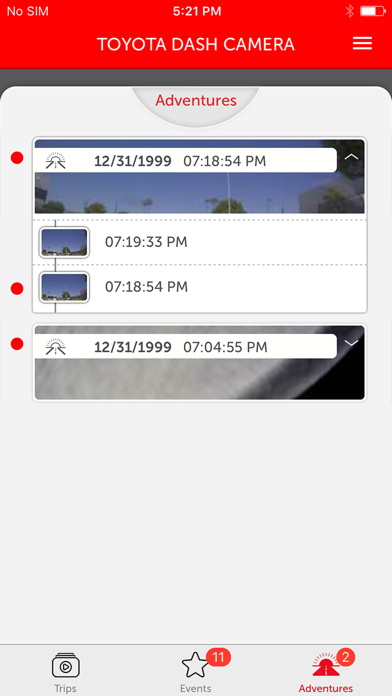


Description by Toyota Canada Written by the developer, not by AppBrain. Click to read.
App Features:
- View and download your recorded videos directly to your phone
- Adjust camera settings:
• Video quality
• Buzzer noise levels
• Turn ON/OFF Adventure Mode, and adjust SD card’s Adventure Mode memory allocation
• Turn ON/OFF Parking Surveillance Mode, and adjust sensitivity, wake-up modes and surveillance start delay functions
• Live view feature
- For your safety, the app will disconnect from the TOYOTA DASHCAM if vehicle movement is detected. Do not operate your iPhone while vehicle is in motion.
Camera Features:
Your TOYOTA DASHCAM features 5 unique recording modes: 3 automatic modes and 2 manual modes activated using the “ACTION” button:
1) Continuous recording – automatically records when vehicle ignition is on. Never worry about turning on the camera to start recording. When SD card is full, oldest files are automatically overwritten.
2) Automatic Incident recording – if an abnormal shock is detected when driving, camera automatically locks and protects the video file from overwriting for review at a later time. Sensitivity can be adjusted. Maximum of 10 event videos can be protected from overwriting.
3) Parking surveillance – when vehicle is parked with vehicle ignition off, camera automatically wakes up and starts recording if an abnormal shock is detected. Parking surveillance files are locked and protected from overwriting. Sensitivity can be adjusted. Maximum of 10 parking surveillance recordings can be protected from overwriting.
4) Manual Flagged Event recording – capture interesting moments by pressing the “ACTION” button on the camera. The current video segment(s) 12 seconds before and 8 seconds after button activation will be protected. Maximum of 5 manual event recordings can be protected from overwriting.
5) Adventure Mode recording – capture your driving adventures. Press and hold the “ACTION” button on the camera for 1 second to start protecting the recorded videos. The Adventure Mode recording will stop protecting files after maximum time is reached, or when the “ACTION” button is pressed and held again for 1 second. Maximum of 1 hour of Adventure Mode videos can be protected from overwriting.
Open Source Software Used:
https://www.e-iserv.jp/top/driverecorder/DashCamViewer/oss/oss_sp.html?lang=en