

Track My Trip
Track My Trip is made and published by Philip Braham. AppBrain is an independent app data site and isn't affiliated with Philip Braham. The app name, icon, screenshots and description belong to Philip Braham and are shown as published on the App Store.
AppBrain's verdict
- Last updated
- July 16, 2026
Rankings
App Store top chartsApp Store Rankings for Track My Trip
Competitors
Similar apps and more from Philip BrahamMore from Philip Braham


Releases
Updates seen on the App Store- Version
- 3.1
- Launched
- April 2025
No changelog data
User feedback
Ratings and reviews on the App StoreComments on Track My Trip for iOS
We don't have enough comments to show example comments. Please check back later.
Technology
Found in the app by AppBrain- Price
- $5.99
- App size
- 10.8 MB
- Content rating
- Everyone
Technologies used by Track My Trip
About the app and developer
About Track My Trip
Track My Trip is a navigation app developed by Philip Braham.
What is the rating of Track My Trip?
Track My Trip has no ratings yet.
Is Track My Trip free?
Track My Trip costs $5.99. The app size is 10.83 MB. The latest version available is 3.1. The last update was on July 16, 2026.
What are the requirements for Track My Trip?
The app has a content rating of Everyone. The app has been available on the App Store since April 2025.
Developer information for Philip Braham
Address:
Store listing
By Philip Braham, from the App Store
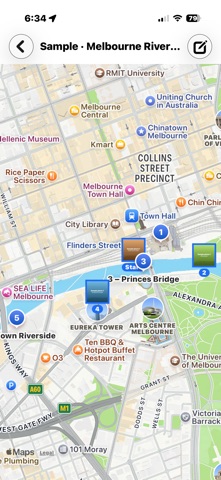


Description by Philip Braham Written by the developer, not by AppBrain. Click to read.
RECORD WITHOUT THINKING ABOUT IT
• Tags drop automatically as you travel — you choose how far apart, from a few hundred metres on a walk to many kilometres on a drive, and you can change it mid-trip with a tap.
• Tap "Tag now" to mark a spot the moment you're standing in it.
• Recording continues with the screen off and the app in the background.
• Pause and resume whenever you like. Close the trip when you're done.
EVERY TAG TELLS A STORY
• Tags are named automatically from the street and suburb, with nearby places of interest added to the note — or name them yourself. • Attach photos from your library or take them in the app; the photo you choose becomes the tag's pin on the map.
• See your whole route at a glance, tap any pin for the details, or long-press for a quick peek.
ORGANISED YOUR WAY
• Sort trips by date, name, group or number of tags, and search names and notes. • Colour-coded groups you can rename to suit — Work, Holidays, Walks, whatever fits your life. • Metric or imperial units, 12 or 24-hour time, light or dark appearance.
SHARE COMPLETE TRIPS
• Export any trip as a single file — route, notes and photos together — and share it by AirDrop, Messages, Mail or Files.
• Choose the photo quality for exports, from compact to full resolution.
• Import trips from friends or your other devices, with built-in verification that shows the trip arrived exactly as it was exported.
YOURS, PRIVATELY
• No account, no sign-up, no server. Your trips and photos stay on your device.
• Location is used only while recording a trip, and everything works offline — names for tags are simply filled in later if you're out of range.
Track My Trip includes a sample trip so you can explore the map, tags and photos before recording your own, plus built-in help that works anywhere — even with no signal.
Start a trip. The map remembers the rest.