AppBrain
AppBrain
  • Apps
  • Apps being viewed right now Trending apps today Most popular apps All-time most installed apps Top rated apps iPhone and iPad apps
  • Intelligence ▾
    Intelligence overview → Track any Android app or your whole market
    Track & analyze
    Keyword Tracker & OptimizerTrack & improve Play rankings App Performance ReportOne-off PDF for any app StatisticsFree Android & Play market stats
    Promote your app
    Featured Apps App Links
  • Intelligence
  • Pricing
  • Dashboard
  • Sign up
  • Log in
App Store Apps > Sports > Track4Facts PRO: 0-60 Timer
App profile & analytics · Sports · Data updated 2026-10-14
Track4Facts PRO: 0-60 Timer icon

Track4Facts PRO: 0-60 Timer

by Klaus Neuendorf · Free · Version 10.01
Availability On the App Store since November 2019 ↗
Rating on App Store
4.67/5
3 ratings
Rating
4.67
3 reviews
Best rank
–
not in the top lists
Last updated
October 12, 2026
10.01
AppBrain's verdict Established

It doesn't have enough ratings yet to judge what users think.

Track4Facts PRO: 0-60 Timer is made and published by Klaus Neuendorf. AppBrain is an independent app data site and isn't affiliated with Klaus Neuendorf. The app name, icon, screenshots and description belong to Klaus Neuendorf and are shown as published on the App Store.

About Track4Facts PRO: 0-60 Timer

Track4Facts PRO: 0-60 Timer is a sports app developed by Klaus Neuendorf.

What is the rating of Track4Facts PRO: 0-60 Timer?

Track4Facts PRO: 0-60 Timer is rated 4.67 out of 5 stars, based on 3 ratings.

Is Track4Facts PRO: 0-60 Timer free?

Track4Facts PRO: 0-60 Timer is free. The app size is 21.49 MB. The latest version available is 10.01. The last update was on October 12, 2026.

What are the requirements for Track4Facts PRO: 0-60 Timer?

The app has a content rating of Everyone. The app has been available on the App Store since November 2019.

Description by Klaus Neuendorf (from the App Store)
Track4Facts PRO turns your iPhone into a GPS driving recorder for sprint, distance, lap and sector times. Compare drives with maps, charts and sensor analysis. Video Studio in the full version lets you film your drive and overlay recorded driving data.

Download for free and measure 0–100 km/h or 0–60 mph. Unlock the full version with a one-time purchase. No subscription. Previous buyers of the paid app keep the full version, including Video Studio.

FREE FEATURES
• GPS speedometer and drive recording with speed, distance, duration, altitude and stops
• 0–100 km/h or 0–60 mph sprint timing, depending on your unit settings
• iPhone sensor fusion for suitable standard sprints
• Background driving data recording, Live Activity on the Lock Screen and Dynamic Island
• Maps, drive summaries and history
• One vehicle profile in the garage
• Sprint start/stop via Siri, Shortcuts and the Action button on supported iPhones
• Apple Watch remote control and optional heart rate recording
• Import existing Track4Facts backups

FULL VERSION — ONE-TIME PURCHASE
• Video Studio: film drives, overlay driving data, design and export clips
• Custom sprint ranges from a standstill or rolling start
• Sprint comparisons across drives and vehicles with overlaid speed curves
• Distance timing with splits, finish speed and custom targets
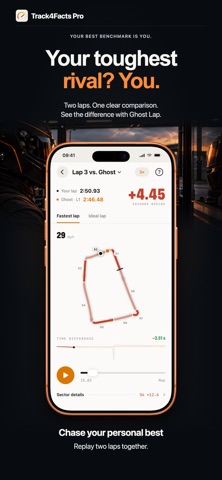
• Automatic lap and sector timing with live delta to your best lap
• Draw tracks, record them with a mapping lap or import GPX and GeoJSON
• Edit track points, driving direction, start/finish and sectors
• Lap comparisons, corner analysis, braking and deceleration profiles
• Theoretical best time, lap consistency and ghost lap replay
• G-circle, cornering dynamics and vibration analysis
• Interactive 3D track, elevation profile, drive replay and measurement charts
• GPX, waypoint CSV and motion CSV export
• Full backups, multiple vehicle profiles and external GPS
• Lap timing start/stop via Siri, Shortcuts and the Action button

VIDEO STUDIO — YOUR DRIVE WITH DRIVING DATA
Film sprint, distance and lap sessions. Overlay relevant driving data: speed, route, G-forces, lap and sector times or saved best sprint and distance times. Customize the position, size and design of the displays.

Select clips and export them as landscape or portrait MP4 files to save and share. Recording up to 4K, higher frame rates, slow motion and an additional driver camera depend on your device and settings. Audio is optional. Recorded Apple Watch heart rate can be overlaid with separate consent. Camera recording requires the app in the foreground.

GPS + IPHONE SENSORS
Sensor fusion adds motion data to suitable standard sprints. The iPhone must be securely mounted. Fusion is used only after checks pass; GPS remains available for comparison. Retrospective ≈ estimates are not confirmed best times. Motion data is stored at a nominal 50 Hz.

APPLE WATCH AND EXTERNAL GPS
Follow live data and control sprint recording from your wrist. Optional Race Training records heart rate with permission and saves a workout in Apple Health. Heart rate data in backups or CSV requires separate consent.

External GPS: Dual XGPS150/XGPS150A, XGPS160 SkyPro and Dragy Lite (10, 20 or 25 Hz). More data points do not guarantee greater accuracy.

RESULTS AND SAFETY
GPS and sensor fusion provide estimates without guaranteed timing accuracy. Track4Facts PRO is not a calibrated measuring instrument. Each drive retains its measurement configuration.

Take performance measurements only on private, closed or expressly authorized tracks and areas. Mount your phone securely, set it up before driving and do not operate it while driving. Observe laws, safety rules and the rights of people filmed. Only import permitted track data and comply with license terms.
Show more Show less

More data about Track4Facts PRO: 0-60 Timer

Price Free
Rating 4.67 based on 3 ratings
Ranking Not ranked
Version 10.01
App size 21.5 MB
Suitable for Everyone

Screenshots

Track4Facts PRO: 0-60 Timer Screenshot 1 of 9
Track4Facts PRO: 0-60 Timer Screenshot 2 of 9
Track4Facts PRO: 0-60 Timer Screenshot 3 of 9
Track4Facts PRO: 0-60 Timer Screenshot 4 of 9
Track4Facts PRO: 0-60 Timer Screenshot 5 of 9
Track4Facts PRO: 0-60 Timer Screenshot 6 of 9
Track4Facts PRO: 0-60 Timer Screenshot 7 of 9
Track4Facts PRO: 0-60 Timer Screenshot 8 of 9
Track4Facts PRO: 0-60 Timer Screenshot 9 of 9
Screenshots by Klaus Neuendorf, from the the App Store listing
Official page on the App Store

Alternatives to Track4Facts PRO: 0-60 Timer

360 LA Los Angeles AR Map icon 360 LA Los Angeles AR Map
Vadym Ustymenko
5.0
$0.99
2 ratings
GPX Tracker: Run, Bike, Hike icon GPX Tracker: Run, Bike, Hike
Oksana Nikita
0.0
Free
Dride for BlackVue icon Dride for BlackVue
Dride, Inc.
2.2
$2.99
4 ratings
Altitude Plus icon Altitude Plus
Mehmet Sucu
0.0
Free
V1 Radar Connect Pro icon V1 Radar Connect Pro
Procypher Software Co.
2.8
$14.99
11 ratings
BIGEMAP icon BIGEMAP
Chengdu Bigemap Data Processing Co. Ltd
5.0
Free
1 ratings
MyTracks: GPS Recorder icon MyTracks: GPS Recorder
CHENGDU MIAOZHI TECHNOLOGY CO., LTD.
4.6
Free
265 ratings
Offline Maps: GPS Tracker GPX icon Offline Maps: GPS Tracker GPX
SERGEI BEZDENEZHNYKH
4.7
$5.99
49 ratings

More from Klaus Neuendorf

New Year's Eve Counter icon New Year's Eve Counter
Klaus Neuendorf
4.1
$1.99
26 ratings
TextReplacer - find & replace icon TextReplacer - find & replace
Klaus Neuendorf
4.9
$4.99
9 ratings
Golden XMAS Bell icon Golden XMAS Bell
Klaus Neuendorf
4.3
$1.99
6 ratings
Baby Sounds Deluxe icon Baby Sounds Deluxe
Klaus Neuendorf
5.0
$2.99
2 ratings
Baby Accessories Sticker icon Baby Accessories Sticker
Klaus Neuendorf
0.0
$0.99
Disco & Party Sticker icon Disco & Party Sticker
Klaus Neuendorf
0.0
$0.99
Traime icon Traime
Klaus Neuendorf
0.0
$0.99

Changelog of Track4Facts PRO: 0-60 Timer

No changelog data

Developer information for Klaus Neuendorf

Klaus Neuendorf

Address:

Share Track4Facts PRO: 0-60 Timer

Comments on Track4Facts PRO: 0-60 Timer for iOS

We don't have enough comments to show example comments. Please check back later.

App Store Rankings for Track4Facts PRO: 0-60 Timer

This app is not ranked

Technologies used by Track4Facts PRO: 0-60 Timer

Top new apps Price drops on Google Play Popular Sports Apps Today's trending apps Apps other people are watching
360 LA Los Angeles AR Map icon 360 LA Los Angeles AR Map
GPX Tracker: Run, Bike, Hike icon GPX Tracker: Run, Bike, Hike
Dride for BlackVue icon Dride for BlackVue
Altitude Plus icon Altitude Plus
V1 Radar Connect Pro icon V1 Radar Connect Pro
BIGEMAP icon BIGEMAP
MyTracks: GPS Recorder icon MyTracks: GPS Recorder
Offline Maps: GPS Tracker GPX icon Offline Maps: GPS Tracker GPX
Overview Alternatives Reviews Rankings Technology
AppBrain Intelligence premium content

Subscribe now to get full and unlimited access to AppBrain Intelligence. You'll have access to:

  • App Intelligence dashboard (performance timeline, competitor comparison, country rankings, insight cards)
  • Detailed ranking data per app
  • Full timeline per developer
  • Device market shares data per country
  • Unlimited keyword tracking
1 Month

$75/mo
(billed every month)

SAVE 0%
Subscribe
3 Months

$65/mo
($195 billed every 3 months)

SAVE 13%
Subscribe
1 Year

$57.50/mo
($690 billed every year)

SAVE 23%
Subscribe
Each subscription will automatically renew 3 days before the expiration date for the same time period. Subscriptions can be cancelled at any time before the renewal.

AppBrain is an app data site, we track rankings, ratings, installs for all apps and games on Google Play and the App Store. AppBrain doesn't host app files or APKs, all install links go directly to the official store. All trademarks are owned by their respective owners. As an Amazon Associate AppBrain earns from qualifying purchases.

More apps

  • Top Android apps being viewed
  • PURE: Anonymous Dating & Chat
  • MovieNova: TV Shows & Movies
  • Deltix Network

App statistics

  • Android statistics
  • Google Play Developer stats
  • Trending Android Apps
  • Trending iOS apps
  • Top popular Apps
  • Buy the best Android phone
  • Buy & sell app businesses

About AppBrain

  • Contact
  • Privacy
  • Documentation
  • DMCA takedowns
  • Articles
  • Blog
  • The AppBrain advertising system
© 2010-2026 - AppBrain