Tracking Device Detector - TDD
Tracking Device Detector - TDD is made and published by SEMA ORUC. AppBrain is an independent app data site and isn't affiliated with SEMA ORUC. The app name, icon, screenshots and description belong to SEMA ORUC and are shown as published on the App Store.
AppBrain's verdict
Loved by users- Rating on App Store
- 4.63
- 133 ratings
- Last updated
- September 18, 2026
Users love it: 4.6 stars from 133 ratings.
Rankings
App Store top chartsApp Store Rankings for Tracking Device Detector - TDD
Competitors
Similar apps and more from SEMA ORUCAlternatives to Tracking Device Detector - TDD
More from SEMA ORUC
Releases
Updates seen on the App Store- Version
- 1.5
- Launched
- November 2025
No changelog data
User feedback
Ratings and reviews on the App StoreComments on Tracking Device Detector - TDD for iOS
We don't have enough comments to show example comments. Please check back later.
Technology
Found in the app by AppBrain- Price
- Free
- App size
- 20.3 MB
- Content rating
- Everyone
Technologies used by Tracking Device Detector - TDD
About the app and developer
About Tracking Device Detector - TDD
Tracking Device Detector - TDD is an utilities app developed by SEMA ORUC.
User Ratings
Tracking Device Detector - TDD is rated 4.63 out of 5 stars. The rating is based on 130 ratings.
App Information
Tracking Device Detector - TDD is freely available from the App Store. The app size is 20.26 MB. The latest version available is 1.5. The last update was on September 18, 2026.
Technical Requirements
The app has a content rating of Everyone. The app has been available on the App Store since November 2025.
Developer information for SEMA ORUC
Address:
Store listing
By SEMA ORUC, from the App StoreDescription by SEMA ORUC Written by the developer, not by AppBrain. Click to read.
TRACKER DETECTION
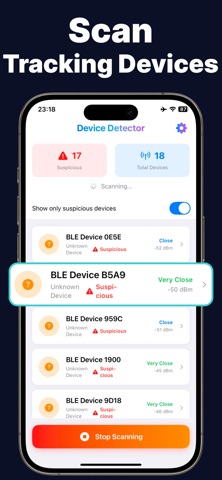
Scan for active Bluetooth devices nearby, including unknown or suspicious trackers. The app identifies potential tracking devices and displays real-time signal strength so you can estimate how close they are. Use the proximity meter to physically locate a suspicious device as you move around. The closer you get, the stronger the signal.
HIDDEN CAMERA DETECTION
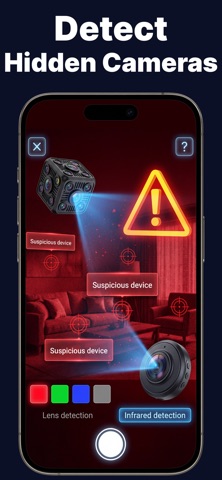
Sweep any room for hidden cameras using four detection methods:
Night Vision Scanner
Uses your iPhone's front camera to reveal infrared light from night-vision cameras in dark environments.
Lens Reflection Finder
Activates your flashlight and camera together to spot reflective glints from hidden camera lenses on surfaces.
Electronics Detector
Measures magnetic field activity near suspicious objects like smoke detectors, clocks, outlets, and wall fixtures to identify concealed electronic devices.
Wi-Fi Camera Scanner
Scans the local network to find connected devices and flags potential cameras based on device type and manufacturer.
DESIGNED FOR REAL-WORLD USE
Traveling, staying at a rental, or moving into a new space? Run a quick scan to check your environment. The app provides clear instructions for each detection mode and shows results you can act on. No technical knowledge required.
Privacy-focused by design. All scanning is performed locally on your device. No data is collected or shared.
Unlimited access to all detection tools requires a subscription.
Terms: https://www.apple.com/legal/internet-services/itunes/dev/stdeula/