

Tractor GPS is made and published by Yaroslav Babenko. AppBrain is an independent app data site and isn't affiliated with Yaroslav Babenko. The app name, icon, screenshots and description belong to Yaroslav Babenko and are shown as published on the App Store.
AppBrain's verdict
Loved by users- Best rank
- #14
- Top Grossing, Poland
- Rating on App Store
- 4.64
- 387 ratings
- Last updated
- October 13, 2026
Users love it: 4.6 stars from 387 ratings. Its best ranking is #14 in Top Grossing, Navigation in Poland.
Rankings
App Store top charts- Highest rank
- #14
- Chart
- Top Grossing
- Navigation
- Country
- Poland
Competitors
Similar apps and more from Yaroslav BabenkoMore from Yaroslav Babenko


Releases
Updates seen on the App Store- Version
- 5.30
- Launched
- July 2024
No changelog data
User feedback
Ratings and reviews on the App StoreComments on Tractor GPS for iOS
We don't have enough comments to show example comments. Please check back later.
Technology
Found in the app by AppBrain- Price
- Free
- App size
- 72.8 MB
- Content rating
- Everyone
Technologies used by Tractor GPS
About the app and developer
About Tractor GPS
Tractor GPS is a navigation app developed by Yaroslav Babenko.
What is the rating of Tractor GPS?
Tractor GPS is rated 4.64 out of 5 stars, based on 390 ratings.
Is Tractor GPS free?
Tractor GPS is free. The app size is 72.81 MB. The latest version available is 5.30. The last update was on October 13, 2026.
What are the requirements for Tractor GPS?
The app has a content rating of Everyone. The app has been available on the App Store since July 2024.
Developer information for Yaroslav Babenko
Address:
Store listing
By Yaroslav Babenko, from the App Store

Description by Yaroslav Babenko Written by the developer, not by AppBrain. Click to read.
Tractor GPS turns the device in your cab into a guidance and record-keeping tool for tractors, sprayers, seeders and harvesters. No extra hardware. No account to create.
AB LINE GUIDANCE
• Tap A at the start of your first pass and B at the end — the app draws parallel guide lines spaced to your implement's working width
• A live readout shows how far you are off the line, with an arrow telling you which way to steer
• Guidance snaps to whichever pass you are nearest, and you can nudge one pass left or right
• Guide lines fit automatically to a selected field boundary
COVERAGE MAPPING
• Worked ground is painted behind the machine as a band the width of your implement
• See at a glance what is done and what is left
• Pause between passes and continue when you are ready
• Clear the painted path and start a pass clean whenever you need
LIVE IN THE CAB
• Speed, covered area, elapsed time, distance and working width at a glance
• Applied spray volume when your equipment has spraying turned on
• Pick a field before you start and get a progress bar, remaining area and an estimated time to finish
FIELD MEASUREMENT
• Draw a boundary on the satellite map point by point, with undo
• Walk or drive the perimeter and let GPS build the shape
• Create a circular center-pivot field from a center point and a radius
• Every field stores area, perimeter, name, description and color
IMPORT AND EXPORT
• Import existing boundaries from KML, KMZ, GPX, GeoJSON and Shapefile — hundreds of parcels at once
• Export a field as PDF, GPX, KML, KMZ, GeoJSON or zipped Shapefile
• Export a finished job as PDF, GPX, KML, GeoJSON or zipped Shapefile
• Hand records to an agronomist or a co-op, load them into farm software, or keep them for paperwork
EQUIPMENT PROFILES
• Save each implement with its working width and left or right offset from the device
• Offset correction puts the painted coverage where the implement actually runs, not where the device sits
• Set a spraying rate per area or per minute and get applied volume and average rate for the job
JOB RECORDS
• Every finished session is saved with worked area, duration, average speed, work rate, distance and spray volume
• Organize jobs into folders, add notes, and link a job to a field
• Reopen a job later and keep adding to it — a field split across two days stays one record
TWO SCREENS, ONE GPS
• Mount your iPhone where it sees the sky and relay its position over the local network to an iPad for a bigger in-cab display
• Ideal for a Wi-Fi-only iPad, which has no GPS of its own
• Fields, jobs and equipment sync across your own devices through iCloud — no server, no sign-up
BUILT FOR THE CAB
• Normal, satellite and hybrid maps, in 2D or tilted 3D
• Light and dark themes
• Optional compass, keep-screen-on, and a choice of markers including an animated 3D tractor
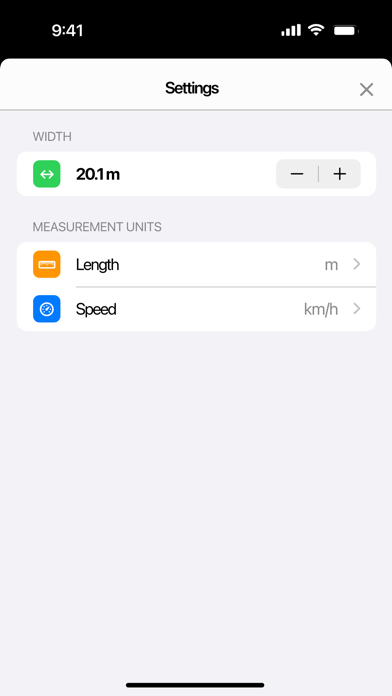
• Metric and imperial units, set independently for area, distance, speed and spray volume
• Available in 41 languages
Terms of Use (EULA): https://www.apple.com/legal/internet-services/itunes/dev/stdeula/