

Transcribatron: Voice to Text
Transcribatron: Voice to Text is made and published by Marc Maguire. AppBrain is an independent app data site and isn't affiliated with Marc Maguire. The app name, icon, screenshots and description belong to Marc Maguire and are shown as published on the App Store.
AppBrain's verdict
- Last updated
- August 21, 2026
Rankings
App Store top chartsApp Store Rankings for Transcribatron: Voice to Text
Competitors
Similar apps and more from Marc MaguireAlternatives to Transcribatron: Voice to Text


Releases
Updates seen on the App Store- Version
- 1.1
- Launched
- August 2026
No changelog data
User feedback
Ratings and reviews on the App StoreComments on Transcribatron: Voice to Text for iOS
We don't have enough comments to show example comments. Please check back later.
Technology
Found in the app by AppBrain- Price
- Free
- App size
- 42.6 MB
- Content rating
- Everyone
Technologies used by Transcribatron: Voice to Text
About the app and developer
About Transcribatron: Voice to Text
Transcribatron: Voice to Text is a productivity app developed by Marc Maguire.
What is the rating of Transcribatron: Voice to Text?
Transcribatron: Voice to Text has no ratings yet.
Is Transcribatron: Voice to Text free?
Transcribatron: Voice to Text is free. The app size is 42.59 MB. The latest version available is 1.1. The last update was on August 21, 2026.
What are the requirements for Transcribatron: Voice to Text?
The app has a content rating of Everyone. The app has been available on the App Store since August 2026.
Developer information for Marc Maguire
Address:
Store listing
By Marc Maguire, from the App Store


Description by Marc Maguire Written by the developer, not by AppBrain. Click to read.
DICTATE IN ANY APP
A system-wide keyboard that records your voice and types polished text into Mail, Messages, Slack, Notes - anywhere you can type. Pick a style (formal email, bullets, casual) and it rewrites as it goes. Apple's dictation gives you raw text; this gives you finished text.
CAPTURE MEETINGS IN THE ROOM
Set your phone on the table and record the whole room - no bot, no calendar invite, no uploads. Get a full transcript plus an AI summary, action items, and decisions, using templates you control. Transcribatron tells speakers apart on-device - name them in the meeting and every line shows who said it. Built for boardrooms, 1:1s, interviews, and lectures.
A MEETING BUDDY IN YOUR CORNER
Turn on live coaching and a Buddy watches the conversation as it happens - surfacing heads-ups, opportunities, and the specific things you asked it to watch for, with a live chat that already knows what's been said. Live coaching runs on a cloud model, so it needs your own API key.
LISTEN TO ANYTHING
Turn any transcript, note, or imported document into audio. Natural on-device and cloud voices, karaoke-style word highlighting, lock-screen playback - or flip to RSVP speed reading and fly through it silently, one word at a time.
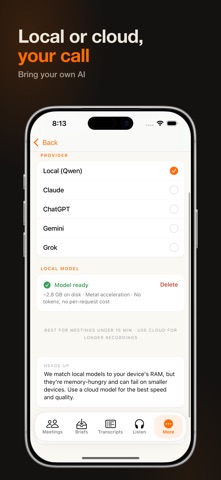
YOUR CHOICE OF AI - OR FULLY ON-DEVICE
Use the best model for the job - Claude, ChatGPT, Gemini, or Grok with your own key - or keep the work on your device with the free on-device model, a one-time download (iPhone 15 Pro and later, and recent iPads). Your call, every time. Confidential conversation? Transcription always runs on-device - and on those devices the AI cleanup does too, so nothing has to leave your phone.
PRIVATE BY DESIGN
No account, ever. Transcription always runs on your device - your recordings are never uploaded to us, because there is no server of ours to upload them to. Choose a cloud AI and only text is sent, using your own API key, straight to the provider you picked. Your keys stay in the Keychain.
ALSO INCLUDED
• Chat with any transcript to ask questions and pull quotes
• Import audio, video, links, and podcasts and turn them into clean notes
• Custom vocabulary so names and jargon come out right
• Connect your calendar to see upcoming meetings and link recordings to events
• Import documents (PDF, DOCX, EPUB) or scan pages - then listen to them read aloud
• Subtitles for imported videos: export .srt/.vtt, edit cues, burn them back in
• Translate your notes into 19 languages when you share them
• Two-way Obsidian sync - edit in your vault, changes flow back
• iCloud sync across iPhone, iPad, and Mac
• A full Mac app with a global dictation hotkey, menu-bar companion, and system-audio capture for remote calls
ONE PRICE, NO SUBSCRIPTION
One purchase. Lifetime. 7-day free trial. No accounts, no servers, no monthly fees - because the work happens on your device.