

Transcribe Speech to Text Note
Transcribe Speech to Text Note is made and published by Andrii Kulchytskyi. AppBrain is an independent app data site and isn't affiliated with Andrii Kulchytskyi. The app name, icon, screenshots and description belong to Andrii Kulchytskyi and are shown as published on the App Store.
AppBrain's verdict
- Last updated
- March 7, 2026
Rankings
App Store top chartsApp Store Rankings for Transcribe Speech to Text Note
Competitors
Similar apps and more from Andrii KulchytskyiAlternatives to Transcribe Speech to Text Note


More from Andrii Kulchytskyi


Also available on Google Play

Releases
Updates seen on the App Store- Version
- 1.0
- Launched
- March 2026
No changelog data
User feedback
Ratings and reviews on the App StoreComments on Transcribe Speech to Text Note for iOS
We don't have enough comments to show example comments. Please check back later.
Technology
Found in the app by AppBrain- Price
- Free
- App size
- 52.9 MB
- Content rating
- Everyone
Technologies used by Transcribe Speech to Text Note
About the app and developer
About Transcribe Speech to Text Note
Transcribe Speech to Text Note is a productivity app developed by Andrii Kulchytskyi.
What is the rating of Transcribe Speech to Text Note?
Transcribe Speech to Text Note has no ratings yet.
Is Transcribe Speech to Text Note free?
Transcribe Speech to Text Note is free. The app size is 52.87 MB. The latest version available is 1.0. The last update was on March 7, 2026.
What are the requirements for Transcribe Speech to Text Note?
The app has a content rating of Everyone. The app has been available on the App Store since March 2026.
Developer information for Andrii Kulchytskyi
Address:
Store listing
By Andrii Kulchytskyi, from the App Store


Description by Andrii Kulchytskyi Written by the developer, not by AppBrain. Click to read.
Built for students, professionals, creators, and everyday users, Speech to Text helps you capture ideas before they are lost. Use it for meeting notes, lecture notes, interviews, reminders, journals, and daily planning.
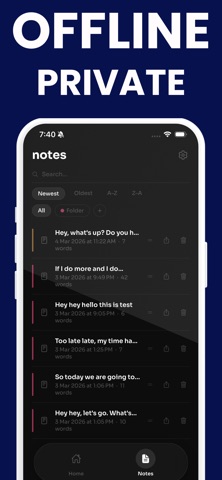
Choose from more than 90 languages and dialects to transcribe in your preferred language. Edit your transcript before saving, organize notes with custom color folders, search and sort your note history, and share your text in one tap.
Speech to Text keeps everything simple. Tap record, speak naturally, review your transcript, and save. No complicated setup, just a clean workflow for fast transcription and voice notes you can use anywhere.
Premium is available for users who want expanded access and additional features.
Download Speech to Text and turn every spoken idea into useful text.