




AppBrain's verdict
- Rating on App Store
- 4.35
- 97 ratings
- Last updated
- October 14, 2025
- Size
- 50.5 MB
It doesn't have enough ratings yet to judge what users think.
User feedback
Ratings and reviews on the App StoreComments on Transcript & AI Video Editing for iOS
We don't have enough comments to show example comments. Please check back later.
Store listing
By Driftwave Labs LLC, from the App StoreDescription by Driftwave Labs LLC Written by the developer, not by AppBrain. Click to read.
you can transcribe, clean voices, add captions, and edit video — all in one easy app
Key Features :
• Video Editing Made Simple – Upload any video, edit the audio, add captions, and export ready-to-share clips.
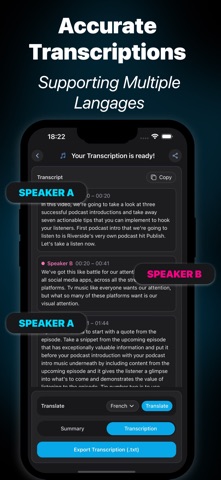
• AI Transcription – Convert audio & video into accurate text with speaker labels and multiple languages.
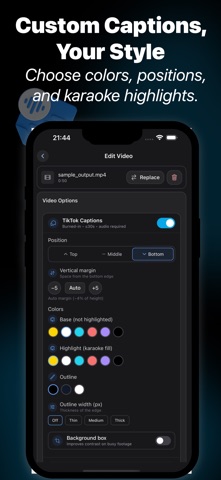
• Auto-Captions for Creators – Instantly generate styled captions for TikTok, Reels & Shorts with colors, positions, and karaoke highlights.
• Noise Removal & Voice Cleaning – Eliminate background noise, clicks, pops, and boost clarity for studio-quality sound.
• Smart Audio Enhancements – Match loudness, fix silences, and polish podcasts, interviews, or lectures.
• Summaries & Notes – Get automatic highlights, action items, and structured notes.
• Export & Share – Save to Photos, share to social media, or download clean transcripts instantly.
Perfect For :
• Students taking lecture notes
• Podcasters & journalists recording interviews
• Businesses capturing meeting minutes
• YouTubers & content creators making Shorts/Reels
• Anyone who wants clear, professional sound without expensive tools
Why Choose Transcript & AI Video Editing?
Unlike basic editors, Transcript & AI Video Editing brings transcription + video captions + audio cleanup + editing tools into one seamless workflow. Just upload your file, let AI do the work, and share content that looks and sounds professional.
Subscriptions
• Weekly Plan – Unlock all features ($4.99 / week)
• Monthly Plan – Unlock all features ($14.99 / month)
Terms & Privacy
By using Transcript & AI Video Editing, you agree to our Terms of Use and Privacy Policy.
• Terms of Use: https://www.transcript.club/terms/
• Privacy Policy : https://www.transcript.club/privacy/
Contact Us
Questions or feedback? We’d love to hear from you.
https://www.transcript.club/contact/
Download Transcript & AI Video Editing today — transcribe, edit, and share content like a pro.
Safety and technology
Found in the app by AppBrain- Price
- Free
- App size
- 50.5 MB
- Content rating
- Medium
Technologies used by Transcript & AI Video Editing
Releases
Updates seen on the App Store- Version
- 1.0.5
- Launched
- August 2025
No changelog data
Alternatives
Similar apps and more from Driftwave Labs LLCMore from Driftwave Labs LLC


Rankings
App Store top chartsApp Store Rankings for Transcript & AI Video Editing
About the app and developer
About Transcript & AI Video Editing
Transcript & AI Video Editing is an utilities app developed by Driftwave Labs LLC.
User Ratings
Transcript & AI Video Editing is rated 4.35 out of 5 stars. The rating is based on 97 ratings.
App Information
Transcript & AI Video Editing is freely available from the App Store. The app size is 50.51 MB. The latest version available is 1.0.5. The last update was on October 14, 2025.
Technical Requirements
The app has a content rating of Medium Maturity. The app has been available on the App Store since August 2025.
Transcript & AI Video Editing is made and published by Driftwave Labs LLC. AppBrain is an independent app data site and isn't affiliated with Driftwave Labs LLC. The app name, icon, screenshots and description belong to Driftwave Labs LLC and are shown as published on the App Store.
Developer information for Driftwave Labs LLC
Address:
Frequently asked questions about Transcript & AI Video Editing
Is Transcript & AI Video Editing free?
Yes. Transcript & AI Video Editing is free on the App Store.
Is Transcript & AI Video Editing still available?
Yes. Transcript & AI Video Editing is on the App Store, and the last update we saw was on October 14, 2025.
How large is Transcript & AI Video Editing?
Transcript & AI Video Editing is 50.51 MB.
Is Transcript & AI Video Editing suitable for children?
App Store gives Transcript & AI Video Editing a medium maturity rating, so it is not meant for young children.
How do people rate Transcript & AI Video Editing?
Transcript & AI Video Editing scores 4.35 out of 5 stars, from 97 ratings on the App Store.
Who made Transcript & AI Video Editing?
Transcript & AI Video Editing was developed by Driftwave Labs LLC. It is listed in the utilities category on the App Store.