

Transcript Dev: Video to Text
Transcript Dev: Video to Text is made and published by Akash Mukherjee. AppBrain is an independent app data site and isn't affiliated with Akash Mukherjee. The app name, icon, screenshots and description belong to Akash Mukherjee and are shown as published on the App Store.
AppBrain's verdict
- Last updated
- September 24, 2026
Rankings
App Store top chartsApp Store Rankings for Transcript Dev: Video to Text
Competitors
Similar apps and more from Akash MukherjeeAlternatives to Transcript Dev: Video to Text


Releases
Updates seen on the App Store- Version
- 1.1.1
- Launched
- July 2026
No changelog data
User feedback
Ratings and reviews on the App StoreComments on Transcript Dev: Video to Text for iOS
We don't have enough comments to show example comments. Please check back later.
Technology
Found in the app by AppBrain- Price
- Free
- App size
- 49.6 MB
- Content rating
- Everyone
Technologies used by Transcript Dev: Video to Text
About the app and developer
About Transcript Dev: Video to Text
Transcript Dev: Video to Text is a productivity app developed by Akash Mukherjee.
User Ratings
The app has no ratings yet.
App Information
Transcript Dev: Video to Text is freely available from the App Store. The app size is 49.56 MB. The latest version available is 1.1.1. The last update was on September 24, 2026.
Technical Requirements
The app has a content rating of Everyone. The app has been available on the App Store since July 2026.
Developer information for Akash Mukherjee
Address:
Store listing
By Akash Mukherjee, from the App Store


Description by Akash Mukherjee Written by the developer, not by AppBrain. Click to read.
Paste a link and get a full, timestamped transcript you can read, search, copy, and export. No clutter, no hoops just the words, fast.
WHAT YOU CAN DO
• Instant transcripts — paste a video URL and get the full text in seconds
• Synced viewer — watch with tap-to-jump captions that follow the video line by line
• Search everything — find any word across a transcript or your whole library
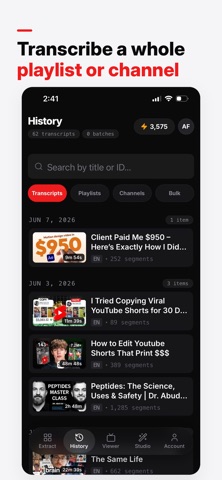
• Bulk & playlists — transcribe an entire playlist or channel in one batch
• Summarize — turn a long video into a quick, readable recap
• AI mind maps — see a video's key ideas laid out visually
• AI chat — ask questions about a video and get answers grounded in its transcript
• Thumbnail Studio — score a thumbnail's click-through potential and generate new ones with AI
• Export anywhere — copy as plain text or structured formats for your notes, docs, and apps
• History that sticks — every transcript saved, searchable, and ready when you are
BUILT FOR
Students, researchers, journalists, creators — anyone who'd rather read than scrub through a video.
WORKS WITH YOUR WORKFLOW
Sign in with Apple, Google, or email. Connect your account to ChatGPT or Claude to use your transcript tools right inside your favourite AI assistant.
Transcript Dev is not affiliated with, endorsed by, or sponsored by YouTube or Google LLC. It uses publicly available caption data for videos you choose to transcribe; you are responsible for your rights to the content you process.
Terms of Use (EULA): https://www.youtubetranscript.dev/terms
Privacy Policy: https://www.youtubetranscript.dev/privacy