

Translate - Photo & Speech
Translate - Photo & Speech is made and published by Bencore Limited. AppBrain is an independent app data site and isn't affiliated with Bencore Limited. The app name, icon, screenshots and description belong to Bencore Limited and are shown as published on the App Store.
AppBrain's verdict
- Last updated
- July 2, 2026
Rankings
App Store top chartsApp Store Rankings for Translate - Photo & Speech
Competitors
Similar apps and more from Bencore LimitedAlternatives to Translate - Photo & Speech


More from Bencore Limited

Releases
Updates seen on the App Store- Version
- 1.0.2
- Launched
- June 2026
No changelog data
User feedback
Ratings and reviews on the App StoreComments on Translate - Photo & Speech for iOS
We don't have enough comments to show example comments. Please check back later.
Technology
Found in the app by AppBrain- Price
- Free
- App size
- 32.3 MB
- Content rating
- Everyone
Technologies used by Translate - Photo & Speech
About the app and developer
About Translate - Photo & Speech
Translate - Photo & Speech is an utilities app developed by Bencore Limited.
User Ratings
The app has no ratings yet.
App Information
Translate - Photo & Speech is freely available from the App Store. The app size is 32.28 MB. The latest version available is 1.0.2. The last update was on July 2, 2026.
Technical Requirements
The app has a content rating of Everyone. The app has been available on the App Store since June 2026.
Developer information for Bencore Limited
Address:
Frequently asked questions about Translate - Photo & Speech
Is Translate - Photo & Speech free?
Yes. Translate - Photo & Speech is free on the App Store.
Is Translate - Photo & Speech still available?
Yes. Translate - Photo & Speech is on the App Store, and the last update we saw was on July 2, 2026.
How large is Translate - Photo & Speech?
Translate - Photo & Speech is 32.28 MB.
Is Translate - Photo & Speech suitable for children?
App Store rates the content of Translate - Photo & Speech as suitable for everyone.
Who made Translate - Photo & Speech?
Translate - Photo & Speech was developed by Bencore Limited. It is listed in the utilities category on the App Store.
What are the best alternatives to Translate - Photo & Speech?
People looking at Translate - Photo & Speech also look at these utilities apps: Universal Voice: AI Translator, Roth QuickStop Sensor, Global Translate - Voice&Photo, AI Translator-Translate Now^^, Photo Resizer - Minify.
Store listing
By Bencore Limited, from the App Store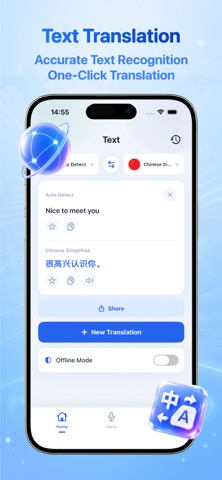


Description by Bencore Limited Written by the developer, not by AppBrain. Click to read.
Main Features:
【Text Translation】
Supports manual input and pasting of text for translation. It includes multiple translation models such as DeepSeek, Douba. After translation, the original text and the translated text can be saved, copied, read aloud in voice, shared with one click, and you can also create a new translation and clear the content to synchronize and retain all translation records.
【Translation History】
Automatically saves each translation record locally, showing the original text, translated text, and language conversion direction. There is no need to re-enter the text for a second translation. You can always go back to previous translation content.
【Voice Conversation Translation】
Real-time bilingual two-way communication translation. You can freely switch between the source language and the target translation language. One-click to switch translation direction. Click the microphone to real-time voice translation. Bottom settings include dual-language quick recording buttons. You can clear the conversation record with one click in the upper right corner. Suitable for overseas travel, oral communication, and foreign language practice.
【Image Translation】
Enable real-time recognition of text in the camera's captured scene. Supports importing translated text from the photo album. You can switch the target language for recognition. With the scene assist frame and flashlight function, road signs, menus, instructions, and paper documents can be quickly recognized and translated.
【Favorites】
Centraliz ed storage of all manually starred and saved translation phrases, convenient for repeated review of frequently used phrases, suitable for foreign language memorization and retention of common short sentences.
【Offline Language Packs】
Unified management of offline translation resources for various languages. You can download the corresponding language pack as needed. Even without an internet connection, you can still use the text and image translation functions. Suitable for travel scenarios without internet access.
Permission Explanation:
To provide voice translation functionality, the App will request microphone and voice recognition permissions when you actively use the voice function; to provide image translation functionality, the App will request camera permissions when you actively use the camera function; to provide photo translation functionality, the App will request album permissions when you actively select a photo. Translation history, saved content, and offline package data are only locally stored on the device. The relevant storage permissions can be managed in the system settings. You can manage all related permissions at any time in the iOS system settings.
If you encounter any problems during your use, please feel free to contact us through the feedback function in the app or the support page.