

Travel Planner - enot66
Travel Planner - enot66 is made and published by Ian Lipliavyi. AppBrain is an independent app data site and isn't affiliated with Ian Lipliavyi. The app name, icon, screenshots and description belong to Ian Lipliavyi and are shown as published on the App Store.
AppBrain's verdict
- Last updated
- October 16, 2026
- Size
- 57.6 MB
User feedback
Ratings and reviews on the App StoreComments on Travel Planner - enot66 for iOS
We don't have enough comments to show example comments. Please check back later.
Store listing
By Ian Lipliavyi, from the App Store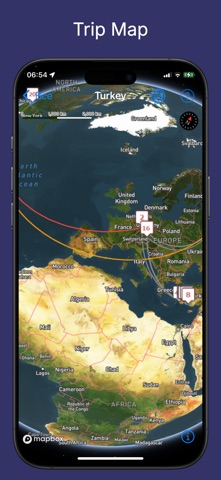





Description by Ian Lipliavyi Written by the developer, not by AppBrain. Click to read.
Free, no in-app purchases, no email address required, no email newsletters, no ads, full functionality without registration.
WHAT IS IT?
This is a very useful app for any traveler. You can use it even if you haven't added anything to your travel plan.
MAIN GOAL
When creating the app, we wanted you to be part of your trip, not just from the outside.
EXAMPLE
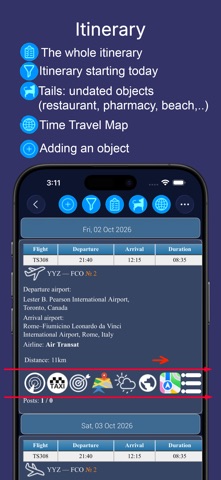
Trip plan. In fact, you can take any other app screen with travel items; it will look pretty much the same.
Typically, a trip plan is a list of travel items sorted by date: departure, arrival, car rental, hotel check-in, etc., or something similar.
ENOT66
For each item in your plan, you have multiple options (icons on the item cell - image #3).
OPERATIONAL INFORMATION
- Open the flight tracker (for flights). Before, during, and after the flight.
- Open Google Navigation with this location as your destination and navigate there yourself (e.g., from the airport to a hotel).
- Open the Lyft or Uber app (if installed) with this location as your destination.
- Copy the coordinates or address of the location for use, for example, in other taxi apps to get to this location.
- Check the weather forecast for your stay at this location. For example, for the day of your flight or during your hotel stay.
- Open an internal travel map with this location as the center (travel geography).
- Open device maps (platform dependent).
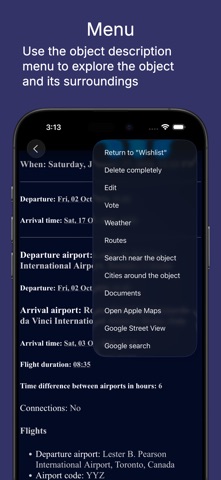
EXPLORE
The last button is the menu; it contains options for exploring the location (you can use this even before you start your trip):
- Google Street View centered on this location.
- Google Search. Find out more about a hotel, restaurant, attraction, departure airport, etc.
- Weather forecast. Not just for your travel dates, as you saw above, but for today and 15 days in advance.
- Nearby towns. They might have something interesting to offer.
- Search for various nearby attractions (restaurants, gas stations, ATMs, beaches, parks, attractions, etc.)
- Routes. This is a list of other related travel attractions. For example, you can check the route or taxi fare from the airport to your hotel in advance.
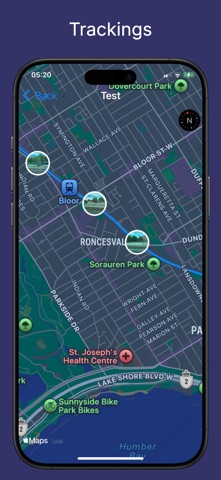
- Photos taken in the surrounding area. This will give you additional information about the area where this attraction is located.
14 FUNCTIONS
This means that for each attraction in your plan, you have 14 functions available, all within one or two clicks (from the menu).
And, of course, if you click on the cell itself, you'll get a description of the attraction and more.
RESULT
That is, the object of your trip (be it a hotel or a beach) on the list is not just a name, it is a starting point to learn more about it.
BY THE WAY
You can add any destination you find in the app to your trip.
For example, if you find a restaurant near your hotel (or near you in the "Where am I?" section), you can add it to your trip plan from the destination's description menu (in this case, a restaurant).
By the way, from the same menu, you can immediately find parking near your hotel, an ATM near the parking lot, a pharmacy near the ATM, and so on.
HELP
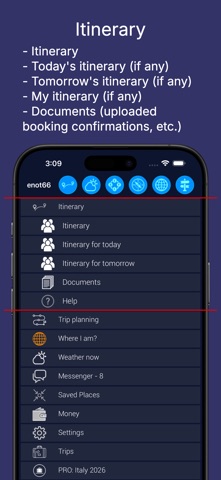
The above is only a small part of the app. We won't describe everything, because each app screen tells you what it can do.
For example, you open the currency converter, but you haven't added any converters yet.
In this case, you'll see a description of what this screen can do.
JUST ONE MORE THING
Did you forget that this is all free, with no ads, no annoying emails, and no in-app purchases?
Naturally, you can invite friends to your trip and join theirs.
And even without registering, you can add other devices or browsers to your account.
If you prefer planning trips on a computer, the same functionality is available at enot66.com.
Have a great trip!
Safety and technology
Found in the app by AppBrain- Price
- Free
- App size
- 57.6 MB
- Content rating
- Everyone
Technologies used by Travel Planner - enot66
Releases
Updates seen on the App Store- Version
- 20261015
- Launched
- June 2022
No changelog data
Alternatives
Similar apps and more from Ian LipliavyiAlternatives to Travel Planner - enot66




Rankings
App Store top chartsApp Store Rankings for Travel Planner - enot66
About the app and developer
About Travel Planner - enot66
Travel Planner - enot66 is a travel app developed by Ian Lipliavyi.
User Ratings
The app has no ratings yet.
App Information
Travel Planner - enot66 is freely available from the App Store. The app size is 57.60 MB. The latest version available is 20261015. The last update was on October 16, 2026.
Technical Requirements
The app has a content rating of Everyone. The app has been available on the App Store since June 2022.
Developer information for Ian Lipliavyi
Address: