




AppBrain's verdict
- Last updated
- October 18, 2026
- Size
- 2.62 MB
User feedback
Ratings and reviews on the App StoreComments on TrendFit for iOS
We don't have enough comments to show example comments. Please check back later.
Store listing
By Curtis Williams, from the App StoreDescription by Curtis Williams Written by the developer, not by AppBrain. Click to read.
TRENDFIT — Are my metrics improving over time?
Pick one activity and one metric, and TrendFit draws the trend line through it. The line is coloured by the angle you can actually see on screen: green when it is going the way you want, red when it is not, yellow when the movement is too small to mean anything. Pace is read the right way round, so a falling line is an improvement. Pinch to zoom and drag to pan; the trend line recalculates for whatever window you are looking at.
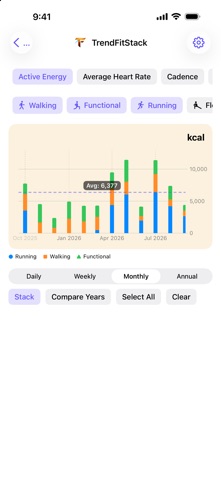
TRENDFIT STACK — How do my workouts compare side by side?
Put several activities on one chart and see how they divide the work between them. Stack them daily, weekly, monthly or as a rolling year to see the total as well as the split. Compare Years draws each calendar year as its own line on a shared January–December axis, so a seasonal dip stops reading as a decline.
TRENDFIT GROUP — Am I getting faster on the routes I repeat?
Outdoor workouts already carry the GPS route they were recorded on. TrendFit Group matches the ones that followed the same path and charts how you have performed across every repeat of it, so the loop you run twice a week becomes a measurement rather than a memory. Charts plot pace, speed and duration. Route history follows your Chart Range in Settings, from 3 to 36 months. It covers up to 200 outdoor workouts across a year or less, rising with the range to 600 at 36 months.
TRENDFIT CHALLENGE — Will I hit my target before time runs out?
Set a target and a deadline, and TrendFit projects whether you are on course for it from the work you have already done. Standings update as new workouts arrive in Health. Targets are typed in the same notation they are displayed in, so a pace target reads 5:24, not 5.4. Optional reminders are scheduled on your device, by your device.
BUILT TO BE READABLE
Charts measure their own plot area and draw fewer whole axis labels rather than letting labels overlap. Every screen scrolls when the text grows, and controls that run out of horizontal room restack instead of truncating. Light and dark appearance are both supported.
YOUR DATA NEVER LEAVES YOUR DEVICE
TrendFit reads from Apple Health and never writes to it. There is no account, no server, no upload and no analytics. Every chart, projection and notification is produced on the device, from data that stays on the device. Route outlines are drawn from geometry cached locally, and no map tiles are fetched to draw them.
REQUIREMENTS
Workouts recorded in Apple Health. TrendFit Group additionally needs outdoor workouts with GPS routes, recorded by an Apple Watch or a GPS workout app. English only. Free, with no account, subscription or in-app purchases.
Safety and technology
Found in the app by AppBrain- Price
- Free
- App size
- 2.62 MB
- Content rating
- Everyone
Technologies used by TrendFit
Releases
Updates seen on the App Store- Version
- 2.0.1
- Launched
- November 2025
No changelog data
Alternatives
Similar apps and more from Curtis WilliamsAlternatives to TrendFit


Rankings
App Store top chartsApp Store Rankings for TrendFit
About the app and developer
About TrendFit
TrendFit is a health & fitness app developed by Curtis Williams.
User Ratings
The app has no ratings yet.
App Information
TrendFit is freely available from the App Store. The app size is 2.62 MB. The latest version available is 2.0.1. The last update was on October 18, 2026.
Technical Requirements
The app has a content rating of Everyone. The app has been available on the App Store since November 2025.
TrendFit is made and published by Curtis Williams. AppBrain is an independent app data site and isn't affiliated with Curtis Williams. The app name, icon, screenshots and description belong to Curtis Williams and are shown as published on the App Store.
Developer information for Curtis Williams
Address: