

Tripper GPS is made and published by Koray Birand. AppBrain is an independent app data site and isn't affiliated with Koray Birand. The app name, icon, screenshots and description belong to Koray Birand and are shown as published on the App Store.
AppBrain's verdict
- Best rank
- #66
- Top Paid, Czech Republic
- Last updated
- August 24, 2026
Rankings
App Store top charts- Highest rank
- #66
- Chart
- Top Paid
- Sports
- Country
- Czech Republic
App Store Rankings for Tripper GPS
Top rankings
| Rank | Country | Category | List |
|---|---|---|---|
| 87 | United States | Sports | Top Paid |
| 66 | Czech Republic | Sports | Top Paid |
| 87 | Iran | Sports | Top Paid |
Ranking history in United States
Competitors
Similar apps and more from Koray BirandMore from Koray Birand


Releases
Updates seen on the App Store- Version
- 1.9
- Launched
- July 2026
No changelog data
User feedback
Ratings and reviews on the App StoreComments on Tripper GPS for iOS
We don't have enough comments to show example comments. Please check back later.
Technology
Found in the app by AppBrain- Price
- $2.99
- App size
- 13.4 MB
- Content rating
- Everyone
Technologies used by Tripper GPS
About the app and developer
About Tripper GPS
Tripper GPS is a sports app developed by Koray Birand.
What is the rating of Tripper GPS?
Tripper GPS has no ratings yet.
Is Tripper GPS free?
Tripper GPS costs $2.99. The app size is 13.43 MB. The latest version available is 1.9. The last update was on August 24, 2026.
What are the requirements for Tripper GPS?
The app has a content rating of Everyone. The app has been available on the App Store since July 2026.
Developer information for Koray Birand
Address:
Store listing
By Koray Birand, from the App Store


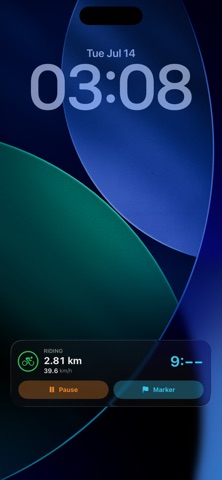
Screenshots by Koray Birand, from the the App Store listing
Description by Koray Birand Written by the developer, not by AppBrain. Click to read.
Tripper turns your iPhone into a proper telemetry logger for motorcycles,
bicycles, and cars. Mount it, tap Start, and ride. Everything else is
recorded for you.
CALIBRATED TO YOUR BIKE, NOT YOUR PHONE
Most apps measure motion in the phone's frame, which is meaningless when the
phone is clamped to your bars at an angle. Tripper measures it in your
vehicle's frame. Tap Reset Angle once and the current orientation becomes
zero, so slope, lean, and g-force are read along the axes that actually
matter: forward, sideways, and up. Level ground reads 0 degrees no matter
how the phone sits in its mount.
WHAT IT RECORDS
• GPS route, speed, distance, and heading
• Barometric elevation, fused with GPS - far smoother than GPS altitude
alone, so real hills survive and noise does not
• Road grade, as a rolling window rather than jittery point-to-point noise
• Lean angle and slope in your vehicle's frame
• G-force: braking, acceleration, and cornering, measured in the horizontal
plane the way motorsport telemetry does, with the vertical jolts from
potholes filtered out instead of inflating your numbers
• Up to 100 Hz motion sampling, logged at the rate you choose
BUILT TO BE USED AT SPEED
The dashboard floats over a fullscreen map: big numbers, high contrast,
readable at a glance with gloves on. The controls are deliberately hard to
get wrong - a stray tap can never end your ride, because finishing is only
possible from a paused state.
It keeps recording with the screen locked, and you can pause, resume, or
drop a marker straight from the Dynamic Island and Lock Screen. Or from your
wrist: the Apple Watch app shows duration, speed, altitude, and your
position on the map, and lets you start, pause, and mark a ride without ever
touching the phone.
FOR VIDEO OVERLAYS
Drop a marker at any moment - a clap, a landmark, a starting gun - and it is
written into the data with an exact timestamp, so you can line the telemetry
up against your action-cam footage frame for frame. Exported CSV is shaped
for overlay tools like DashWare and Telemetry Overlay.
AFTER THE RIDE
• Replay any ride full-screen: scrub through it, or play it back and watch
the dashboard come alive over the map exactly as it was
• Speed and elevation charts, with distance, moving time, average and top
speed, elevation gain, and peak g
• Overlay past tracks on the live map and go and chase them
• Import rides from .trip, GPX, KML, or CSV
• Export full-telemetry CSV, GPX with telemetry extensions, or a compact
.trip archive
ENTIRELY YOURS
No account. No cloud. No analytics, no advertising, no third-party SDKs.
Every ride is processed and stored on your device, and nothing leaves it
unless you explicitly export or share it.
bicycles, and cars. Mount it, tap Start, and ride. Everything else is
recorded for you.
CALIBRATED TO YOUR BIKE, NOT YOUR PHONE
Most apps measure motion in the phone's frame, which is meaningless when the
phone is clamped to your bars at an angle. Tripper measures it in your
vehicle's frame. Tap Reset Angle once and the current orientation becomes
zero, so slope, lean, and g-force are read along the axes that actually
matter: forward, sideways, and up. Level ground reads 0 degrees no matter
how the phone sits in its mount.
WHAT IT RECORDS
• GPS route, speed, distance, and heading
• Barometric elevation, fused with GPS - far smoother than GPS altitude
alone, so real hills survive and noise does not
• Road grade, as a rolling window rather than jittery point-to-point noise
• Lean angle and slope in your vehicle's frame
• G-force: braking, acceleration, and cornering, measured in the horizontal
plane the way motorsport telemetry does, with the vertical jolts from
potholes filtered out instead of inflating your numbers
• Up to 100 Hz motion sampling, logged at the rate you choose
BUILT TO BE USED AT SPEED
The dashboard floats over a fullscreen map: big numbers, high contrast,
readable at a glance with gloves on. The controls are deliberately hard to
get wrong - a stray tap can never end your ride, because finishing is only
possible from a paused state.
It keeps recording with the screen locked, and you can pause, resume, or
drop a marker straight from the Dynamic Island and Lock Screen. Or from your
wrist: the Apple Watch app shows duration, speed, altitude, and your
position on the map, and lets you start, pause, and mark a ride without ever
touching the phone.
FOR VIDEO OVERLAYS
Drop a marker at any moment - a clap, a landmark, a starting gun - and it is
written into the data with an exact timestamp, so you can line the telemetry
up against your action-cam footage frame for frame. Exported CSV is shaped
for overlay tools like DashWare and Telemetry Overlay.
AFTER THE RIDE
• Replay any ride full-screen: scrub through it, or play it back and watch
the dashboard come alive over the map exactly as it was
• Speed and elevation charts, with distance, moving time, average and top
speed, elevation gain, and peak g
• Overlay past tracks on the live map and go and chase them
• Import rides from .trip, GPX, KML, or CSV
• Export full-telemetry CSV, GPX with telemetry extensions, or a compact
.trip archive
ENTIRELY YOURS
No account. No cloud. No analytics, no advertising, no third-party SDKs.
Every ride is processed and stored on your device, and nothing leaves it
unless you explicitly export or share it.