

Tropa: Proxy Client
Tropa: Proxy Client is made and published by Tropa. AppBrain is an independent app data site and isn't affiliated with Tropa. The app name, icon, screenshots and description belong to Tropa and are shown as published on the App Store.
AppBrain's verdict
- Last updated
- October 7, 2026
- Size
- 90.0 MB
User feedback
Ratings and reviews on the App StoreComments on Tropa: Proxy Client for iOS
We don't have enough comments to show example comments. Please check back later.
Store listing
By Tropa, from the App Store


Description by Tropa Written by the developer, not by AppBrain. Click to read.
Important: Tropa does not sell subscriptions, issue keys, or provide its own server catalog. You need an active key from your service provider or administrator. The key determines the configuration, servers, and protocols available to you.
Data protection during connection
Tropa helps create a secure connection from an existing configuration and manage it without entering network parameters by hand. The level of protection depends on the protocol, key settings, selected server, and network conditions. Compatible keys may use VLESS, V2Ray, or other protocols supported by the configuration.
Tropa features
1. Secure connection. Use an existing configuration to create a connection based on your key settings.
2. Key-based activation. Paste the key manually or open the link you received when this method is supported by your configuration.
3. Clear validation results. Tropa confirms successful activation and shows when a key is invalid, blocked, or no longer active.
4. Available server list. Choose the servers included in your key configuration.
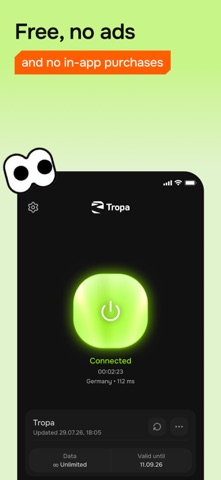
5. Connection controls and status. Create or end the connection from the main screen and see its current state at a glance.
6. Key details. Review the configuration name, expiration date, and other information when supplied by your provider.
7. Key replacement. Add a new key when the current one expires or when you need another configuration.
8. Automatic startup. Let Tropa create the connection automatically according to your selected settings.
9. Ad-free interface. Essential controls stay visible without advertising interruptions.
How to get started
1. Obtain an active compatible key from your provider or administrator.
2. Open Tropa and add the key using one of the available methods.
3. Wait for the activation confirmation.
4. Select a server from the list loaded for your key.
5. Allow the device to create a network connection the first time, then tap Connect.
After activation, Tropa keeps the essential controls on the main screen. You can check the connection state, choose another available server, open the key details, or disconnect. If the key is no longer active, replace it with a new key issued by your provider.
Who Tropa is for
The app is intended for users who already received a compatible key and want a secure proxy connection without configuring protocols manually. Tropa works on Wi-Fi and mobile networks and keeps the ready configuration in one focused interface.
Server availability, expiration information, supported features, speed, and connection stability depend on your key, selected server, internet provider, and current network conditions. Tropa cannot renew or restore a third-party key without its provider. Use the app in accordance with the service rules and the laws applicable in your country.
Safety and technology
Found in the app by AppBrain- Price
- Free
- App size
- 90.0 MB
- Content rating
- Everyone
Technologies used by Tropa: Proxy Client
Releases
Updates seen on the App Store- Version
- 1.1
- Launched
- September 2026
No changelog data
Alternatives
Similar apps and more from TropaAlternatives to Tropa: Proxy Client


Rankings
App Store top chartsApp Store Rankings for Tropa: Proxy Client
About the app and developer
About Tropa: Proxy Client
Tropa: Proxy Client is an utilities app developed by Tropa.
What is the rating of Tropa: Proxy Client?
Tropa: Proxy Client has no ratings yet.
Is Tropa: Proxy Client free?
Tropa: Proxy Client is free. The app size is 89.99 MB. The latest version available is 1.1. The last update was on October 7, 2026.
What are the requirements for Tropa: Proxy Client?
The app has a content rating of Everyone. The app has been available on the App Store since September 2026.
Developer information for Tropa
Address: