

Tropos: reading list and shelf
Tropos: reading list and shelf is made and published by Mercurio Solutions. AppBrain is an independent app data site and isn't affiliated with Mercurio Solutions. The app name, icon, screenshots and description belong to Mercurio Solutions and are shown as published on the App Store.
AppBrain's verdict
- Last updated
- October 5, 2026
Rankings
App Store top chartsApp Store Rankings for Tropos: reading list and shelf
Competitors
Similar apps and more from Mercurio SolutionsAlternatives to Tropos: reading list and shelf


More from Mercurio Solutions


Releases
Updates seen on the App Store- Version
- 1.3.0
- Launched
- September 2026
No changelog data
User feedback
Ratings and reviews on the App StoreComments on Tropos: reading list and shelf for iOS
We don't have enough comments to show example comments. Please check back later.
Technology
Found in the app by AppBrain- Price
- Free
- App size
- 7.27 MB
- Content rating
- Everyone
Technologies used by Tropos: reading list and shelf
About the app and developer
About Tropos: reading list and shelf
Tropos: reading list and shelf is a books app developed by Mercurio Solutions.
User Ratings
The app has no ratings yet.
App Information
Tropos: reading list and shelf is freely available from the App Store. The app size is 7.27 MB. The latest version available is 1.3.0. The last update was on October 5, 2026.
Technical Requirements
The app has a content rating of Everyone. The app has been available on the App Store since September 2026.
Developer information for Mercurio Solutions
Address:
Frequently asked questions about Tropos: reading list and shelf
Is Tropos: reading list and shelf free?
Yes. Tropos: reading list and shelf is free on the App Store.
Is Tropos: reading list and shelf still available?
Yes. Tropos: reading list and shelf is on the App Store, and the last update we saw was on October 5, 2026.
How large is Tropos: reading list and shelf?
Tropos: reading list and shelf is 7.27 MB.
Is Tropos: reading list and shelf suitable for children?
App Store rates the content of Tropos: reading list and shelf as suitable for everyone.
Who made Tropos: reading list and shelf?
Tropos: reading list and shelf was developed by Mercurio Solutions. It is listed in the books category on the App Store.
What are the best alternatives to Tropos: reading list and shelf?
People looking at Tropos: reading list and shelf also look at these books apps: Reading Tracker: Livros, Ritsu - Book Tracker, Cover to Cover Club, Bookward: Book Tracker & TBR, Book Tracker: Bookshelf & TBR.
Store listing
By Mercurio Solutions, from the App Store


Description by Mercurio Solutions Written by the developer, not by AppBrain. Click to read.
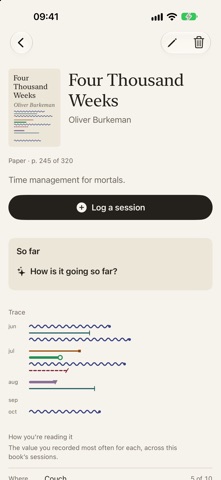
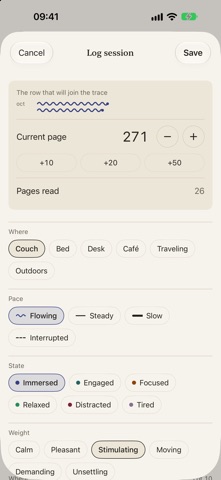
No yearly goals, no streaks to protect, no leaderboards. You add a book when you start it, and come back to log a session when you have read. Each session records the page you reached and four things almost nobody writes down: where you were reading, at what pace, in what state, and what weight that text had for you.
Over time those notes become a record. Sessions gather by month, and the gaps between one month and the next tell you how continuous that reading was, without you having to count anything.
What it gives back, for free
For each book, Tropos shows the value you recorded most often in each dimension, and out of how many sessions. Counts, not interpretations.
Tropos AI
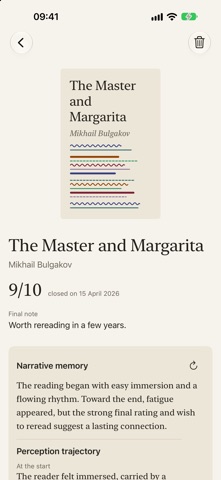
With a one-time unlock, no subscription, Tropos reads those notes and tells you about them: a reflection on the book you are reading now, a narrative memory when you close it, and the patterns that surface between one book and the next.
Each of the three is free to try once, so you can see it on your own reading before you decide.
It runs entirely on your device with Apple Intelligence. Nothing is sent to a server, not to us and not to Apple.
Your data is yours
No account, no servers of ours, no third-party analytics. Everything lives in your own private iCloud and syncs across Mac, iPhone, and iPad. You can delete all of it whenever you want, from Settings.
Tropos AI is bought once and works on Mac and iOS together. It requires a device with Apple Intelligence: where that is unavailable, the feature does not appear.