

TruGrid Authenticator
TruGrid Authenticator is made and published by N.E. Desktop Software, Inc. ("TruGrid"). AppBrain is an independent app data site and isn't affiliated with N.E. Desktop Software, Inc. ("TruGrid"). The app name, icon, screenshots and description belong to N.E. Desktop Software, Inc. ("TruGrid") and are shown as published on the App Store.
AppBrain's verdict
Established- Rating on App Store
- 4.69
- 16 ratings
- Last updated
- October 16, 2026
It doesn't have enough ratings yet to judge what users think.
Rankings
App Store top chartsApp Store Rankings for TruGrid Authenticator
Competitors
Similar apps and more from N.E. Desktop Software, Inc. ("TruGrid")Alternatives to TruGrid Authenticator







More from N.E. Desktop Software, Inc. ("TruGrid")

Releases
Updates seen on the App Store- Version
- 2.0.6
- Launched
- August 2018
No changelog data
User feedback
Ratings and reviews on the App StoreComments on TruGrid Authenticator for iOS
We don't have enough comments to show example comments. Please check back later.
Technology
Found in the app by AppBrain- Price
- Free
- App size
- 32.6 MB
- Content rating
- Everyone
Technologies used by TruGrid Authenticator
About the app and developer
About TruGrid Authenticator
TruGrid Authenticator is an utilities app developed by N.E. Desktop Software, Inc. ("TruGrid").
What is the rating of TruGrid Authenticator?
TruGrid Authenticator is rated 4.69 out of 5 stars, based on 16 ratings.
Is TruGrid Authenticator free?
TruGrid Authenticator is free. The app size is 32.59 MB. The latest version available is 2.0.6. The last update was on October 16, 2026.
What are the requirements for TruGrid Authenticator?
The app has a content rating of Everyone. The app has been available on the App Store since August 2018.
Developer information for N.E. Desktop Software, Inc. ("TruGrid")
Frequently asked questions about TruGrid Authenticator
Is TruGrid Authenticator free?
Yes. TruGrid Authenticator is free on the App Store.
Is TruGrid Authenticator still available?
Yes. TruGrid Authenticator is on the App Store, and the last update we saw was on October 16, 2026.
How large is TruGrid Authenticator?
TruGrid Authenticator is 32.59 MB.
Is TruGrid Authenticator suitable for children?
App Store rates the content of TruGrid Authenticator as suitable for everyone.
How do people rate TruGrid Authenticator?
TruGrid Authenticator scores 4.69 out of 5 stars, from 16 ratings on the App Store.
Who made TruGrid Authenticator?
TruGrid Authenticator was developed by N.E. Desktop Software, Inc. ("TruGrid"). It is listed in the utilities category on the App Store.
What are the best alternatives to TruGrid Authenticator?
People looking at TruGrid Authenticator also look at these utilities apps: vMobileConnect, ThreatLocker Admin, Authenticator App - SafeID, Intermedia VeriKey, Evo Authenticator.
Store listing
By N.E. Desktop Software, Inc. ("TruGrid"), from the App Store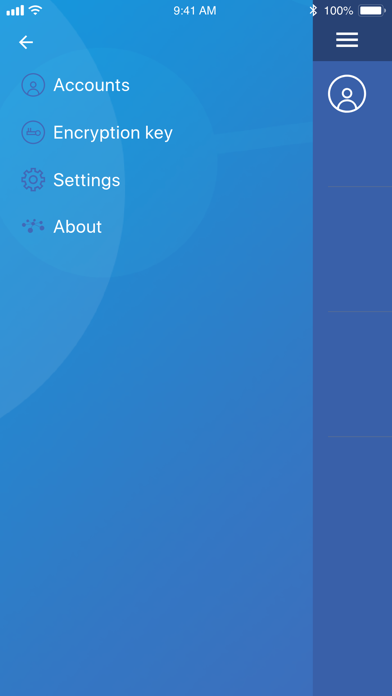
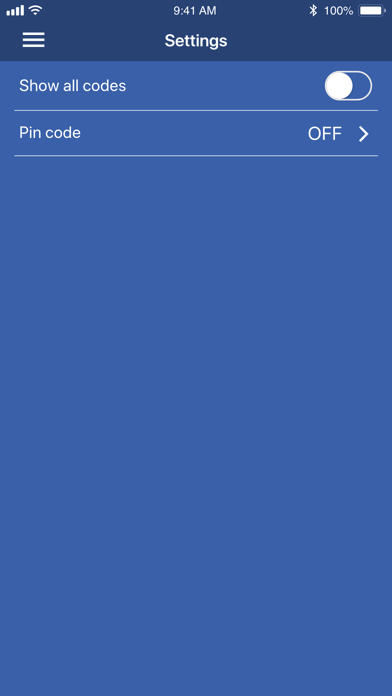
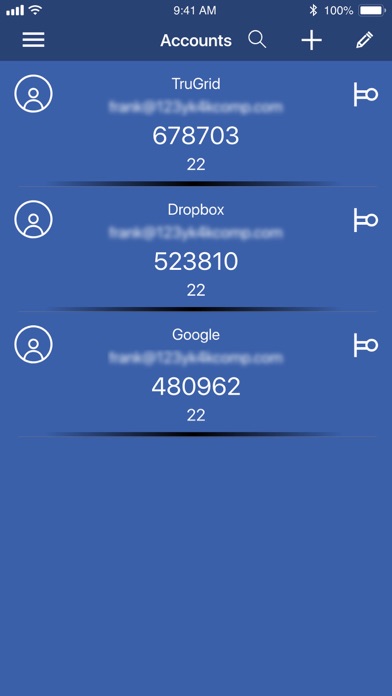
Description by N.E. Desktop Software, Inc. ("TruGrid") Written by the developer, not by AppBrain. Click to read.
Improve your account security with an easy to use multi-factor authentication application. Provides an additional layer of security when signing in to accounts, so that even if someone had your password, they could not access your account.
Once setup, when you sign into your account, you will use your login and password PLUS a one-time, rotating passcode generated from the TruGrid Authenticator. This will work even if you are temporarily offline.
FEATURES:
- Supports any TOTP-compatible sites that already supports Google Authenticator
- Quick setup via QR code scan
- Add as many accounts as you would like
- Edit account nicknames
- Search for accounts
- Setup PIN code
When using the TruGrid Authenticator on TruGrid.com or any other website that supports MFA, just scan the QR code when prompted.
HOW TO USE IT
1. Download the TruGrid Authenticator to your mobile device
2. Enable MFA (or sometimes called 2FA) on your account. Note: This is enabled by default when logging into TruGrid.com accounts
3. When prompted with a QR code, select Add in TruGrid Authenticator to scan and add the new account
4. Select the new account row added in TruGrid Authenticator
5. Enter code from TruGrid Authenticator into your site, app or service