

Max Video AI: H3 Video Maker
Max Video AI: H3 Video Maker is made and published by 6677tech. AppBrain is an independent app data site and isn't affiliated with 6677tech. The app name, icon, screenshots and description belong to 6677tech and are shown as published on the App Store.
AppBrain's verdict
- Last updated
- October 12, 2026
- Size
- 44.7 MB
User feedback
Ratings and reviews on the App StoreComments on Max Video AI: H3 Video Maker for iOS
We don't have enough comments to show example comments. Please check back later.
Store listing
By 6677tech, from the App Store


Description by 6677tech Written by the developer, not by AppBrain. Click to read.
Max Video is an AI workspace for video, images, and virtual try-on. Animate photos, explore concepts, keep subjects consistent, or build scenes from text and references.
CREATE AI VIDEOS IN MULTIPLE WAYS
Text to Video
Describe the subject, action, camera movement, lighting, mood, and visual style you want. Turn written ideas into dynamic scenes, with aspect ratio, resolution, and duration options based on the selected model.
Image to Video
Upload one or more images and add motion, camera movement, atmosphere, and storytelling. Animate portraits, products, landscapes, illustrations, fashion concepts, and creative artwork.
Reference to Video
Combine images, videos, and audio as creative references. Use them to guide characters, subjects, movement, sound, composition, and visual style. Mention uploaded media in your prompt and explain how each reference should influence the result.
Reference limits, media, resolution, duration, and aspect ratio vary by model. Review available controls and credit cost before generation.
EXPLORE POWERFUL VIDEO MODELS
Choose from MiniMax H3, Seedance 2.0, Vidu Q3, Kling Omni O3, Kling 3.0, Veo 3.1, and more. Different models specialize in speed, quality, motion, audio, or reference control. Model availability and capabilities may change; review the current settings shown in the app.
CREATE AI IMAGES AND TRY ON STYLES
Use Nano Banana AI, Flux.1 Schnell, Seedream 5.0, Qwen Image V2, and other models to generate images, explore styles, combine references, and create new compositions. Preview clothing with virtual try-on, then develop backgrounds and creative looks with AI image tools.
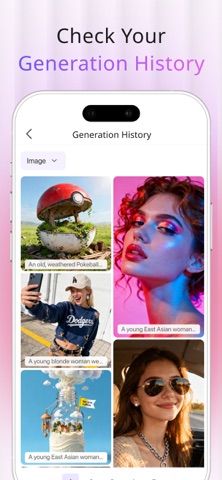
Choose a creation mode and model, write a prompt, add references when needed, and select available settings. Review the credit cost before starting, then follow progress, play completed work, and download results from generation history.
WRITE CLEARER PROMPTS
Name the main subject, action, environment, camera movement, lighting, and visual style. For references, explain whether each file should guide appearance, clothing, motion, background, composition, or sound. Use clear, recognizable media and avoid blurry, duplicate, or conflicting references.
CHOOSE THE RIGHT FORMAT
Use landscape for stories, scenery, and products; portrait for mobile and social clips; or square and alternate ratios for artwork and platform-specific layouts. Higher resolutions can preserve more detail but may require more credits and processing time. Short durations are useful for testing ideas, while longer durations allow more complete actions.
CREDITS, SUBSCRIPTIONS, AND RESPONSIBLE USE
Max Video is free to download and offers in-app purchases. Some models and advanced features require credits or a subscription. Credit costs depend on the model, resolution, duration, and reference capabilities, and are displayed before generation.
AI results may vary based on prompts, references, and model capabilities. Only use text, images, videos, and audio you have the right to process, and confirm applicable rights and local rules before sharing or commercial use.
Start with an idea or a set of references and discover a more flexible way to create AI videos and images with Max Video.
Privacy Policy: https://aitryon.art/privacy-policy/
Terms of Use: https://aitryon.art/terms-of-service/
Safety and technology
Found in the app by AppBrain- Price
- Free
- App size
- 44.7 MB
- Content rating
- Medium
Technologies used by Max Video AI: H3 Video Maker
Releases
Updates seen on the App Store- Version
- 3.0.3
- Launched
- December 2025
No changelog data
Alternatives
Similar apps and more from 6677tech


Rankings
App Store top chartsApp Store Rankings for Max Video AI: H3 Video Maker
About the app and developer
About Max Video AI: H3 Video Maker
Max Video AI: H3 Video Maker is a graphics & design app developed by 6677tech.
User Ratings
The app has no ratings yet.
App Information
Max Video AI: H3 Video Maker is freely available from the App Store. The app size is 44.67 MB. The latest version available is 3.0.3. The last update was on October 12, 2026.
Technical Requirements
The app has a content rating of Medium Maturity. The app has been available on the App Store since December 2025.
Developer information for 6677tech
Address:
Frequently asked questions about Max Video AI: H3 Video Maker
Is Max Video AI: H3 Video Maker free?
Yes. Max Video AI: H3 Video Maker is free on the App Store.
Is Max Video AI: H3 Video Maker still available?
Yes. Max Video AI: H3 Video Maker is on the App Store, and the last update we saw was on October 12, 2026.
How large is Max Video AI: H3 Video Maker?
Max Video AI: H3 Video Maker is 44.67 MB.
Is Max Video AI: H3 Video Maker suitable for children?
App Store gives Max Video AI: H3 Video Maker a medium maturity rating, so it is not meant for young children.
Who made Max Video AI: H3 Video Maker?
Max Video AI: H3 Video Maker was developed by 6677tech. It is listed in the graphics & design category on the App Store.
What are the best alternatives to Max Video AI: H3 Video Maker?
People looking at Max Video AI: H3 Video Maker also look at these graphics & design apps: AI Clothes Changer : Stylea, Change Clothes: Outfit Creator, Clothes Changer: Outfit Maker, BodyGlow: AI Photo & Video, PicG : Ai Photo Styler.