

TSplus Remote Support
TSplus Remote Support is made and published by TSPLUS. AppBrain is an independent app data site and isn't affiliated with TSPLUS. The app name, icon, screenshots and description belong to TSPLUS and are shown as published on the App Store.
AppBrain's verdict
- Last updated
- June 16, 2026
Rankings
App Store top chartsApp Store Rankings for TSplus Remote Support
Competitors
Similar apps and more from TSPLUSAlternatives to TSplus Remote Support


Releases
Updates seen on the App Store- Version
- 1.5.2
- Launched
- January 2026
No changelog data
User feedback
Ratings and reviews on the App StoreComments on TSplus Remote Support for iOS
We don't have enough comments to show example comments. Please check back later.
Technology
Found in the app by AppBrain- Price
- Free
- App size
- 70.6 MB
- Content rating
- Everyone
Technologies used by TSplus Remote Support
About the app and developer
About TSplus Remote Support
TSplus Remote Support is an utilities app developed by TSPLUS.
What is the rating of TSplus Remote Support?
TSplus Remote Support has no ratings yet.
Is TSplus Remote Support free?
TSplus Remote Support is free. The app size is 70.63 MB. The latest version available is 1.5.2. The last update was on June 16, 2026.
What are the requirements for TSplus Remote Support?
The app has a content rating of Everyone. The app has been available on the App Store since January 2026.
Developer information for TSPLUS
Address:
Store listing
By TSPLUS, from the App Store


Description by TSPLUS Written by the developer, not by AppBrain. Click to read.
KEY FEATURES
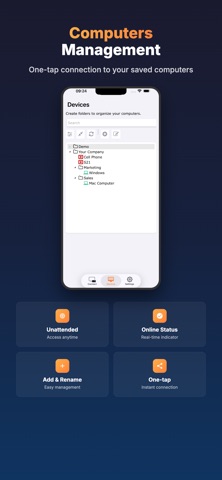
• Computers Management
View and manage all your registered computers from the "Computers" tab. Connect with one tap to computers configured for unattended access. When multiple Windows sessions are active, select the right session directly from your iPhone or iPad. Add, remove, and rename computers easily. See real-time online/offline status indicators.
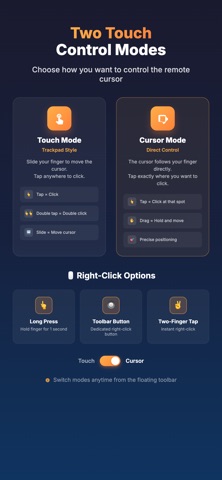
• Two Touch Control Modes
- Touch Mode (Trackpad): Control the remote cursor like a trackpad - slide your finger to move the cursor, tap to click
- Cursor Mode (Direct): The cursor follows your finger directly - tap exactly where you want to click on screen
- Switch between modes via the dedicated toolbar button
• Right-Click Options
- Long press: Hold your finger to perform a right-click
- Dedicated button: Use the right-click button in the toolbar
- Two-finger tap: Tap with two fingers simultaneously for instant right-click
• Floating Toolbar & Modifier Keys
Access all controls from a convenient floating toolbar during your session. Send keyboard modifiers (Ctrl, Alt, Shift, Cmd) for Windows/Mac shortcuts. Execute Ctrl+C, Ctrl+V, Alt+Tab, Ctrl+Alt+Del and other shortcuts easily. Escape and arrow keys always accessible.
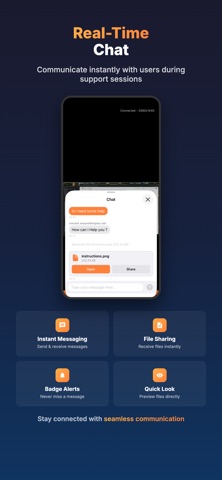
• Real-Time Chat
Communicate instantly with users during support sessions. Send and receive messages in real-time. Consecutive messages from the same sender are grouped for a cleaner conversation view. Receive files shared by the remote user with one-tap preview. Badge notifications ensure you never miss a message.
• Real-time Screen Viewing
Access the screen of any Windows or Mac computer connected to TSplus Remote Support. Smooth video streaming optimized for mobile connections.
• Full Virtual Keyboard
Type text on the remote computer using the iOS keyboard. Full support for special characters, accents, and emojis.
• Multi-Monitor Support
Switch seamlessly between multiple monitors on the remote computer. Access all screens from your mobile device.
• Zoom and Navigation
Zoom up to 8x with pinch gesture to see details. Navigate the zoomed screen with two fingers.
• Secure Connection
All connections are end-to-end encrypted with TLS. Your sessions remain private and secure.
• iPhone and iPad Compatible
Interface optimized for all screens, from small iPhone to large iPad Pro.
USE CASES
• Technical Support: Troubleshoot issues for your clients or colleagues remotely
• IT Maintenance: Perform updates and configurations without traveling
• Mobile Access: Access your office computer from anywhere
• System Administration: Monitor and manage your servers on the go
GLOBAL INFRASTRUCTURE
TSplus Remote Support relies on relay servers distributed worldwide. You are automatically connected to the nearest server for optimal performance.
TRUST AND RELIABILITY
TSplus is used by over 500,000 companies worldwide, including Huawei, Oracle, and Siemens. Rated 4.8/5 on Trustpilot and 4.9/5 on SourceForge.
REQUIREMENTS
- A TSplus Remote Support account (15-day free trial available at tsplus.net)
- A Windows or Mac computer with the TSplus Remote Support client installed