Tsuku Tsuku is a travel app developed by Yoshihiko Eto.
User Ratings
Tsuku Tsuku is rated 4.24 out of 5 stars. The rating is based on 25 ratings.
App Information
Tsuku Tsuku is freely available from the App Store. The app size is 23.46 MB. The latest version available is 7.0.0. The last update was on September 24, 2021.
Technical Requirements
The app has a content rating of Everyone. The app has been available on the App Store since November 2015.
Tsuku Tsuku is made and published by
Yoshihiko Eto.
AppBrain is an independent app data site and isn't affiliated with Yoshihiko Eto.
The app name, icon, screenshots and description belong to Yoshihiko Eto and are shown as published on the App Store.
Description by Yoshihiko Eto(from the App Store)
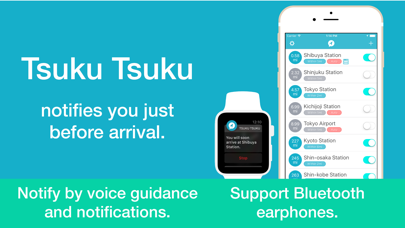
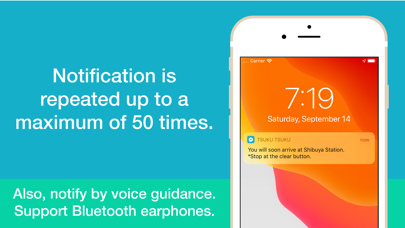
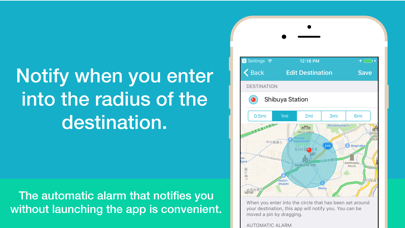
◆ Best for traveling by train or bus. ◆ Notifies before you reach your destination. ◆ Notify by voice and notification. ◆ Notification is repeated up to a maximum of 50 times. ◆ On the Apple Watch, it vibrates, making it even more convenient. ◆ Automatically turn on notification of the destination without launching the application. ◆Supports iOS 13 Dark Mode.
▼ Perfect for these situations - When you doze off on the train or bus. - When you’re listening to music and can’t hear the announcement of arrival on the loudspeaker. - When you’re traveling for pleasure or business to a place you’ve never been to before.
▼Notification - Up to 50 times are notified continuously. - Notification interval can be set up to 10 seconds. - Notify by voice and notification. - Select a voice for voice guidance on Settings. - Edit a message of voice guidance for each destination. - Supports Bluetooth earphones.
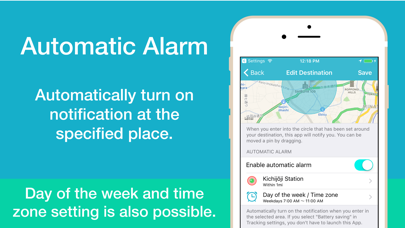
▼Automatic Alarm - Automatically turn on the notification when you go through in the specified place. - When you specify the nearest station or the station you always go through, the notification of the destination will be turned on automatically when you go through that place. - If you select "Battery saving" in Tracking settings, you don't have to launch this App. - You can set the day of the week and time zone to enable the automatic alarm.
▼Tracking settings - Battery saving This app does not track your location. Obtains your location only after significant changes to avoid battery loss. Most suitable if another app is already tracking your location. *Can be set using the automatic alarm without launching the app. *If you receive no notification before arrival, please switch “Tracking location” in the settings.
- Tracking location Your location is being tracked during moving. The accuracy of the notification will increase. When you stop moving, the app will automatically stop tracking you. *To begin/resume tracking, the app must be launched.
▼ Note - This app only works with "Always" in Location Services. In iOS 13, you cannot select “Always allow” for Location Services at installation. Please select "Always" for Privacy>Location Services in Settings. - Continued use of GPS running in the background can dramatically decrease battery life. (Tracking location) - In places such as subways and tunnels where location information cannot be obtained, no notification will be received prior to arrival at the destination. - If Wi-Fi is enabled, you can get the current location more accurate.
Each subscription will automatically renew 3 days before the expiration date for
the same time period. Subscriptions can be cancelled at any time before the renewal.