

TV Remote Control for Roku ®
TV Remote Control for Roku ® is made and published by SEAMOBI TECH PTE LTD. AppBrain is an independent app data site and isn't affiliated with SEAMOBI TECH PTE LTD. The app name, icon, screenshots and description belong to SEAMOBI TECH PTE LTD and are shown as published on the App Store.
AppBrain's verdict
Loved by users- Rating on App Store
- 4.63
- 4,955 ratings
- Last updated
- August 21, 2026
Users love it: 4.6 stars from 4,955 ratings.
Rankings
App Store top chartsApp Store Rankings for TV Remote Control for Roku ®
Competitors
Similar apps and more from SEAMOBI TECH PTE LTDMore from SEAMOBI TECH PTE LTD







Releases
Updates seen on the App Store- Version
- 1.3.1
- Launched
- June 2024
No changelog data
User feedback
Ratings and reviews on the App StoreComments on TV Remote Control for Roku ® for iOS
We don't have enough comments to show example comments. Please check back later.
Technology
Found in the app by AppBrain- Price
- Free
- App size
- 103.5 MB
- Content rating
- Low
Technologies used by TV Remote Control for Roku ®
About the app and developer
About TV Remote Control for Roku ®
TV Remote Control for Roku ® is an utilities app developed by SEAMOBI TECH PTE LTD.
User Ratings
TV Remote Control for Roku ® is rated 4.63 out of 5 stars. The rating is based on 5 thousand ratings.
App Information
TV Remote Control for Roku ® is freely available from the App Store. The app size is 103.50 MB. The latest version available is 1.3.1. The last update was on August 21, 2026.
Technical Requirements
The app has a content rating of Low Maturity. The app has been available on the App Store since June 2024.
Developer information for SEAMOBI TECH PTE LTD
Address:
Store listing
By SEAMOBI TECH PTE LTD, from the App Store


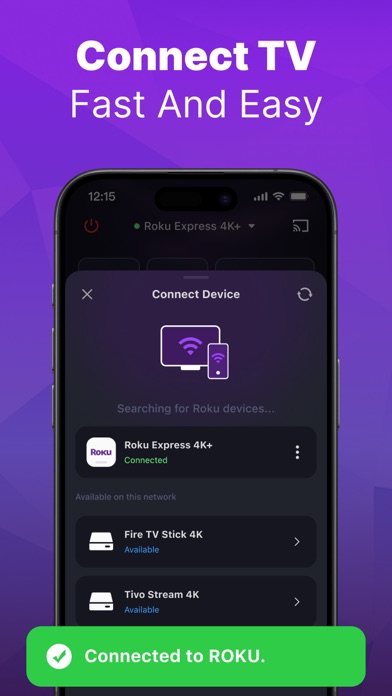

Description by SEAMOBI TECH PTE LTD Written by the developer, not by AppBrain. Click to read.
Lost your TV remote control? Say goodbye to the hassle of searching for your remote.
Simply connect it to the same Wi-Fi network as your Roku TV, you can effortlessly turn the TV on/off, switch channels, adjust the volume and manage content playback - just like a typical physical remote control. It even has a touchpad and voice input for added convenience. Enhance your TV experience with the TV remote app today!
Here are the guidelines for using the TV remote app:
1. Download and install the universal roki TV Remote app.
2. Select a Roku TV that is connected to the same WiFi network.
3. Tap to connect.
4. Voila! The TV Remote control is now all set up.
Enjoy seamless control of your Roku TV with these simple steps!
With the TV Remote app, you'll enjoy a range of convenient features:
- Automatic detection of Roku TVs on the same WiFi network makes setup a breeze.
- Rapid Roku TV control gives you instant access to volume adjustment, reverse, and fast forward functions.
- Experience smooth and efficient TV control with the touchpad feature.
- Swift text input and search functionality help you find your favorite shows and movies quickly.
- Power on/off your Roku TV directly from your device for added convenience.
- Take advantage of voice search functionality for hands-free control.
Enjoy the functionalities and features of the app at your own discretion.
For troubleshooting:
- The app can only connect to the same WiFi network as your Roku device.
- For connection failure with Roku TV, app reinstallation and TV reboot are suggested to resolve most issues.
Please note that the TV Remote is not an official application and is not affiliated with Roku. However, it provides a convenient and user-friendly way to romote control your Roku TV.
Privacy Policy: https://sites.google.com/view/tv-remote-ios-privacy-policy
Terms of Use: https://sites.google.com/view/tv-remote-ios-terms-of-use