

TV Remote – Universal Control
TV Remote – Universal Control is made and published by Serhii Blinov. AppBrain is an independent app data site and isn't affiliated with Serhii Blinov. The app name, icon, screenshots and description belong to Serhii Blinov and are shown as published on the App Store.
AppBrain's verdict
- Rating on App Store
- 5.00
- 1 ratings
- Last updated
- October 12, 2026
It doesn't have enough ratings yet to judge what users think.
Rankings
App Store top chartsApp Store Rankings for TV Remote – Universal Control
Competitors
Similar apps and more from Serhii BlinovAlternatives to TV Remote – Universal Control





More from Serhii Blinov


Releases
Updates seen on the App Store- Version
- 2.0.1
- Launched
- February 2023
No changelog data
User feedback
Ratings and reviews on the App StoreComments on TV Remote – Universal Control for iOS
We don't have enough comments to show example comments. Please check back later.
Technology
Found in the app by AppBrain- Price
- Free
- App size
- 4.57 MB
- Content rating
- Everyone
Technologies used by TV Remote – Universal Control
About the app and developer
About TV Remote – Universal Control
TV Remote – Universal Control is an utilities app developed by Serhii Blinov.
What is the rating of TV Remote – Universal Control?
TV Remote – Universal Control is rated 5.00 out of 5 stars, based on one rating ratings.
Is TV Remote – Universal Control free?
TV Remote – Universal Control is free. The app size is 4.57 MB. The latest version available is 2.0.1. The last update was on October 12, 2026.
What are the requirements for TV Remote – Universal Control?
The app has a content rating of Everyone. The app has been available on the App Store since February 2023.
Developer information for Serhii Blinov
Address:
Frequently asked questions about TV Remote – Universal Control
Is TV Remote – Universal Control free?
Yes. TV Remote – Universal Control is free on the App Store.
Is TV Remote – Universal Control still available?
Yes. TV Remote – Universal Control is on the App Store, and the last update we saw was on October 12, 2026.
How large is TV Remote – Universal Control?
TV Remote – Universal Control is 4.57 MB.
Is TV Remote – Universal Control suitable for children?
App Store rates the content of TV Remote – Universal Control as suitable for everyone.
How do people rate TV Remote – Universal Control?
TV Remote – Universal Control has one rating of 5.00 stars on the App Store.
Who made TV Remote – Universal Control?
TV Remote – Universal Control was developed by Serhii Blinov. It is listed in the utilities category on the App Store.
What are the best alternatives to TV Remote – Universal Control?
People looking at TV Remote – Universal Control also look at these utilities apps: Phil - Smart TV Remote Control, Remote for Samsung: TapToolbox, Roberts Hot Tub Controller, Universal Remote For Smart TVs, Remote for Philips Hue Devices.
Store listing
By Serhii Blinov, from the App Store


Description by Serhii Blinov Written by the developer, not by AppBrain. Click to read.
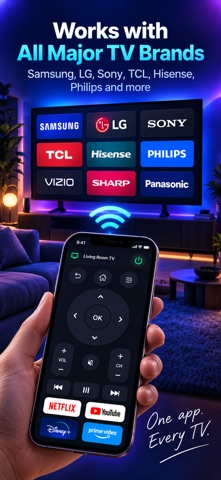
Point it at a Samsung, an LG, a Sony BRAVIA, a Roku, a Philips or anything running Android TV or Google TV. The app works out which remote protocol your set speaks and opens the keypad for it: arrows, OK, back, home, volume, channels, playback and power.
FINDING YOUR TV IS FREE
Searching your Wi-Fi costs nothing, so you can see whether this app finds your television before you decide anything at all. Most sets turn up by themselves. If yours stays out of sight, type its IP address — it is in the television's own network settings — and the app reaches it anyway.
WHAT THE REMOTE DOES
• The full keypad for your brand, drawn from what your set actually answers — no keys that do nothing
• Type into the TV's search box with your phone's keyboard, instead of pecking out letters with the arrows (Samsung, LG, Roku, Android TV and Google TV)
• Open an app from the list the television itself reports
• Wake a set from standby over Wi-Fi, which its own remote is usually the only thing that can do
• A number pad for channels, and the red, green, yellow and blue keys for teletext and set menus
• A trackpad for televisions with a pointer
• Every television you own, remembered and one tap apart
WHICH TELEVISIONS
Samsung — 2016 and newer (Tizen), and the encrypted 2014–15 and pre-2014 protocols.
LG — 2014 and newer (webOS), including the on-screen keyboard and the pointer.
Sony BRAVIA — the four-digit code the set shows you, or a Pre-Shared Key.
Roku — every model, and no pairing at all.
Philips — over JointSpace, which is what reaches the sets that speak nothing else.
Android TV and Google TV — any make: Philips, TCL, Hisense, Xiaomi, the NVIDIA SHIELD, and Google's own Chromecast with Google TV and Google TV Streamer.
An Apple TV and an Amazon Fire TV cannot be driven by another app on the network at all. This app says so rather than pretending otherwise — and the compatibility screen inside it tells you what has been tested on real televisions and what has not.
PAIRING, ONCE
Some televisions show a PIN, some ask you to allow the phone on their own screen, and a Roku asks for nothing. Whichever yours does, it happens the first time only: the app keeps the key and reconnects by itself afterwards.
The phone and the television have to be on the same Wi-Fi. This app is not affiliated with, endorsed by or connected to Samsung, LG, Sony, Roku, Philips, Google or Amazon; those names appear only to say which televisions the app can drive.
THE SUBSCRIPTION
Finding televisions is free, and so is the compatibility list. The remote itself is the full version, opened by a monthly or yearly auto-renewing subscription — or by a one-off lifetime purchase for anyone who would rather not subscribe. The free trial opens every part of it.
Payment is charged to your Apple Account at confirmation of purchase. The subscription renews automatically unless auto-renew is turned off at least 24 hours before the end of the current period; your account is charged for renewal within 24 hours before that. You can manage the subscription and turn auto-renewal off in your Account Settings after purchase. Any unused portion of a free trial is forfeited when a subscription is bought.
Privacy Policy: https://sblinov.com/applications-privacy-policy/
Terms of Use (EULA): https://sblinov.com/applications-terms-of-usage/
Support: https://sblinov.com/contact-us/