

TweetSnap - Twitter Screenshot
TweetSnap - Twitter Screenshot is made and published by 丽华 楚. AppBrain is an independent app data site and isn't affiliated with 丽华 楚. The app name, icon, screenshots and description belong to 丽华 楚 and are shown as published on the App Store.
AppBrain's verdict
- Last updated
- March 18, 2026
Rankings
App Store top chartsApp Store Rankings for TweetSnap - Twitter Screenshot
Competitors
Similar apps and more from 丽华 楚More from 丽华 楚

Releases
Updates seen on the App Store- Version
- 1.2.0
- Launched
- January 2026
No changelog data
User feedback
Ratings and reviews on the App StoreComments on TweetSnap - Twitter Screenshot for iOS
We don't have enough comments to show example comments. Please check back later.
Technology
Found in the app by AppBrain- Price
- Free
- App size
- 41.3 MB
- Content rating
- Everyone
Technologies used by TweetSnap - Twitter Screenshot
About the app and developer
About TweetSnap - Twitter Screenshot
TweetSnap - Twitter Screenshot is an utilities app developed by 丽华 楚.
User Ratings
The app has no ratings yet.
App Information
TweetSnap - Twitter Screenshot is freely available from the App Store. The app size is 41.31 MB. The latest version available is 1.2.0. The last update was on March 18, 2026.
Technical Requirements
The app has a content rating of Everyone. The app has been available on the App Store since January 2026.
Developer information for 丽华 楚
Address:
Frequently asked questions about TweetSnap - Twitter Screenshot
Is TweetSnap - Twitter Screenshot free?
Yes. TweetSnap - Twitter Screenshot is free on the App Store.
Is TweetSnap - Twitter Screenshot still available?
Yes. TweetSnap - Twitter Screenshot is on the App Store, and the last update we saw was on March 18, 2026.
How large is TweetSnap - Twitter Screenshot?
TweetSnap - Twitter Screenshot is 41.31 MB.
Is TweetSnap - Twitter Screenshot suitable for children?
App Store rates the content of TweetSnap - Twitter Screenshot as suitable for everyone.
Who made TweetSnap - Twitter Screenshot?
TweetSnap - Twitter Screenshot was developed by 丽华 楚. It is listed in the utilities category on the App Store.
Store listing
By 丽华 楚, from the App Store


Description by 丽华 楚 Written by the developer, not by AppBrain. Click to read.
Why Choose TweetSnap?
TweetSnap is designed for social media creators and marketers, offering professional-grade Twitter screenshot features:
• High-Quality Screenshots: Generate clear, high-resolution Twitter screenshots that preserve original formatting and media content
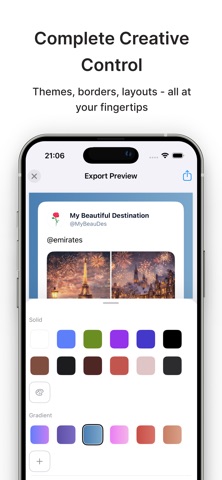
• Custom Branding: Customize themes, logos, layouts, and borders to create your unique brand style
• Remove Watermarks: Generate clean Twitter screenshots that enhance your sharing impact
• Multi-Platform Support: Perfectly optimized for Instagram, Facebook, and other major platforms
• History Management: Locally save all tweets with a clear grid view for quick access
• Batch Processing: Import multiple tweets continuously for unified management and export
Core Features
Quick Tweet Import
Simply paste a tweet link and import with one tap. Supports all public tweets, including text, images, and videos. Smart link recognition with automatic tweet content parsing.
History Management
All imported tweets are automatically saved locally. 2-column grid view for clear display and quick access. Pull-to-refresh support and clear history option.
Custom Branding Options
Multiple themes (light and dark), logo settings with custom positioning, layout options optimized for Instagram and Facebook, border styles (solid color and gradient), image styles (list or grid), pagination mode for long tweets and threads, and remove watermarks. Settings are automatically saved for convenient future use.
Easy Export & Share
Generate high-definition Twitter screenshots with one tap. Save to photo library or share directly. Compatible with Instagram, Facebook, and other major platforms. Quick share to other apps without saving to photo library.
Use Cases
Instagram Content Creation
Convert tweets into Instagram Stories, Reels, and Feed posts. Customize brand styles and remove watermarks to enhance content quality. Batch process tweets to create Instagram collections.
Social Media Sharing
Share amazing tweets on Facebook and other social media platforms. Optimize aspect ratios for better sharing results. Add personal brand logos to create a professional image.
Marketing and Content Creation
Save important tweets to build a content library. Batch process tweets to improve work efficiency. Customize tweet styles to unify brand visual identity.
How to Use
1. Import Tweet: Tap the center plus button and paste the tweet link
2. View History: Browse all imported tweets on the history page
3. Customize Style: Tap a tweet to enter the edit page and adjust theme, logo, layout, borders, etc.
4. Export & Share: Generate screenshot with one tap, save or share to other apps
If you have any questions or suggestions, please contact us through App Store reviews. We will continue to optimize the product to provide you with a better experience.
Download TweetSnap now and generate high-quality Twitter screenshots to enhance your social media content quality!