
Twin: Scans for Passthrough
Twin: Scans for Passthrough is made and published by 1984 LLC. AppBrain is an independent app data site and isn't affiliated with 1984 LLC. The app name, icon, screenshots and description belong to 1984 LLC and are shown as published on the App Store.
AppBrain's verdict
- Rating on App Store
- 4.00
- 4 ratings
- Last updated
- February 11, 2025
It doesn't have enough ratings yet to judge what users think.
Rankings
App Store top chartsApp Store Rankings for Twin: Scans for Passthrough
Competitors
Similar apps and more from 1984 LLCAlternatives to Twin: Scans for Passthrough




More from 1984 LLC


Releases
Updates seen on the App Store- Version
- 1.02.2
- Launched
- April 2024
No changelog data
User feedback
Ratings and reviews on the App StoreComments on Twin: Scans for Passthrough for iOS
We don't have enough comments to show example comments. Please check back later.
Technology
Found in the app by AppBrain- Price
- Free
- App size
- 16.0 MB
- Content rating
- Everyone
Technologies used by Twin: Scans for Passthrough
About the app and developer
About Twin: Scans for Passthrough
Twin: Scans for Passthrough is a productivity app developed by 1984 LLC.
What is the rating of Twin: Scans for Passthrough?
Twin: Scans for Passthrough is rated 4.00 out of 5 stars, based on 4 ratings.
Is Twin: Scans for Passthrough free?
Twin: Scans for Passthrough is free. The app size is 16.02 MB. The latest version available is 1.02.2. The last update was on February 11, 2025.
What are the requirements for Twin: Scans for Passthrough?
The app has a content rating of Everyone. The app has been available on the App Store since April 2024.
Developer information for 1984 LLC
Address:
Frequently asked questions about Twin: Scans for Passthrough
Is Twin: Scans for Passthrough free?
Yes. Twin: Scans for Passthrough is free on the App Store.
Is Twin: Scans for Passthrough still available?
Yes. Twin: Scans for Passthrough is on the App Store, and the last update we saw was on February 11, 2025.
How large is Twin: Scans for Passthrough?
Twin: Scans for Passthrough is 16.02 MB.
Is Twin: Scans for Passthrough suitable for children?
App Store rates the content of Twin: Scans for Passthrough as suitable for everyone.
How do people rate Twin: Scans for Passthrough?
Twin: Scans for Passthrough scores 4.00 out of 5 stars, from 4 ratings on the App Store.
Who made Twin: Scans for Passthrough?
Twin: Scans for Passthrough was developed by 1984 LLC. It is listed in the productivity category on the App Store.
What are the best alternatives to Twin: Scans for Passthrough?
People looking at Twin: Scans for Passthrough also look at these productivity apps: Vizonare, Perspectives: To-Do List, Spatial Teleprompter, SynergyXR, Groups, the social alternative.
Store listing
By 1984 LLC, from the App Store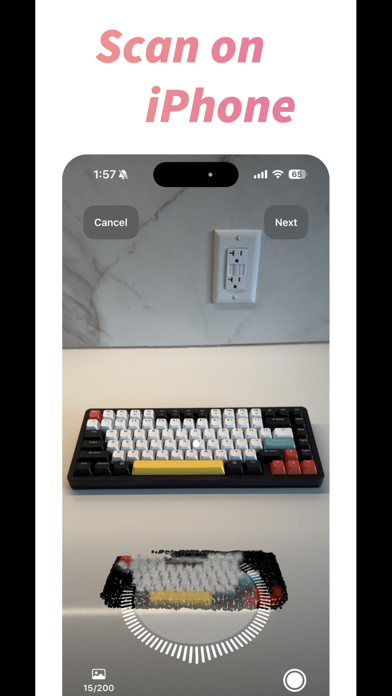


Description by 1984 LLC Written by the developer, not by AppBrain. Click to read.
To make a 3D model for use in visionOS, all you need to do is:
1. Use Twin on your Apple iPhone or Apple iPad to scan your item
2. Use Twin on your Apple Vision Pro to place your digital twin
That's it!
- Your Twin models will be visible even when fully immersed in a visionOS environment, scan in your keyboard and actually see what you're typing on
- Your Twin models are created using photogrammetry so they keep their real-world size, bring your favorite things with you into visionOS
- Your Twin models can create fun twists on your world, mix and match the real world and the virtual world to your heart's content
Please note:
• Scanning on iOS and iPadOS requires a device with LiDAR and an A14 Bionic chip or later – this generally means an Apple iPhone Pro released in 2020 or later, or an Apple iPad Pro released in 2021 or later
• Models are not tracked, they are not linked to a real world object, and they are stationary – place the stationary Twin model over your stationary real-world objects or wherever you desire
• You must be signed into the same Apple ID across your devices – sign into the same account on your Apple iPhone/Apple iPad that creates the scans as well as on your Apple Vision Pro to place the models
Twin's Features:
1. Use the photogrammetry capabilities of Twin on iOS/iPadOS to create 3D models (photogrammetry models require a minimum of ten pictures and can use up to a maximum of 200 pictures, pictures must be taken from different angles)
2. Filter your models to bring them to life in entirely new ways – create new colorways or use a filter on your stuff that would be impossible in the real world
3. In the Twin app models are automatically synced between devices signed into the same Apple ID
4. Search, sort, favorite, and rename your 3D models to organize them the way you want
5. Browse your 3D models on your Apple iPhone/Apple iPad or truly see them come to life as you browse and place them in 3D on your Apple Vision Pro
WARNING:
Photogrammetry works well with some objects and doesn't work at all with other objects, failure to follow these guidelines may result in a failure to create 3D models from your objects.
OBJECTS THAT WORK: Solid, non-reflective, evenly lit objects that are less than 4 feet in all dimensions (width, height, depth)
OBJECTS THAT DO NOT WORK: Transparent, shiny, monochromatic, unvaried texture, casting shadows objects that are greater than 4 feet in any dimension (width, height, depth)
Bring your physical world into your visionOS spatial computing digital world with Twin!
Twin Pro Subscription
There are some features only available to Twin Pro subscribers:
- Ability to place more than one model simultaneously in Twin on Vision Pro
- Ability to filter your models in Twin on Vision Pro
- No commitment, cancel anytime
Subscription Pricing and Terms
Payment will be charged to the credit card connected to your Apple ID at confirmation of purchase. Subscriptions automatically renew unless auto-renew is turned off at least 24 hours before the end of the current subscription period. Your account will be charged for renewal within 24 hours prior to the end of the current period, and the cost of the renewal will be identified. You may manage your subscription and auto-renewal may be turned off by going to your Apple ID Subscriptions after purchase. Any unused portion of a free trial period will be forfeited if you purchase a subscription.
Privacy Policy: https://1984.dev/Twin-Privacy.html
Terms of Use: https://1984.dev/Twin-Terms