

TwinkleBox: Photo Organizer
TwinkleBox: Photo Organizer is made and published by 瑞 吴. AppBrain is an independent app data site and isn't affiliated with 瑞 吴. The app name, icon, screenshots and description belong to 瑞 吴 and are shown as published on the App Store.
AppBrain's verdict
- Last updated
- August 12, 2026
Rankings
App Store top chartsApp Store Rankings for TwinkleBox: Photo Organizer
Competitors
Similar apps and more from 瑞 吴Alternatives to TwinkleBox: Photo Organizer




More from 瑞 吴


Releases
Updates seen on the App Store- Version
- 1.0
- Launched
- August 2026
No changelog data
User feedback
Ratings and reviews on the App StoreComments on TwinkleBox: Photo Organizer for iOS
We don't have enough comments to show example comments. Please check back later.
Technology
Found in the app by AppBrain- Price
- Free
- App size
- 10.6 MB
- Content rating
- Everyone
Technologies used by TwinkleBox: Photo Organizer
About the app and developer
About TwinkleBox: Photo Organizer
TwinkleBox: Photo Organizer is an utilities app developed by 瑞 吴.
User Ratings
The app has no ratings yet.
App Information
TwinkleBox: Photo Organizer is freely available from the App Store. The app size is 10.62 MB. The latest version available is 1.0. The last update was on August 12, 2026.
Technical Requirements
The app has a content rating of Everyone. The app has been available on the App Store since August 2026.
Developer information for 瑞 吴
Address:
Frequently asked questions about TwinkleBox: Photo Organizer
Is TwinkleBox: Photo Organizer free?
Yes. TwinkleBox: Photo Organizer is free on the App Store.
Is TwinkleBox: Photo Organizer still available?
Yes. TwinkleBox: Photo Organizer is on the App Store, and the last update we saw was on August 12, 2026.
How large is TwinkleBox: Photo Organizer?
TwinkleBox: Photo Organizer is 10.62 MB.
Is TwinkleBox: Photo Organizer suitable for children?
App Store rates the content of TwinkleBox: Photo Organizer as suitable for everyone.
Who made TwinkleBox: Photo Organizer?
TwinkleBox: Photo Organizer was developed by 瑞 吴. It is listed in the utilities category on the App Store.
What are the best alternatives to TwinkleBox: Photo Organizer?
People looking at TwinkleBox: Photo Organizer also look at these utilities apps: Track.TW 包裹查詢-物流查詢與貨態追蹤, FlexTour 4, 肃客会员营销服装收银系统, Photos: Fast Photo Organizer, QR Code Scan &Barcode Generate.
Store listing
By 瑞 吴, from the App Store



Description by 瑞 吴 Written by the developer, not by AppBrain. Click to read.
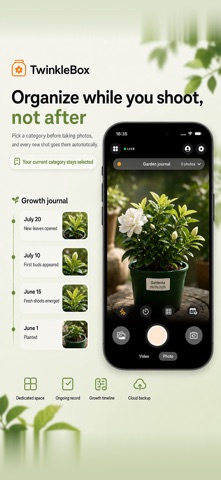
Nobody goes back and sorts four thousand photos. TwinkleBox sorts at the shutter, the only moment it ever actually happens.
PICK A CATEGORY ONCE, THEN JUST SHOOT
Tap a color-coded category and it stays picked. Forty shots of a unit turnover, a roof, a listing, a science fair project — each one lands where it belongs and you never stop to file anything. Quit the app, come back tomorrow, and the camera is still on the same category. That is the whole product in one sentence, and it is why the sorting gets done at all.
SCREENSHOTS STOP DISAPPEARING
A screenshot is the first thing to get lost: the door code, the parking level, the tracking number. Take one while TwinkleBox is open and it asks where it goes right away. Take one out in the world and TwinkleBox looks back over your recent screenshots next time you open it, offering them one at a time. A tap files it, and it can clear the original out of Photos, so your library gets smaller instead of bigger.
SEARCH THE WORDS INSIDE THE PICTURE
Text recognition runs on your iPhone and makes the writing inside a picture searchable: an invoice number, a street address, the serial plate on a furnace, a name on a form. Look for what you remember instead of guessing which week you shot it. Nothing is sent anywhere to be read.
IT MAKES A REASONABLE GUESS
When a picture contains words like invoice, receipt, total, passport, license, contract, agreement, tracking or boarding, TwinkleBox offers the matching category before you choose one. Plain pattern matching on the text it found, nothing mysterious.
LOCK WHAT SHOULD BE LOCKED
Any category can sit behind Face ID, Touch ID or your passcode — IDs, medical paperwork, anything you would rather not scroll past while someone else is holding your phone. Locked categories hide their covers on the home screen, stay out of search results, and re-lock the moment you leave the app. With no passcode set on the iPhone, the app tells you outright that the lock is decorative.
HAND OVER A WHOLE CATEGORY
Export three ways: the original files, a PDF with one picture per page and a footer carrying category name and capture time, or a single zip. Files come out named Category_20260728_001 rather than a 36-character string, so the adjuster, the client or your bookkeeper can read the list. Video is skipped in the PDF.
STAMP THE DATE ON THE FRAME
Optional watermarks burn date, time and category into the picture, and into video too, with a live preview in the viewfinder before you press the shutter. Video records with sound, into the same category.
HANDS FULL? DON'T OPEN THE APP
File screenshots, shoot into a category, or jump to one using Shortcuts, Siri, Back Tap or the Action Button. Background refresh lets TwinkleBox catch up on screenshots it missed and send a notification whose buttons file them without opening anything. Being straight: iOS does not wake an app the instant you take a screenshot, so this catches up rather than reacting live, and it needs notification permission.
TwinkleBox Annual Membership unlocks every feature, plus ongoing updates and support. It renews automatically through your Apple Account unless canceled at least 24 hours before the current period ends; renewal is charged within the final 24 hours. Manage or cancel it in Settings > Apple Account > Subscriptions.
Terms of Use: https://burly-origami-e7c.notion.site/TwinkleBox-Terms-of-Use-3abcc92c14208114b8fdd148c90c8efd?pvs=73
Privacy Policy: https://burly-origami-e7c.notion.site/TwinkleBox-Privacy-Policy-3abcc92c142081d18a71d6319f8e3134?pvs=73