

Two Steps: Plan Your Walk
Two Steps: Plan Your Walk is made and published by Oluwafemi Obajuluwa. AppBrain is an independent app data site and isn't affiliated with Oluwafemi Obajuluwa. The app name, icon, screenshots and description belong to Oluwafemi Obajuluwa and are shown as published on the App Store.
AppBrain's verdict
- Last updated
- August 10, 2026
Rankings
App Store top chartsApp Store Rankings for Two Steps: Plan Your Walk
Competitors
Similar apps and more from Oluwafemi ObajuluwaAlternatives to Two Steps: Plan Your Walk





More from Oluwafemi Obajuluwa


Also available on Google Play

Releases
Updates seen on the App Store- Version
- 2.0
- Launched
- June 2025
No changelog data
User feedback
Ratings and reviews on the App StoreComments on Two Steps: Plan Your Walk for iOS
We don't have enough comments to show example comments. Please check back later.
Technology
Found in the app by AppBrain- Price
- Free
- App size
- 59.7 MB
- Content rating
- Medium
Technologies used by Two Steps: Plan Your Walk
About the app and developer
About Two Steps: Plan Your Walk
Two Steps: Plan Your Walk is a health & fitness app developed by Oluwafemi Obajuluwa.
User Ratings
The app has no ratings yet.
App Information
Two Steps: Plan Your Walk is freely available from the App Store. The app size is 59.70 MB. The latest version available is 2.0. The last update was on August 10, 2026.
Technical Requirements
The app has a content rating of Medium Maturity. The app has been available on the App Store since June 2025.
Developer information for Oluwafemi Obajuluwa
Address:
Store listing
By Oluwafemi Obajuluwa, from the App Store



Description by Oluwafemi Obajuluwa Written by the developer, not by AppBrain. Click to read.
Tell it how many steps you want to take. It works out a loop that long from where you are and brings you back to your door. You never pick a destination, and you never plan a route.
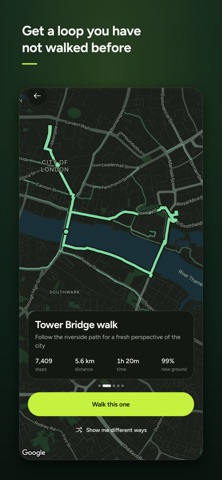
Every walk avoids ground you have already covered. Two Steps remembers where you have been and sends the next route down streets you have not walked yet, so an area you thought you knew keeps turning up corners you have missed.
You get a few routes to choose from, each with a name, a distance and a rough time. Pick the one you like and set off.
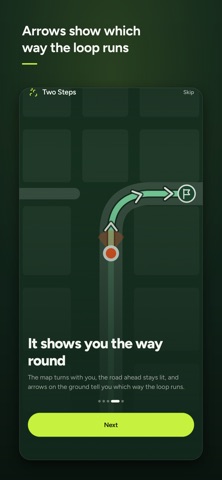
While you walk, the map turns with you. The road ahead stays lit, arrows on the ground show which way the loop runs, and a flag marks the spot where it closes. Put your phone in your pocket and the trail keeps drawing.
When you finish, the walk is saved with the line you actually took, your steps, your distance, and how much of it was new ground. You can walk any of them again whenever you like.
WHAT YOU GET
• Loops from 1,000 to 20,000 steps
• Routes that steer around the streets you have already walked
• A guided map that turns as you turn
• Your trail drawn live, and kept afterwards
• A week of steps and your current streak
• Walks saved to Apple Health
• A Home Screen widget showing your last walk
• A Live Activity on the Lock Screen while you are out
• An optional daily nudge to get you moving
• Light and dark, miles or kilometres
YOUR WALKS STAY ON YOUR PHONE
Your trails and the ground you have covered are kept on your device. There is no account to create and nothing to sign in to.