

TypeLearn is made and published by ZeroEra Tech. AppBrain is an independent app data site and isn't affiliated with ZeroEra Tech. The app name, icon, screenshots and description belong to ZeroEra Tech and are shown as published on the App Store.
AppBrain's verdict
New- Rating on App Store
- 4.75
- 4 ratings
- Last updated
- October 23, 2026
- Size
- 378.8 MB
TypeLearn came out 32 days ago. It doesn't have enough ratings yet to judge what users think.
User feedback
Ratings and reviews on the App StoreComments on TypeLearn for iOS
We don't have enough comments to show example comments. Please check back later.
Store listing
By ZeroEra Tech, from the App Store



Description by ZeroEra Tech Written by the developer, not by AppBrain. Click to read.
Learn in everyday writing
Chats, notes and email contain expressions worth remembering. Select the text that matters, view an available translation, and choose whether to insert it, hear it or save it. Your input language and learning target are separate settings; changing your target does not replace your draft.
Chinese and English typing tools
• Bilingual candidates show local dictionary meanings for supported directions, with horizontal scrolling for longer definitions.
• Chinese and English next-word predictions suggest what to type next. Manage available models in input settings.
• English spelling correction offers suggestions while leaving the choice to you.
• Offline Chinese and English speech transcription runs in the main app after you download the corresponding speech model. Save a transcript to the keyboard and confirm before inserting it. This is not direct voice dictation inside the third-party keyboard.
Build your own vocabulary collection
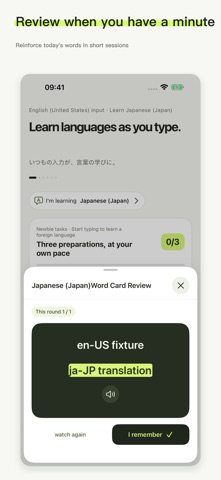
A successful translation creates a preview card with the source text and target expression. Only cards you explicitly save enter My Cards. Search your collection, listen to available pronunciation and use lightweight reviews to revisit expressions from conversations, study and work. Cards and progress stay separate by language direction.
Choose English, Japanese, Korean, Spanish, Russian, German, Italian, French or Chinese as a learning target. A selectable target does not mean every translation pair is supported. Apple translation availability depends on your OS, device, region and prepared language models.
Compatibility and access
• Supports iPhone and iPad with iOS or iPadOS 17 or later. Apple system translation requires iOS or iPadOS 18 or later and a supported language pair.
• Local translation and target-language speech do not require Full Access. Sharing saved cards from the keyboard extension with the main app may require Full Access under iOS keyboard rules.
• Secure fields and apps that block third-party keyboards use the system keyboard.
• New cards come from your actual text and successful translations. Previewing a card does not save it.
Type as usual. Keep an expression when it is something you want to learn.
Safety and technology
Found in the app by AppBrain- Price
- Free
- App size
- 378.8 MB
- Content rating
- Everyone
Technologies used by TypeLearn
Releases
Updates seen on the App Store- Version
- 1.1.1
- Launched
- October 2026
No changelog data
Alternatives
Similar apps and more from ZeroEra TechMore from ZeroEra Tech

Rankings
App Store top chartsApp Store Rankings for TypeLearn
About the app and developer
About TypeLearn
TypeLearn is an education app developed by ZeroEra Tech.
User Ratings
TypeLearn is rated 4.75 out of 5 stars. The rating is based on 4 ratings.
App Information
TypeLearn is freely available from the App Store. The app size is 378.76 MB. The latest version available is 1.1.1. The last update was on October 23, 2026.
Technical Requirements
The app has a content rating of Everyone. The app has been available on the App Store since October 2026.
Developer information for ZeroEra Tech
Address: