

TypoCollector: Letter Cutouts
TypoCollector: Letter Cutouts is made and published by SANGSANGLYEOG. AppBrain is an independent app data site and isn't affiliated with SANGSANGLYEOG. The app name, icon, screenshots and description belong to SANGSANGLYEOG and are shown as published on the App Store.
AppBrain's verdict
- Last updated
- August 5, 2026
Rankings
App Store top chartsApp Store Rankings for TypoCollector: Letter Cutouts
Competitors
Similar apps and more from SANGSANGLYEOGMore from SANGSANGLYEOG


Releases
Updates seen on the App Store- Version
- 1.0
- Launched
- August 2026
No changelog data
User feedback
Ratings and reviews on the App StoreComments on TypoCollector: Letter Cutouts for iOS
We don't have enough comments to show example comments. Please check back later.
Technology
Found in the app by AppBrain- Price
- $1.99
- App size
- 1.67 MB
- Content rating
- Everyone
Technologies used by TypoCollector: Letter Cutouts
About the app and developer
About TypoCollector: Letter Cutouts
TypoCollector: Letter Cutouts is a photo & video app developed by SANGSANGLYEOG.
User Ratings
The app has no ratings yet.
App Information
TypoCollector: Letter Cutouts costs $1.99. The app size is 1.67 MB. The latest version available is 1.0. The last update was on August 5, 2026.
Technical Requirements
The app has a content rating of Everyone. The app has been available on the App Store since August 2026.
Developer information for SANGSANGLYEOG
Address:
Store listing
By SANGSANGLYEOG, from the App Store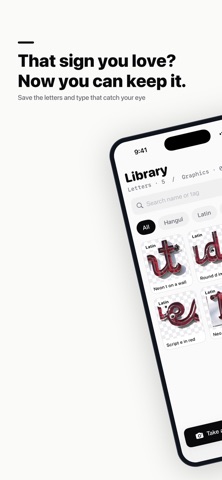


Description by SANGSANGLYEOG Written by the developer, not by AppBrain. Click to read.
TypoCollector is an iPhone app for collecting hand-painted signs, menu lettering, worn shop type, logos, and characters as reusable image cutouts. You do not need to trace every edge: draw a loose loop around what you want, then refine the result only where needed.
How it works
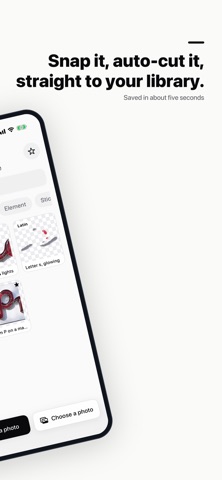
1. Take a photo or choose one from your photo library.
2. Loosely circle the letter, sign, logo, or element you want to keep.
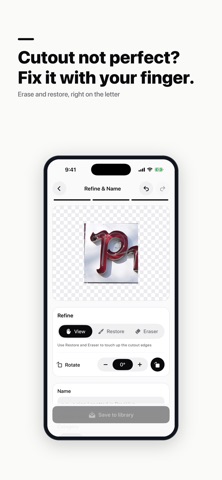
3. Fine-tune the generated mask with Restore and Erase brushes.
4. Add a name and tags, save it to your library, and export a transparent PNG.
Key features
• Loose-lasso cutouts guided by the area you select
• Add or remove separate letter pieces
• Restore and Erase brushes with stroke-by-stroke undo and redo
• Trim transparent space, soften edges, and rotate
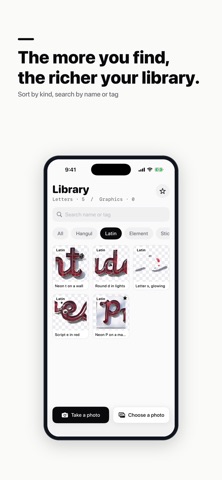
• Organize by script or kind
• Search by name and tag, filter, and mark favorites
• Reopen and edit saved cutouts at any time
• Export full-resolution transparent PNG files
Private by design
Your photos, cutouts, and metadata stay on your iPhone. TypoCollector has no account, sign-in, ad tracking, or server upload.
Permissions
Camera access is used only to take a new photo. Photo Library access is used only to import an existing image. TypoCollector requires an iPhone running iOS 17 or later.