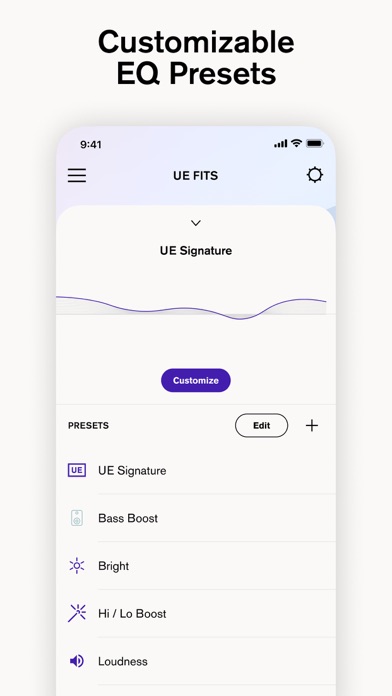
UE FITS is made and published by Logitech Inc. AppBrain is an independent app data site and isn't affiliated with Logitech Inc. The app name, icon, screenshots and description belong to Logitech Inc. and are shown as published on the App Store.
AppBrain's verdict
EstablishedPoorly rated- Rating on App Store
- 2.20
- 116 ratings
- Last updated
- August 15, 2022
Users are critical: 2.2 stars from 116 ratings.
Rankings
App Store top chartsApp Store Rankings for UE FITS
Competitors
Similar apps and more from Logitech Inc.Releases
Updates seen on the App Store- Version
- 1.67
- Launched
- October 2020
No changelog data
User feedback
Ratings and reviews on the App StoreComments on UE FITS for iOS
We don't have enough comments to show example comments. Please check back later.
Technology
Found in the app by AppBrain- Price
- Free
- App size
- 166.7 MB
- Content rating
- Everyone
Technologies used by UE FITS
About the app and developer
About UE FITS
UE FITS is a music app developed by Logitech Inc.
What is the rating of UE FITS?
UE FITS is rated 2.20 out of 5 stars, based on 120 ratings.
Is UE FITS free?
UE FITS is free. The app size is 166.70 MB. The latest version available is 1.67. The last update was on August 15, 2022.
What are the requirements for UE FITS?
The app has a content rating of Everyone. The app has been available on the App Store since October 2020.
Developer information for Logitech Inc.
Address:
Store listing
By Logitech Inc., from the App StoreDescription by Logitech Inc. Written by the developer, not by AppBrain. Click to read.
Custom eartips provide unparalleled long-term listening comfort, a transparent fit that won't fall out, and non-intrusive seal for incredible audio performance, but the UE FITS app offers more than a remarkable FIT that's unique to you.
The UE FITS app enables several features in addition to setup:
1. Monitor battery life for case and earbuds on the app home screen (Up to 20 hours of total listening time)
2. Adjust EQ. Create your own custom presets or select from a range of provided EQ presets
2. Customize your UE FITS product name (Bluetooth ID)
3. Customize double tap controls to your liking independently on each earbud. Play/pause, access voice assistant, skip tracks, and adjust volume.
4. Access additional product usage information within the app menu.
5. Take a fit test and access support to assure you have achieved the optimal FIT.