

Ultimate Planner App
Ultimate Planner App is made and published by Evopaper. AppBrain is an independent app data site and isn't affiliated with Evopaper. The app name, icon, screenshots and description belong to Evopaper and are shown as published on the App Store.
AppBrain's verdict
- Rating on App Store
- 4.00
- 6 ratings
- Last updated
- October 6, 2026
- Size
- 58.4 MB
It doesn't have enough ratings yet to judge what users think.
User feedback
Ratings and reviews on the App StoreComments on Ultimate Planner App for iOS
We don't have enough comments to show example comments. Please check back later.
Store listing
By Evopaper, from the App Store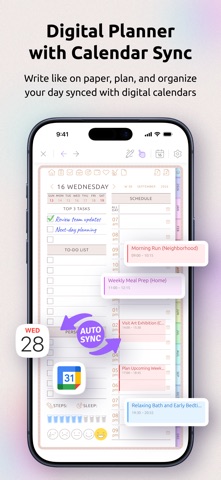



Description by Evopaper Written by the developer, not by AppBrain. Click to read.
Use Ultimate Planner as your daily planner, weekly planner, monthly planner, yearly planner, task planner, habit tracker, goal planner, note-taking app, and visual calendar planner in one simple planning system. It is designed for people who want the feel of a real planner with the flexibility of a modern productivity app.
More than a to-do list, Ultimate Planner gives you real planner pages for daily schedules, weekly routines, monthly plans, yearly goals, notes, trackers, budgets, meal planning, projects, journaling, wellness, study, work, and home organization. It helps you build a planner that fits the way you actually plan.
Ultimate Planner is not a static PDF planner. You can customize layouts, add pages, create multiple planners, change covers and themes, sync calendar events, type text, use checkboxes, add images, paste content, write by hand, and continue planning across future years without rebuilding your planner from scratch.
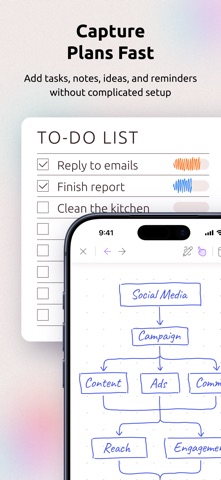
Capture plans without friction. Add tasks, notes, ideas, reminders, routines, and calendar events, then organize everything into daily, weekly, monthly, yearly, or custom planner pages when you are ready. Ultimate Planner is flexible enough for detailed planning, but simple enough to keep using every day.
Key Features:
• Digital planner app for iPad and iPhone
• Handwriting with Apple Pencil or finger
• Apple Calendar sync and Google Calendar sync
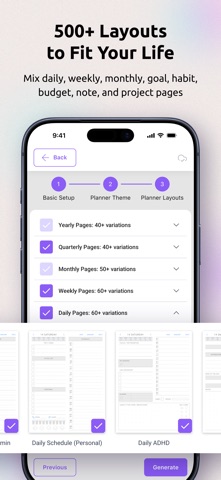
• Daily planner, weekly planner, monthly planner, quarterly planner, and yearly planner pages
• 500+ flexible planner layouts, templates, and page designs
• Checklists, reminders, recurring plans, and routines
• Habit tracker, goal planner, routine tracker, progress tracker, and wellness planner pages
• Notes, journals, sketches, stickers, images, handwriting, typed text, and pasted content
• Budget planner, meal planner, project planner, student planner, teacher planner, ADHD-friendly planner pages, and more
• Light and dark mode, planner themes, covers, colors, fonts, and custom sections
• Multiple planners for work, study, home, wellness, school, projects, and personal life
• Cross-device and cross-platform sync
• Offline planning support when you do not have internet access
Use Ultimate Planner for:
• Daily planning and time blocking
• Weekly routines and recurring tasks
• Monthly planning and long-term goals
• Work planning, project planning, and meeting notes
• Budget planning, expense tracking, and personal finance organization
• Meal planning, grocery planning, wellness planning, habits, and journaling
• ADHD planning, visual planning, flexible routines, and personal productivity
• Notes, checklists, schedules, trackers, and custom planner pages
Ultimate Planner helps you organize your life without forcing you into one rigid productivity system. Start free and build a digital planner that works the way you do.
Subscriptions:
- App subscriptions are paid on either monthly or yearly intervals
- Payment will be charged to iTunes Account at confirmation of purchase
- Subscription automatically renews unless auto-renew is turned off at least 24-hours before the end of the current period
- Account will be charged for renewal within 24-hours prior to the end of the current period, and identify the cost of the renewal
- Subscriptions may be managed by the user and auto-renewal may be turned off by going to the user's iTunes Account Settings after purchase
- Any unused portion of a free trial period will be forfeited when the user purchases a subscription
- Privacy Policy: https://ultimate-planner.app/privacy/
- Terms of Service: https://ultimate-planner.app/terms/
Safety and technology
Found in the app by AppBrain- Price
- Free
- App size
- 58.4 MB
- Content rating
- Everyone
Technologies used by Ultimate Planner App
Releases
Updates seen on the App Store- Version
- 0.3.5
- Launched
- December 2025
No changelog data
Alternatives
Similar apps and more from EvopaperMore from Evopaper

Rankings
App Store top chartsApp Store Rankings for Ultimate Planner App
About the app and developer
About Ultimate Planner App
Ultimate Planner App is a productivity app developed by Evopaper.
User Ratings
Ultimate Planner App is rated 4.00 out of 5 stars. The rating is based on 6 ratings.
App Information
Ultimate Planner App is freely available from the App Store. The app size is 58.42 MB. The latest version available is 0.3.5. The last update was on October 6, 2026.
Technical Requirements
The app has a content rating of Everyone. The app has been available on the App Store since December 2025.
Developer information for Evopaper
Address:
Frequently asked questions about Ultimate Planner App
Is Ultimate Planner App free?
Yes. Ultimate Planner App is free on the App Store.
Is Ultimate Planner App still available?
Yes. Ultimate Planner App is on the App Store, and the last update we saw was on October 6, 2026.
How large is Ultimate Planner App?
Ultimate Planner App is 58.42 MB.
Is Ultimate Planner App suitable for children?
App Store rates the content of Ultimate Planner App as suitable for everyone.
How do people rate Ultimate Planner App?
Ultimate Planner App scores 4.00 out of 5 stars, from 6 ratings on the App Store.
Who made Ultimate Planner App?
Ultimate Planner App was developed by Evopaper. It is listed in the productivity category on the App Store.