

UltraNotes - Note Taking & PDF
UltraNotes - Note Taking & PDF is made and published by Skyjos Co., Ltd. AppBrain is an independent app data site and isn't affiliated with Skyjos Co., Ltd. The app name, icon, screenshots and description belong to Skyjos Co., Ltd. and are shown as published on the App Store.
AppBrain's verdict
Loved by users- Rating on App Store
- 4.56
- 181 ratings
- Last updated
- October 15, 2026
- Size
- 29.7 MB
Users love it: 4.6 stars from 181 ratings.
User feedback
Ratings and reviews on the App StoreComments on UltraNotes - Note Taking & PDF for iOS
We don't have enough comments to show example comments. Please check back later.
Store listing
By Skyjos Co., Ltd., from the App Store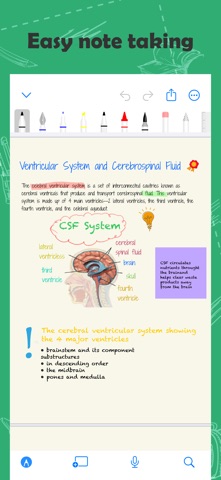


Description by Skyjos Co., Ltd. Written by the developer, not by AppBrain. Click to read.
Handwritten Notes
• Create notes with covers and paper templates. Built-in 19 covers and 17 templates. And you could also import your own covers and templates.
• 10+ Pens and Brushes: Ball Pen, Fountain Pen, Marker, Crayon, Water Color, Laser, Scribble, Tape etc.
• Adjust the thickness and color of the pen tip
• Draw perfect shapes and lines.
• Write with scribble tool by using Apple Pencil, and it will convert to text instantly.
• Use tape tool to help you memorize learning content.
• Squeeze Apple Pencil Pro to show contextual palette.
• Add text box, stickers and images to make your note more beautiful.
• Export note to PDF and image
Text Notes
• Set headings to make TOC(Table of Contents).
• Format text with bold, italics, strikethrough, underline
• Highlight text with colors
• Bullet List, Numbered List and To-Do List.
• Set your own font, font size, line spacing, paragraph spacing, and more
• Attach files and images on note.
• Templates: Resume, Essay, Shopping List, To-Do List, Weekly Planner etc.
• Export note to PDF, RTF, HTML, Markdown and Plain TXT
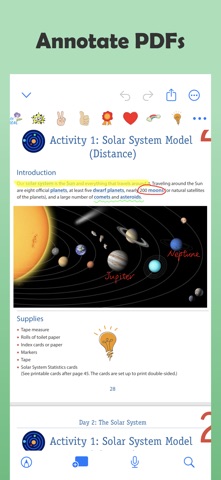
Annotation
• Mark up PDFs.
• Sign documents
Search
• Search text and handwritting in notes and PDFs.
Multi-task
• Work with two notes side-by-side on iPad and Mac.
• Drag & Drop handwriting, typed text, and images between notes.
Presentation
• Present your notes on TV screen via AirPlay or HDMI cable.
• 3 Presentation Modes: Entire Screen, Current Page and All Pages.
• Use laser tool to point out the content what you’re presenting.
More
• Record audio while you’re taking note.
• Set reminder on note.
• Organize notes into categories and folders.
• Move, copy and delete notes and folders.
• Show notes in grid view and list view.
• Sort notes by name, date etc.
• Scan physical documents and import to UltraNotes.
• Import PDFs and images.
• Lock app with password or Face ID.
Synchronization & Backup
• Synchronize notes among your iPhone, iPad, and Mac via iCloud.
• Backup notes to Google Drive.
===== CONTACT US =====
Email: support@skyjos.com
Twitter: @SkyjosApps
Facebook: @SkyjosApp
Safety and technology
Found in the app by AppBrain- Price
- Free
- App size
- 29.7 MB
- Content rating
- Everyone
Technologies used by UltraNotes - Note Taking & PDF
Releases
Updates seen on the App Store- Version
- 2.5.1
- Launched
- August 2024
No changelog data
Alternatives
Similar apps and more from Skyjos Co., Ltd.Alternatives to UltraNotes - Note Taking & PDF




More from Skyjos Co., Ltd.




Rankings
App Store top chartsApp Store Rankings for UltraNotes - Note Taking & PDF
About the app and developer
About UltraNotes - Note Taking & PDF
UltraNotes - Note Taking & PDF is a productivity app developed by Skyjos Co., Ltd.
User Ratings
UltraNotes - Note Taking & PDF is rated 4.56 out of 5 stars. The rating is based on 180 ratings.
App Information
UltraNotes - Note Taking & PDF is freely available from the App Store. The app size is 29.74 MB. The latest version available is 2.5.1. The last update was on October 15, 2026.
Technical Requirements
The app has a content rating of Everyone. The app has been available on the App Store since August 2024.
Developer information for Skyjos Co., Ltd.
Address:
Frequently asked questions about UltraNotes - Note Taking & PDF
Is UltraNotes - Note Taking & PDF free?
Yes. UltraNotes - Note Taking & PDF is free on the App Store.
Is UltraNotes - Note Taking & PDF still available?
Yes. UltraNotes - Note Taking & PDF is on the App Store, and the last update we saw was on October 15, 2026.
How large is UltraNotes - Note Taking & PDF?
UltraNotes - Note Taking & PDF is 29.74 MB.
Is UltraNotes - Note Taking & PDF suitable for children?
App Store rates the content of UltraNotes - Note Taking & PDF as suitable for everyone.
How do people rate UltraNotes - Note Taking & PDF?
UltraNotes - Note Taking & PDF scores 4.56 out of 5 stars, from 181 ratings on the App Store.
Who made UltraNotes - Note Taking & PDF?
UltraNotes - Note Taking & PDF was developed by Skyjos Co., Ltd. It is listed in the productivity category on the App Store.
What are the best alternatives to UltraNotes - Note Taking & PDF?
People looking at UltraNotes - Note Taking & PDF also look at these productivity apps: PaperCode, SharingDrive, Axon.AI, Focus Pals, Whoice Widget - Transcriptions.