

Unfry: App Blocker & Focus
Unfry: App Blocker & Focus is made and published by SEBASTIAN OLTEDAL THORP. AppBrain is an independent app data site and isn't affiliated with SEBASTIAN OLTEDAL THORP. The app name, icon, screenshots and description belong to SEBASTIAN OLTEDAL THORP and are shown as published on the App Store.
AppBrain's verdict
- Last updated
- September 28, 2026
Rankings
App Store top chartsApp Store Rankings for Unfry: App Blocker & Focus
Competitors
Similar apps and more from SEBASTIAN OLTEDAL THORPAlternatives to Unfry: App Blocker & Focus


More from SEBASTIAN OLTEDAL THORP

Releases
Updates seen on the App Store- Version
- 3.0.1
- Launched
- July 2026
No changelog data
User feedback
Ratings and reviews on the App StoreComments on Unfry: App Blocker & Focus for iOS
We don't have enough comments to show example comments. Please check back later.
Technology
Found in the app by AppBrain- Price
- Free
- App size
- 252.0 MB
- Content rating
- Everyone
Technologies used by Unfry: App Blocker & Focus
About the app and developer
About Unfry: App Blocker & Focus
Unfry: App Blocker & Focus is a productivity app developed by SEBASTIAN OLTEDAL THORP.
User Ratings
The app has no ratings yet.
App Information
Unfry: App Blocker & Focus is freely available from the App Store. The app size is 252.01 MB. The latest version available is 3.0.1. The last update was on September 28, 2026.
Technical Requirements
The app has a content rating of Everyone. The app has been available on the App Store since July 2026.
Developer information for SEBASTIAN OLTEDAL THORP
Address:
Frequently asked questions about Unfry: App Blocker & Focus
Is Unfry: App Blocker & Focus free?
Yes. Unfry: App Blocker & Focus is free on the App Store.
Is Unfry: App Blocker & Focus still available?
Yes. Unfry: App Blocker & Focus is on the App Store, and the last update we saw was on September 28, 2026.
How large is Unfry: App Blocker & Focus?
Unfry: App Blocker & Focus is 252.01 MB.
Is Unfry: App Blocker & Focus suitable for children?
App Store rates the content of Unfry: App Blocker & Focus as suitable for everyone.
Who made Unfry: App Blocker & Focus?
Unfry: App Blocker & Focus was developed by SEBASTIAN OLTEDAL THORP. It is listed in the productivity category on the App Store.
What are the best alternatives to Unfry: App Blocker & Focus?
People looking at Unfry: App Blocker & Focus also look at these productivity apps: Toll: Earn Your App Time, App Blocker: Lockscreen, Roty - Unrot Your Brain, Hardcore Focus: Deep Work, Calume - Time tracker.
Store listing
By SEBASTIAN OLTEDAL THORP, from the App Store


Description by SEBASTIAN OLTEDAL THORP Written by the developer, not by AppBrain. Click to read.
When a quick check becomes a long scroll, give yourself a reason to do something else first. Combine scheduled app blocking, a focus timer and small daily activities to make more room for life outside your screen.
How it works
1. Choose the distracting apps you want to block and set your schedule.
2. Complete an Unfry activity or Quick Bit to earn Braincells, your in-app coins.
3. When you want a break, tap Fry to spend Braincells on screen time. Earning coins does not automatically unlock your apps. Your selected apps lock again when the break ends and your blocking schedule is active.
App blocking that fits your day
Use Frywall to block selected apps during study, work or other times you want fewer distractions. Set a schedule or choose always-on protection. Decide when to spend your earned screen time instead of opening an app out of habit.
A focus timer for things worth doing
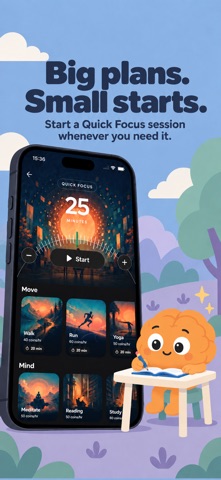
Read a chapter, study for an exam, work on a project, write or choose another activity. Set your timer, keep Unfry open and give the task your attention. Completed timed sessions earn Braincells without a photo check. Quick Focus offers a simple way to start a focus session.
Quick Bits for small wins
Use a few spare minutes for a short activity. Go for a walk, do push-ups or squats, hold a plank, make your bed or tidy up. You can also follow a breathing exercise, take a moment for prayer or write a reflection.
Quick Bits use guided steps, movement tracking or photo checks, depending on the activity. Choose a small action that fits the time and energy you have.
Fewer distractions in the evening and morning
Set bedtime and wake-up routines to create space around your first and last scroll. Night protection restricts distracting apps while you follow your routine.
See your progress
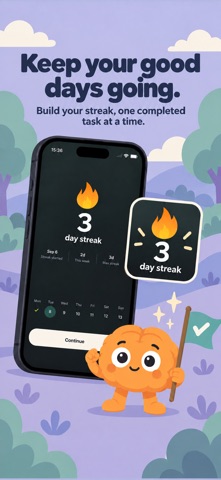
Follow your Braincells balance, daily streak and earned badges. Check your screen time and activity history to see how you spend your day and what you have completed.
Start with one useful thing. Earn a break. Make more room for life.
Subscription
A subscription is required to use Unfry. Available plans, prices and any trial offer are shown in the app before you subscribe.
The app interface is in English.
Support: https://lockinblocker.app/support
Privacy Policy: https://lockinblocker.app/privacy
Terms of Use: https://lockinblocker.app/terms