




AppBrain's verdict
- Last updated
- August 14, 2023
- Size
- 281.8 MB
User feedback
Ratings and reviews on the App StoreComments on UniConverter13 - Convert Video for iOS
We don't have enough comments to show example comments. Please check back later.
Store listing
By Shenzhen Wondershare Software Co., Ltd, from the App StoreDescription by Shenzhen Wondershare Software Co., Ltd Written by the developer, not by AppBrain. Click to read.
Wondershare UniConverter 13 is a complete video conversion toolset (conversion, editing, screen recording) with a simple user interface. It is easy to learn, cost-effective, and empowers you to work faster. Compress files to more manageable sizes, convert them into over 1000 formats, and edit your videos with one software.
***Why Choose UniConverter for Mac?***
CONVERT VIDEOS EASILY AND QUICKLY
• Convert any video/audio file to MP4, MOV, AVI, MKV, and other 1000+ formats.
• Convert videos for all devices, including Apple devices, Android devices, VR devices, game consoles, etc.
• Powered by APEXTRANS technology, it converts 4K/8K videos with zero quality loss.
• High-Speed Conversion mode converts files at 30X faster speed than contemporaries.
• Batch converts multiple files to one or different formats at one time.
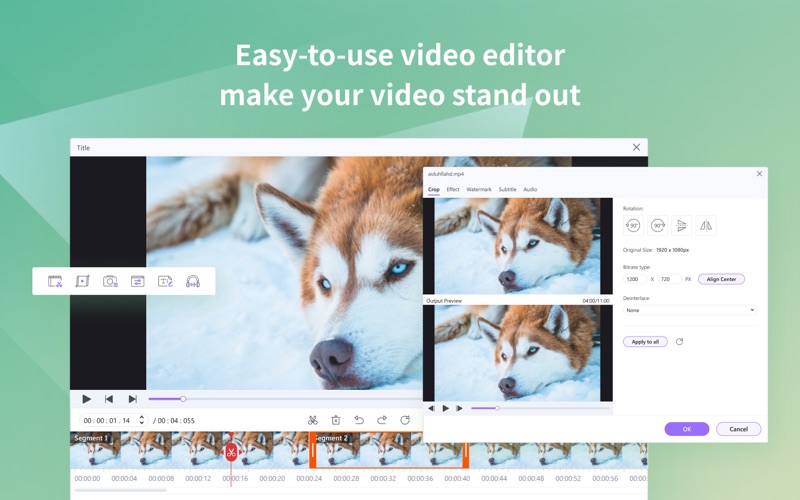
VERSATILE VIDEO/PHOTO EDITOR MAC
• Trim your videos into clips: Delete unwanted segments from a movie or TV episode or split a long video into multiple clips for sharing and other uses.
• Merge your entire TV series for flawless enjoyment or merge a playlist for seamless playback.
• Speed up or slow down any videos! Using speed controls to highlight important moments.
• Apply effects to your video in one click.
• Add watermarks for copyright protection.
YOUR FLEXIBLE SUBTITLE TOOL
• Easily sync subtitles to any video.
• Make completely custom subtitles, easy to read, and look great.
• Find subtitles for your favorite movies, sync SRT subtitles inside UniConverter.
ONE-CLICK VIDEO COMPRESSOR
• Compress videos with customizable settings: adjust video resolution, bitrate, and output format to reduce video size.
• Compress more than 1,000 video and audio formats.
• Compress multiple files in batches.
• Preview compressed video to check output video quality beforehand.
• It fully supports compressing HD videos such as 1080P,4K/8K videos.
RECORD YOUR SCREEN WITH EASE
• Recording any area on your screen.
• Recording games without any frame rate loss.
• Record from your webcam while recording your screen! Perfect for reactions and tutorials.
• Record system audio and microphones easily.
• Schedule recording tasks anytime.
• Switch screens while recording.
• Support adding marker lines, arrows, rectangle painting, circle painting, undo, anti-undo, and other operations in the recording process.
BURN DVD & CD IN A FEW STEPS
• Burn any video to DVD, DVD folder, or ISO files with free stylish DVD templates.
• Numerous free stylish DVD templates to unique your DVD.
• Rip DVD movies to video in MP4, MPG, WMV, 3GP, FLV, and over 1000 formats.
MULTI-FUNCTION VIDEO TOOLBOX
• Subtitle Editor: Import subtitle files, voice-to-subtitle, text-to-subtitle, edit subtitles, etc.
• Auto Reframe: Automatically resize/crop your video for social media channels without a watermark.
• Smart Trimmer: One-click crop silent clips and AI portrait cutout.
• Intro & Outro: Batch remove or add the beginning and end of your videos.
• Watermark Editor: edit watermarks.
• AI Portrait: Separate video portraits with artificial intelligence and switch backgrounds.
• GIF Maker: Create animated GIFs from videos or pictures.
• Fix Media Metadata: Auto-fix and edit metadata at will.
• Image Converter: Convert images to popular formats like PNG, JPEG, TIFF, etc.
• CD Burner: Burn M4A, FLAC, MP3, and any music file to the CD.
• VR Converter: Convert videos to VR and enjoy them on your VR devices.
SIMPLE-TO-USE
Intuitive and user-friendly interface.
Add files to iTunes library after conversion automatically.
Add video in an easy drag-and-drop way.
Customize the output folder to save output files.
***Any inquiries, Please find quick solutions***
Terms of Use: https://www.wondershare.com/company/terms_conditions.html
Privacy Policy: https://www.wondershare.com/privacy.html
We value your feedback.
Here’s how you can contact us: http://support.wondershare.com
Safety and technology
Found in the app by AppBrain- Price
- Free
- App size
- 281.8 MB
- Content rating
- Everyone
Technologies used by UniConverter13 - Convert Video
Releases
Updates seen on the App Store- Version
- 13.0.4
- Launched
- September 2021
No changelog data
Alternatives
Similar apps and more from Shenzhen Wondershare Software Co., LtdMore from Shenzhen Wondershare Software Co., Ltd


Rankings
App Store top chartsApp Store Rankings for UniConverter13 - Convert Video
About the app and developer
About UniConverter13 - Convert Video
UniConverter13 - Convert Video is a photo & video app developed by Shenzhen Wondershare Software Co., Ltd.
User Ratings
The app has no ratings yet.
App Information
UniConverter13 - Convert Video is freely available from the App Store. The app size is 281.82 MB. The latest version available is 13.0.4. The last update was on August 14, 2023.
Technical Requirements
The app has a content rating of Everyone. The app has been available on the App Store since September 2021.
UniConverter13 - Convert Video is made and published by Shenzhen Wondershare Software Co., Ltd. AppBrain is an independent app data site and isn't affiliated with Shenzhen Wondershare Software Co., Ltd. The app name, icon, screenshots and description belong to Shenzhen Wondershare Software Co., Ltd and are shown as published on the App Store.
Developer information for Shenzhen Wondershare Software Co., Ltd
Frequently asked questions about UniConverter13 - Convert Video
Is UniConverter13 - Convert Video free?
Yes. UniConverter13 - Convert Video is free on the App Store.
Is UniConverter13 - Convert Video still available?
Yes. UniConverter13 - Convert Video is on the App Store, and the last update we saw was on August 14, 2023.
How large is UniConverter13 - Convert Video?
UniConverter13 - Convert Video is 281.82 MB.
Is UniConverter13 - Convert Video suitable for children?
App Store rates the content of UniConverter13 - Convert Video as suitable for everyone.
Who made UniConverter13 - Convert Video?
UniConverter13 - Convert Video was developed by Shenzhen Wondershare Software Co., Ltd. It is listed in the photo & video category on the App Store.