

Universal Remote for MAG
Universal Remote for MAG is made and published by SHUBHAM SHAH. AppBrain is an independent app data site and isn't affiliated with SHUBHAM SHAH. The app name, icon, screenshots and description belong to SHUBHAM SHAH and are shown as published on the App Store.
AppBrain's verdict
- Rating on App Store
- 5.00
- 3 ratings
- Last updated
- June 12, 2026
It doesn't have enough ratings yet to judge what users think.
Rankings
App Store top chartsApp Store Rankings for Universal Remote for MAG
Competitors
Similar apps and more from SHUBHAM SHAHAlternatives to Universal Remote for MAG


More from SHUBHAM SHAH


Releases
Updates seen on the App Store- Version
- 1.0
- Launched
- June 2026
No changelog data
User feedback
Ratings and reviews on the App StoreComments on Universal Remote for MAG for iOS
We don't have enough comments to show example comments. Please check back later.
Technology
Found in the app by AppBrain- Price
- Free
- App size
- 5.79 MB
- Content rating
- Everyone
Technologies used by Universal Remote for MAG
About the app and developer
About Universal Remote for MAG
Universal Remote for MAG is an utilities app developed by SHUBHAM SHAH.
User Ratings
Universal Remote for MAG is rated 5.00 out of 5 stars. The rating is based on 3 ratings.
App Information
Universal Remote for MAG is freely available from the App Store. The app size is 5.79 MB. The latest version available is 1.0. The last update was on June 12, 2026.
Technical Requirements
The app has a content rating of Everyone. The app has been available on the App Store since June 2026.
Developer information for SHUBHAM SHAH
Address:
Store listing
By SHUBHAM SHAH, from the App Store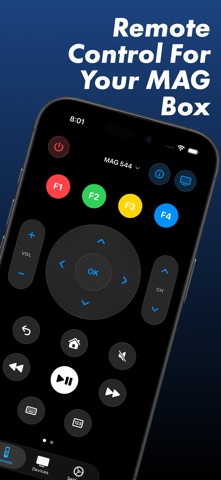


Description by SHUBHAM SHAH Written by the developer, not by AppBrain. Click to read.
Lost the physical remote? This app puts every essential control right on your iPhone, iPad, and Apple Watch. Switch channels, adjust volume, power your box on or off, navigate menus, and type text. All this done over your local Wi‑Fi network with a clean, intuitive interface designed for one-handed use with user privacy in mind.
EVERYTHING YOU NEED IN ONE REMOTE
• Navigation: D-pad with swipe gestures, OK/Select, Back, and Home
• Channels & volume: Dedicated channel and volume rockers
• Power & playback: Power, Play/Pause, Rewind, and Fast Forward
• Number keypad: Direct channel entry with a live on-screen HUD
• Color buttons: Red, Green, Yellow, and Blue (F1–F4)
• Live keyboard: Type search terms, passwords, and URLs on your TV
• Haptic feedback: Optional tactile response for every press
BEYOND THE APP
• Home Screen & Lock Screen widgets: Volume, playback, and navigation without opening the app
• Apple Watch app: Full D-pad, power, keyboard, and Digital Crown volume control
• Siri Shortcuts: Automate remote actions or send keyboard input with your voice
• Multiple devices: Add, pair, and switch between several MAG boxes
• iCloud Sync: Keep your device list in sync across your Apple devices
EASY SETUP
1. Connect your MAG box and iPhone to the same Wi‑Fi network.
2. On your MAG box, enable remote control: Settings → System settings → Remote control.
3. Open the app, add your box, and complete the quick pairing flow.
DISCLAIMER & SUPPORT
Universal Remote for MAG is an independent, third-party client tool and is not affiliated with, endorsed by, or sponsored by Infomir or Telecommunication Technologies. All trademarks belong to their respective owners.
Questions or feedback? Use Settings → Send Feedback in the app. We read every message.
Terms of Use: https://www.apple.com/legal/internet-services/itunes/dev/stdeula/