

Universal Remote for TV - Remo
Universal Remote for TV - Remo is made and published by VIDUS TEKNOLOJI ANONIM SIRKETI. AppBrain is an independent app data site and isn't affiliated with VIDUS TEKNOLOJI ANONIM SIRKETI. The app name, icon, screenshots and description belong to VIDUS TEKNOLOJI ANONIM SIRKETI and are shown as published on the App Store.
AppBrain's verdict
- Last updated
- August 15, 2026
Rankings
App Store top chartsApp Store Rankings for Universal Remote for TV - Remo
Competitors
Similar apps and more from VIDUS TEKNOLOJI ANONIM SIRKETIAlternatives to Universal Remote for TV - Remo


More from VIDUS TEKNOLOJI ANONIM SIRKETI


Also available on Google Play

Releases
Updates seen on the App Store- Version
- 1.0.0
- Launched
- August 2026
No changelog data
User feedback
Ratings and reviews on the App StoreComments on Universal Remote for TV - Remo for iOS
We don't have enough comments to show example comments. Please check back later.
Technology
Found in the app by AppBrain- Price
- Free
- App size
- 53.4 MB
- Content rating
- Everyone
Technologies used by Universal Remote for TV - Remo
About the app and developer
About Universal Remote for TV - Remo
Universal Remote for TV - Remo is an utilities app developed by VIDUS TEKNOLOJI ANONIM SIRKETI.
User Ratings
The app has no ratings yet.
App Information
Universal Remote for TV - Remo is freely available from the App Store. The app size is 53.39 MB. The latest version available is 1.0.0. The last update was on August 15, 2026.
Technical Requirements
The app has a content rating of Everyone. The app has been available on the App Store since August 2026.
Developer information for VIDUS TEKNOLOJI ANONIM SIRKETI
VIDUS TEKNOLOJI ANONIM SIRKETI
Address:
Store listing
By VIDUS TEKNOLOJI ANONIM SIRKETI, from the App Store


Description by VIDUS TEKNOLOJI ANONIM SIRKETI Written by the developer, not by AppBrain. Click to read.
Lost the remote again? Batteries dead right before the big game? With Remo, your iPhone becomes a full universal remote for your smart TV in seconds — no extra hardware, no complicated setup. If your TV is on the same Wi-Fi network as your phone, you're ready to go.
HOW IT WORKS
Remo automatically discovers the smart TVs on your Wi-Fi network. Tap your TV in the list, approve the pairing request on the TV screen or enter a short PIN, and you're connected. From then on, Remo reconnects instantly whenever you open the app.
A COMPLETE REMOTE ON YOUR PHONE
Every key from your physical remote, redesigned for your iPhone:
- D-pad navigation with OK button
- Volume up/down and mute
- Channel controls
- Power on and off
- Playback keys: play, pause, rewind, fast-forward
- Color keys for advanced TV menus
Whether you need a replacement for a broken remote, a backup remote for the bedroom TV, or simply a TV controller that's always in your pocket, Remo covers it.
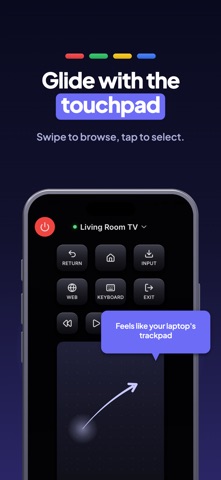
TOUCHPAD MODE
Prefer to swipe? Switch to touchpad mode and glide through menus with natural gestures. It feels like a trackpad for your TV — smooth, precise, and perfect for cursor-based interfaces.
TYPE ON YOUR TV FROM YOUR PHONE
Stop pecking out letters one arrow press at a time. Open Remo's keyboard and type directly into your TV's search fields from your iPhone. Searching for a movie, entering a password, logging into an app — done in seconds instead of minutes.
LAUNCH YOUR STREAMING APPS INSTANTLY
Jump straight into the streaming apps already installed on your TV with a single tap in Remo — no scrolling through rows of icons on the big screen.
MADE FOR REAL LIFE
Use Remo as a TV remote app when the original goes missing, a quick volume control for late-night viewing, or a second remote so nobody has to fight over the first one. Movie night, game day, or bedtime shows for the kids — your phone is always within reach.
ONE APP FOR EVERY TV IN THE HOUSE
Living room, bedroom, kitchen — save all your TVs in Remo and switch between them with a tap. Each TV pairs once and stays saved, so the whole household can be controlled from one phone. You can disconnect or remove a TV anytime.
WORKS WITH NETWORK-CONNECTED SMART TVS
- Smart TVs with built-in Wi-Fi and a network control service
- Streaming players, sticks and set-top boxes on the same network
- Screens that pair by on-screen approval or a short PIN code
The quickest way to be sure is to try it: open Remo, run a scan, and every compatible screen on your Wi-Fi appears in the list within seconds.
GOOD TO KNOW
Remo controls smart TVs over your home Wi-Fi network. Your iPhone and your TV need to be connected to the same network, and the TV must be a network-connected smart TV. Older TVs without Wi-Fi are not supported. Remo sends remote-control commands to your TV rather than streaming video from your phone — it is a dedicated remote, and it does that one job exceptionally well.
WHY PEOPLE CHOOSE REMO
- Pairs in seconds with on-screen approval or PIN
- Clean, modern design that's easy for everyone in the family
- Full remote, touchpad, keyboard, and app launcher in one place
- Reliable Wi-Fi connection — no pointing, no line of sight needed
- Multi-TV support for the whole home
The couch cushions can keep the old remote. Download Remo, pair your TV, and enjoy a smarter way to watch.
Privacy Policy: https://universaltvremote.vidus6.com/privacy
Terms of Service: https://universaltvremote.vidus6.com/terms