

Universal TV ‣ Remote Control
Universal TV ‣ Remote Control is made and published by Hey Apps. AppBrain is an independent app data site and isn't affiliated with Hey Apps. The app name, icon, screenshots and description belong to Hey Apps and are shown as published on the App Store.
AppBrain's verdict
Well rated- Rating on App Store
- 4.18
- 109 ratings
- Last updated
- October 10, 2026
Users rate it well: 4.2 stars from 109 ratings.
Rankings
App Store top chartsApp Store Rankings for Universal TV ‣ Remote Control
Competitors
Similar apps and more from Hey AppsAlternatives to Universal TV ‣ Remote Control


More from Hey Apps


Releases
Updates seen on the App Store- Version
- 1.2.6
- Launched
- June 2026
No changelog data
User feedback
Ratings and reviews on the App StoreComments on Universal TV ‣ Remote Control for iOS
We don't have enough comments to show example comments. Please check back later.
Technology
Found in the app by AppBrain- Price
- Free
- App size
- 65.4 MB
- Content rating
- Everyone
Technologies used by Universal TV ‣ Remote Control
About the app and developer
About Universal TV ‣ Remote Control
Universal TV ‣ Remote Control is an utilities app developed by Hey Apps.
User Ratings
Universal TV ‣ Remote Control is rated 4.18 out of 5 stars. The rating is based on 110 ratings.
App Information
Universal TV ‣ Remote Control is freely available from the App Store. The app size is 65.43 MB. The latest version available is 1.2.6. The last update was on October 10, 2026.
Technical Requirements
The app has a content rating of Everyone. The app has been available on the App Store since June 2026.
Developer information for Hey Apps
Address:
Frequently asked questions about Universal TV ‣ Remote Control
Is Universal TV ‣ Remote Control free?
Yes. Universal TV ‣ Remote Control is free on the App Store.
Is Universal TV ‣ Remote Control still available?
Yes. Universal TV ‣ Remote Control is on the App Store, and the last update we saw was on October 10, 2026.
How large is Universal TV ‣ Remote Control?
Universal TV ‣ Remote Control is 65.43 MB.
Is Universal TV ‣ Remote Control suitable for children?
App Store rates the content of Universal TV ‣ Remote Control as suitable for everyone.
How do people rate Universal TV ‣ Remote Control?
Universal TV ‣ Remote Control scores 4.18 out of 5 stars, from 109 ratings on the App Store.
Who made Universal TV ‣ Remote Control?
Universal TV ‣ Remote Control was developed by Hey Apps. It is listed in the utilities category on the App Store.
What are the best alternatives to Universal TV ‣ Remote Control?
People looking at Universal TV ‣ Remote Control also look at these utilities apps: TV Remote Pro & Screen Mirror, TV Remote - Voice Control, TV Remote Control · Universal, TVRem Universal SmartTV Remote, Universal TV Remote Control !.
Store listing
By Hey Apps, from the App Store


Description by Hey Apps Written by the developer, not by AppBrain. Click to read.
WHY YOU'LL LOVE IT
Misplaced remotes, dead batteries, juggling three controllers for one movie night — that's over. This app connects to your TV over your existing WiFi network and puts every function right on your phone: power, volume, navigation, app switching, and more. It works with virtually every smart TV and streaming device sold today.
FEATURES
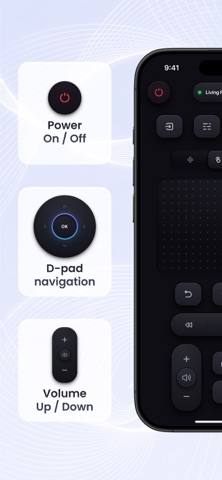
• One-tap power, volume, and mute control
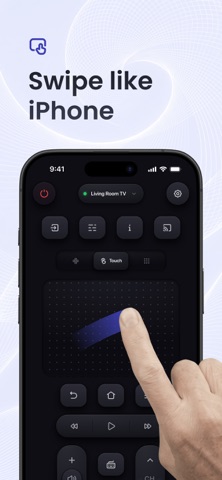
• Full D-pad navigation for menus, apps, and streaming interfaces
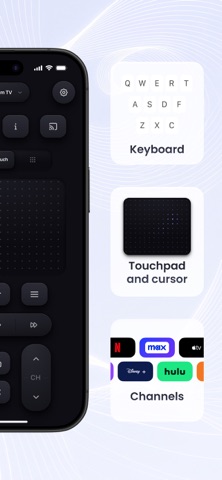
• Keyboard input for fast text search, sign-in, and messaging
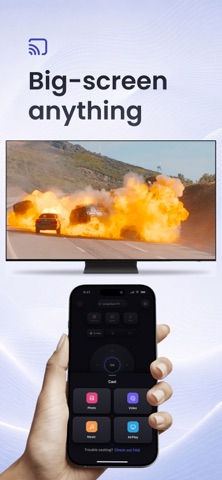
• Screen mirroring — project your iPhone screen to your TV
• Cast to TV — stream photos and videos wirelessly
• Works over WiFi and your local network — no Bluetooth required
• Switch between multiple TVs from one app
• Channel number pad and input source switcher
• No extra hardware, no IR blaster needed
WORKS WITH
Samsung · LG · Roku TV and players · Fire TV · Firestick · Sony Bravia · Vizio SmartCast · TCL · Hisense · Philips · Android TV · Google TV · Chromecast · Apple TV · Panasonic · Sharp · and more
HOW IT WORKS
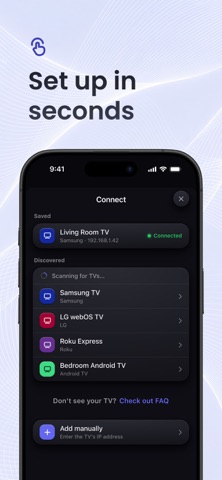
1. Open the app — it scans your WiFi network automatically
2. Tap your TV or streaming device from the list
3. Start controlling — ready in under a minute
SUBSCRIPTION & PRIVACY
Full access to all features requires an auto-renewing subscription. New users start with a 3-day free trial — every feature unlocked, free for 3 days. After the trial, your subscription renews automatically at the price shown in the app, unless you cancel at least 24 hours before the renewal date. Your plan and price are always displayed before you confirm any purchase. Manage or cancel anytime in your Apple ID settings.
Your data stays private. We do not sell or share your device information or usage data with third parties.
Privacy Policy: https://heyapps.co/tv_remote/privacy
Terms of Use: https://heyapps.co/tv_remote/terms
Support: https://heyapps.co/tv_remote/support
Download now and never hunt for a remote again.