

Unpack-File Extractor is made and published by 子晴 彭. AppBrain is an independent app data site and isn't affiliated with 子晴 彭. The app name, icon, screenshots and description belong to 子晴 彭 and are shown as published on the App Store.
AppBrain's verdict
- Rating on App Store
- 3.67
- 3 ratings
- Last updated
- January 24, 2025
It doesn't have enough ratings yet to judge what users think.
Rankings
App Store top chartsApp Store Rankings for Unpack-File Extractor
Competitors
Similar apps and more from 子晴 彭Alternatives to Unpack-File Extractor








More from 子晴 彭



Releases
Updates seen on the App Store- Version
- 1.9
- Launched
- June 2023
No changelog data
User feedback
Ratings and reviews on the App StoreComments on Unpack-File Extractor for iOS
We don't have enough comments to show example comments. Please check back later.
Technology
Found in the app by AppBrain- Price
- Free
- App size
- 24.1 MB
- Content rating
- Everyone
Technologies used by Unpack-File Extractor
About the app and developer
About Unpack-File Extractor
Unpack-File Extractor is a business app developed by 子晴 彭.
User Ratings
Unpack-File Extractor is rated 3.67 out of 5 stars. The rating is based on 3 ratings.
App Information
Unpack-File Extractor is freely available from the App Store. The app size is 24.10 MB. The latest version available is 1.9. The last update was on January 24, 2025.
Technical Requirements
The app has a content rating of Everyone. The app has been available on the App Store since June 2023.
Developer information for 子晴 彭
Address:
Frequently asked questions about Unpack-File Extractor
Is Unpack-File Extractor free?
Yes. Unpack-File Extractor is free on the App Store.
Is Unpack-File Extractor still available?
Yes. Unpack-File Extractor is on the App Store, and the last update we saw was on January 24, 2025.
How large is Unpack-File Extractor?
Unpack-File Extractor is 24.10 MB.
Is Unpack-File Extractor suitable for children?
App Store rates the content of Unpack-File Extractor as suitable for everyone.
How do people rate Unpack-File Extractor?
Unpack-File Extractor scores 3.67 out of 5 stars, from 3 ratings on the App Store.
Who made Unpack-File Extractor?
Unpack-File Extractor was developed by 子晴 彭. It is listed in the business category on the App Store.
What are the best alternatives to Unpack-File Extractor?
People looking at Unpack-File Extractor also look at these business apps: 解压助手 - RAR 7zZIP多种压缩格式快速解压, RARZIP - Rar Zip File Opener, Decibel Tester: Sound Level, Photo Converter: Covert SVG, Authenticator 2Fa ∘ Verify App.
Store listing
By 子晴 彭, from the App Store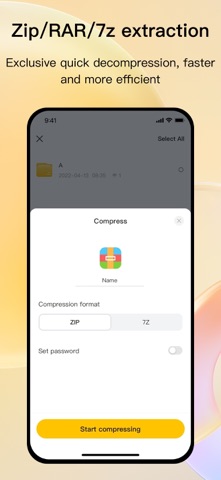




Description by 子晴 彭 Written by the developer, not by AppBrain. Click to read.
This is an efficient tool focused on compression and decompression of archive files and file management. It integrates file compression, decompression, preview, and management, providing you with a convenient file handling experience. Whether it's work files, study materials, or personal files, everything can be easily managed to help you efficiently complete your tasks.
Key Features:
1. Multi-Format Compression and Decompression:
- Supports common archive formats such as RAR, 7Z, ZIP, and more. Quickly perform decompression and compression operations to meet various user needs.
- Supports decompressing encrypted archives and offers file encryption compression for double security of your data.
2. File Preview Feature:
- Supports direct preview of various file formats, including documents and images.
3. Powerful File Management:
- File Sorting: Quickly sort files by name, size, date, etc., for easy file location.
- Folder Management: Create new folders and freely organize and categorize your files.
- Move and Delete: One-click file move or delete operation to keep your file directory neat and tidy.
4. Support for Multiple File Types:
- Supports compressing and decompressing various file types such as documents and images, adaptable to different usage scenarios, and capable of meeting the needs of work, study, and daily life.
5. Efficient and Secure:
- The compression and decompression process is fast and smooth, ensuring file integrity and operational security.
- Offers encrypted compression for important files, safeguarding your privacy and data security.
Applicable Scenarios:
- Daily Office Work: Unzip email attachments, quickly preview document content, and organize important materials.
- Study Assistant: Manage learning resources and easily compress or decompress assignments and materials.
- Leisure and Entertainment: Compress or decompress files for easy storage and sharing, adaptable to various needs.
Why Choose Us?
- A user-friendly interface design, making it easy for beginners to get started quickly.
- Professional and efficient file handling capabilities, saving you time and effort.
- Thoughtful file management features that make file organization hassle-free.
Download now and experience this powerful compression and decompression tool, making file handling easier and more efficient!
Subscription Service:
1. Payment Process: Payment is deducted from the user's iTunes account. Payment is made after the user confirms the purchase.
2. Renewal Process: The Apple iTunes account will be charged 24 hours before the subscription expires, and the subscription period will extend by one cycle after successful payment.
3. Cancel Renewal: To cancel renewal, go to "Settings" on your Apple device → "iTunes & App Store" → tap "Apple ID" → select "View Apple ID" → go to "Account Settings" → tap "Subscriptions" and choose to cancel the subscription. If you don't cancel at least 24 hours before the subscription period ends, the subscription will automatically renew.
Related Agreements:
- User Agreement:https://docs.qq.com/doc/DRmx4QUtzUHpSckp6
- Privacy Policy:https://docs.qq.com/doc/DRkdYendHdlBIek9P
- Subscription Agreement: https://docs.qq.com/doc/DRkdDZUN2RWpBQ0dl