Unraid Deck - Server Manager is an overall app developed by 祥瑞 谢.
Download Statistics
User Ratings
Unraid Deck - Server Manager is rated 4.61 out of 5 stars. The rating is based on 18 ratings.
App Information
Unraid Deck - Server Manager is FREE to download. The APK download size is 25.52 MB. The latest version available is 2.2.1. The last update was on June 21, 2026.
Technical Requirements
The app has a content rating of Everyone. The app has been available on Google Play January 2026.
Description
Securely control your Unraid server from your iPhone and iPad.
Unraid Deck is a native iOS client for monitoring dashboards, managing files, Docker containers and Compose stacks, controlling VMs, receiving instant server alerts, streaming live Docker logs, and accessing your server through a built-in SSH terminal.
Built for direct server connections, privacy-first workflows, and a fast native iOS experience.
Key Features:
Built-In File Manager
• Browse and manage files directly on your Unraid server. • Download, upload, move, rename, preview, copy paths, view file details, and delete files. • Built on SSH/SFTP for secure direct access to your server.
SSH Terminal
• Open an SSH terminal directly inside the app for remote access and command-line workflows. • Run Docker log shortcut actions with one tap when SSH is configured.
Real-Time Push Notifications
• Receive critical Unraid server notifications instantly via Apple APNs. • Powered by a lightweight Unraid companion plugin for reliable message delivery. • Archive, restore unread, and manage notifications in batches.
Smart Connect
• Automatically switch between local and remote server addresses based on your current network.
Home Screen Widgets
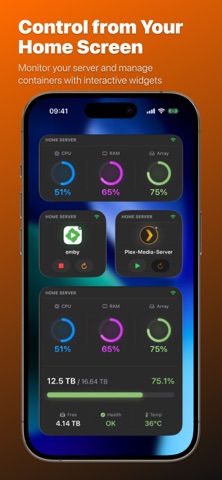
• Monitor CPU, memory, and array usage at a glance. • Control Docker containers directly from your Home Screen with start, stop, and restart actions.
Stunning Dashboard
• Monitor CPU, memory, network traffic, and storage array usage in real time. • View CPU temperature, power telemetry, network throughput, array health, parity status, and disk temperatures.
Powerful Docker Management
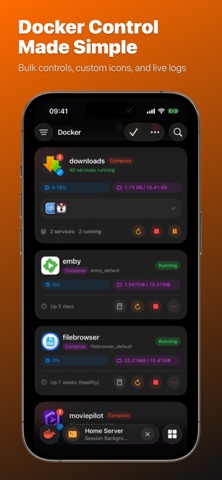
• Docker Compose Stacks: Group containers by Compose project with grouped rows, preview badges, and representative icons. • Stack Icons: Choose service icons, custom images, or online icon libraries with a unified picker. • Search & Filter: Quickly search Docker containers to find the right service faster. • View container status, port mappings, and volume mounts. • Start, stop, restart, pause, resume, and update containers. • Perform batch actions across multiple containers. • Live Logs: Stream Docker container logs directly on your device. • Customization: Set custom container icons from your photo library or online icon libraries.
Virtual Machine Control
• Search VMs quickly to find the right machine faster. • Start, pause, resume, and force stop VMs. • Run batch operations across multiple VMs. • Monitor VM status instantly.
Security & Privacy
• Direct Connection: The app communicates directly with your Unraid server. No traffic is routed through third-party servers. • Secure Storage: API keys are encrypted and stored in the iOS Keychain. • Biometric Lock: Protect access with Face ID or Touch ID. • Custom Headers: Access servers behind authenticated reverse proxies such as Authelia. • iCloud Sync: Securely sync configuration across your Apple devices.
API Key Access Control
• Create API keys with custom permission groups. • Use the Unraid Deck preset to auto-fill required permissions. • View and copy API key details in the app.
REQUIREMENTS
• Unraid OS v6.12 or later, v7.2+ recommended • Unraid API enabled on your server • Valid API key for authentication • Network access to your Unraid server • SSH access required for Terminal, Docker log shortcuts, and File Manager features
Each subscription will automatically renew 3 days before the expiration date for
the same time period. Subscriptions can be cancelled at any time before the renewal.