

Up Ahead: Countdown Widgets
Up Ahead: Countdown Widgets is made and published by Daniel Gauthier. AppBrain is an independent app data site and isn't affiliated with Daniel Gauthier. The app name, icon, screenshots and description belong to Daniel Gauthier and are shown as published on the App Store.
AppBrain's verdict
Loved by users- Rating on App Store
- 4.85
- 686 ratings
- Last updated
- October 22, 2024
Users love it: 4.9 stars from 686 ratings.
Rankings
App Store top chartsApp Store Rankings for Up Ahead: Countdown Widgets
Competitors
Similar apps and more from Daniel GauthierAlternatives to Up Ahead: Countdown Widgets



Releases
Updates seen on the App Store- Version
- 1.4.3
- Launched
- September 2022
No changelog data
User feedback
Ratings and reviews on the App StoreComments on Up Ahead: Countdown Widgets for iOS
We don't have enough comments to show example comments. Please check back later.
Technology
Found in the app by AppBrain- Price
- Free
- App size
- 37.5 MB
- Content rating
- Everyone
Technologies used by Up Ahead: Countdown Widgets
About the app and developer
About Up Ahead: Countdown Widgets
Up Ahead: Countdown Widgets is an utilities app developed by Daniel Gauthier.
What is the rating of Up Ahead: Countdown Widgets?
Up Ahead: Countdown Widgets is rated 4.85 out of 5 stars, based on 690 ratings.
Is Up Ahead: Countdown Widgets free?
Up Ahead: Countdown Widgets is free. The app size is 37.49 MB. The latest version available is 1.4.3. The last update was on October 22, 2024.
What are the requirements for Up Ahead: Countdown Widgets?
The app has a content rating of Everyone. The app has been available on the App Store since September 2022.
Developer information for Daniel Gauthier
Address:
Store listing
By Daniel Gauthier, from the App Store




Description by Daniel Gauthier Written by the developer, not by AppBrain. Click to read.
---
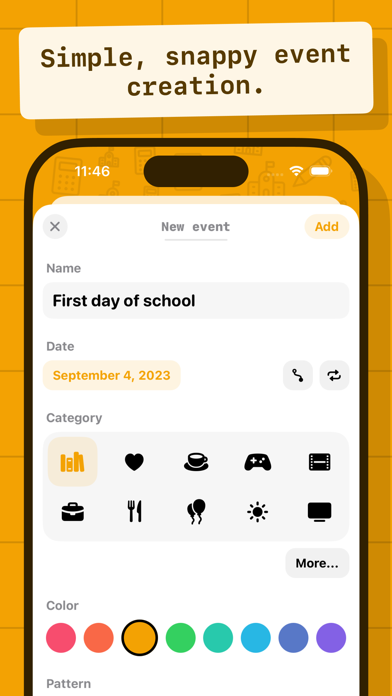
CREATE EVENTS
Up Ahead events are quick and simple to create — just give your event a name, a date (with optional time), a category icon, and a color.
EVENT TIMELINE
View your events in a unique timeline format that gives you visual information about how much time is passing between events, and allows you to easily look back on your entire event history.
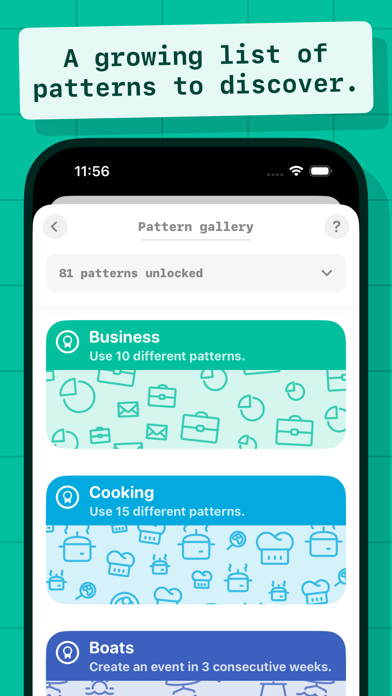
PATTERNS
As you create events, you’ll start to unlock decorative patterns that can be applied to any of your events and appear in both your in-app timeline and your widgets. Patterns are unlocked based on the content of your events, or as weekly gifts. How many can you find?
REMINDERS
Schedule flexible reminders to get notified about the events you don't want to miss.
ATTACHMENTS
Keep all your event information in one place by attaching short notes or links to your events.
HOME SCREEN WIDGETS
* "Countdown" widgets are simple widgets for counting down to a specific event.
* "Coming up" widgets come in multiple sizes and will dynamically count down to whatever event is coming up next. They can be customized with filters and display names, allowing you to create widgets such as “Next Raptors game” or “Upcoming game releases”.
* "Timeline grid" widgets give you a colorful high-level overview of all your upcoming events.
LOCK SCREEN WIDGETS
Simplified versions of “Countdown” and “Coming up” widgets are available to place right on your Lock Screen.
SIRI SHORTCUTS
Automate event creation or ask Siri about your events with Siri Shortcuts.
TIMELINE FILTERING
Quickly filter your events temporarily so that you can get a clean look at just the film releases you’re looking forward to, or the birthdays you want to remember.
RECURRING EVENTS
Mark an event as recurring — weekly, bi-weekly, monthly, or yearly — to have it automatically replace itself in your timeline when an instance of the event has passed.
MULTI-DAY EVENTS
Give an event an optional end date to countdown to both an event’s beginning and its end.
ICLOUD BACKUPS
Automatically back up your events and pattern unlocks to iCloud Drive to ensure you never lose access to your data.
EVENT SHARING
Lightweight event sharing allows you to export and share colorful images of any event.
SOUND AND HAPTICS
Delightful sound effects and haptics bring the app to life.
...and lots more fun stuff to discover.
---
The free version of Up Ahead is free forever, and contains no ads. If you’re looking for the best way to simply pop a few good-looking countdown widgets onto your Home Screen or Lock Screen, downloading Up Ahead for free is a great place to start.
With an in-app subscription to Up Ahead Plus, you’ll get all the bells and whistles: unlimited event creation, recurring and multi-day events, the full suite of widget types, and more.
---
Payment will be charged to your Apple ID account at the confirmation of purchase. The subscription automatically renews unless it is canceled at least 24 hours before the end of the current period. Your account will be charged for renewal within 24 hours before the end of the current period. You can manage and cancel your subscriptions by going to your App Store account settings after purchase. Cancellation of the current active subscription period is not allowed.
Privacy policy: https://upaheadapp.com/privacy
Terms of service: https://www.apple.com/legal/internet-services/itunes/dev/stdeula/