AppBrain
AppBrain
  • Apps
  • Apps being viewed right now Trending apps today Most popular apps All-time most installed apps Top rated apps iPhone and iPad apps
  • Intelligence ▾
    Intelligence overview → Track any Android app or your whole market
    Track & analyze
    Keyword Tracker & OptimizerTrack & improve Play rankings App Performance ReportOne-off PDF for any app StatisticsFree Android & Play market stats
    Promote your app
    Featured Apps App Links
  • Intelligence
  • Pricing
  • Dashboard
  • Sign up
  • Log in
App Store Apps > Productivity > UPAD V
UPAD V icon

UPAD V

by TaeJin Kim · Productivity · $9.99
On the App Store since July 2018 · Data updated 2026-10-15
App Store

UPAD V is made and published by TaeJin Kim. AppBrain is an independent app data site and isn't affiliated with TaeJin Kim. The app name, icon, screenshots and description belong to TaeJin Kim and are shown as published on the App Store.

AppBrain's verdict

Established
Rating on App Store
4.21
24 ratings
Last updated
July 25, 2018

It doesn't have enough ratings yet to judge what users think.

Rankings

App Store top charts

App Store Rankings for UPAD V

This app is not ranked

Competitors

Similar apps and more from TaeJin Kim

Alternatives to UPAD V

Noteshelf 2 icon Noteshelf 2
Fluid Touch Pte. Ltd.
4.7
$9.99
1.7K ratings
Bluebeam Revu for iPad icon Bluebeam Revu for iPad
Bluebeam, Inc.
1.8
$9.99
525 ratings
Bluebeam Vu for iPad icon Bluebeam Vu for iPad
Bluebeam, Inc.
2.2
Free
74 ratings
Noteshelf: AI Notes & PDF icon Noteshelf: AI Notes & PDF
Fluid Touch Pte. Ltd.
4.6
Free
7.0K ratings
BIM 360 icon BIM 360
Autodesk Inc.
1.8
Free
148 ratings
Lead Connector icon Lead Connector
LEADCONNECTOR LLC
4.5
Free
4.0K ratings
Digital Planner for iPad icon Digital Planner for iPad
Alina Shpak
4.3
Free
2.1K ratings
Notebook – AI Notes, Notepad icon Notebook – AI Notes, Notepad
Zoho Corporation
4.7
Free
23.8K ratings

More from TaeJin Kim

UPAD for iCloud icon UPAD for iCloud
TaeJin Kim
2.3
$6.99
47 ratings
monolog - Your Second Brain icon monolog - Your Second Brain
TaeJin Kim
0.0
Free

Releases

Updates seen on the App Store
Version
5.0
Launched
July 2018

No changelog data

User feedback

Ratings and reviews on the App Store

Comments on UPAD V for iOS

We don't have enough comments to show example comments. Please check back later.

Technology

Found in the app by AppBrain
Price
$9.99
App size
36.9 MB
Content rating
Everyone

Technologies used by UPAD V

About the app and developer

About UPAD V

UPAD V is a productivity app developed by TaeJin Kim.

User Ratings

UPAD V is rated 4.21 out of 5 stars. The rating is based on 24 ratings.

App Information

UPAD V costs $9.99. The app size is 36.86 MB. The latest version available is 5.0. The last update was on July 25, 2018.

Technical Requirements

The app has a content rating of Everyone. The app has been available on the App Store since July 2018.

Developer information for TaeJin Kim

TaeJin Kim

Address:

Share UPAD V

Store listing

By TaeJin Kim, from the App Store
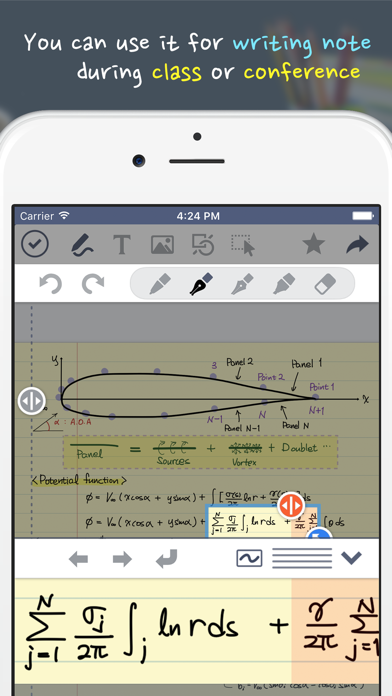
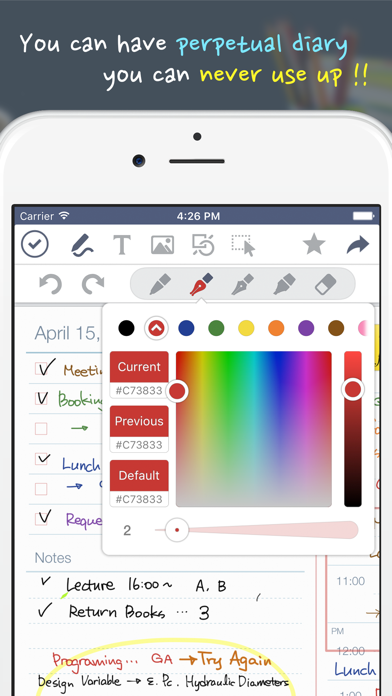
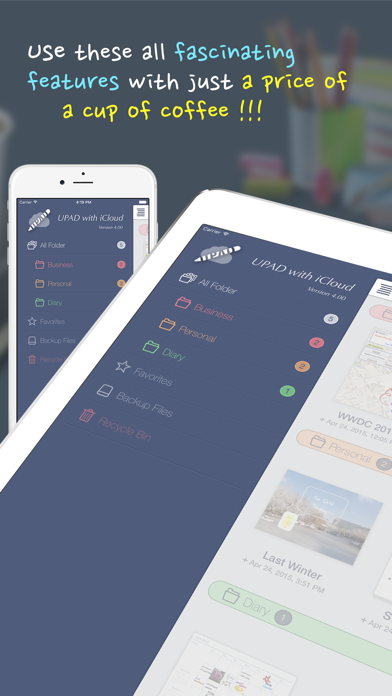
UPAD V Screenshot 1 of 5
UPAD V Screenshot 2 of 5
UPAD V Screenshot 3 of 5
UPAD V Screenshot 4 of 5
UPAD V Screenshot 5 of 5
Screenshots by TaeJin Kim, from the the App Store listing
Description by TaeJin Kim Written by the developer, not by AppBrain. Click to read.
Finally, UPAD has re-arrived!
When downloading UPAD, your iPad becomes more of a worthy instrument.

UPAD is the best application for handwriting. Write on it, just like you would on a sheet of paper.
You can use this for a diary, planner, lecture note, conference note, letters, Calligraphy, etc.

Create documents with easier-than-ever-to-use interface and a variety of features

[The best feel of writing]
- Write fast and easy—like when you handwrite on a sheet of paper.
- When you’re listening to a lecture or at a conference, you can draw, modify, and write fast.
- You may rest your palm on the screen. It is made to recognize just the touch-pen.
- No other application allows the feeling of writing like UPAD.
- It allows the “real” feeling of handwriting.

[PDF Editing]
- Read and edit PDF files with UPAD.
- Edit PDF files with add/copy/delete functions.
- Add handwriting, texts, pictures, etc. to PDF files.
- Manage theses, lecture notes, manuals, musical notes, etc. in PDF format effectively.

[Easier-than-ever-to-use image insertion]
- Save multiple pictures in a form of documents easily.
- You can capture a part of a map or web page and save it to a file.
- This provides you with special effects and frames that will enhance images.
- You no longer need to move back and forth from one application to another.

[Typing]
- You can enter words by using a keyboard.
- This includes various fonts, sizes, backgrounds, and alignments that are in Microsoft Word.

[Shapes]
- You can put in callouts, rectangles, arrows, circles, etc. easily.
- You’ll be able to draw a table easily.

[Sharing documents]
- You’ll be able to share not only emails, but SMS such as Facebook and Tweeter through iMessage.
- You can print out documents immediately through Air Printer.
- You can send UPAD documents to all applications that can read images and PDF’s.

[A variety of easy templates]
- Set up schedules monthly/weekly/daily.
- This provides various templates you need when you create a document.
- You may use the image of your choice as the background.

[Safe backing-up]
- You can now back-up not only as a whole, but partially—one document at a time.
- It’s possible to back-up and restore quickly and stably.

This app is not support iCloud sync.
Official page on the App Store
Popular Productivity Apps Apps other people are watching Today's trending apps Top new apps Price drops on Google Play
Noteshelf 2 icon Noteshelf 2
Bluebeam Revu for iPad icon Bluebeam Revu for iPad
Bluebeam Vu for iPad icon Bluebeam Vu for iPad
Noteshelf: AI Notes & PDF icon Noteshelf: AI Notes & PDF
BIM 360 icon BIM 360
Lead Connector icon Lead Connector
Digital Planner for iPad icon Digital Planner for iPad
Notebook – AI Notes, Notepad icon Notebook – AI Notes, Notepad
Overview Alternatives Reviews Rankings Technology
AppBrain Intelligence premium content

Subscribe now to get full and unlimited access to AppBrain Intelligence. You'll have access to:

  • App Intelligence dashboard (performance timeline, competitor comparison, country rankings, insight cards)
  • Detailed ranking data per app
  • Full timeline per developer
  • Device market shares data per country
  • Unlimited keyword tracking
1 Month

$75/mo
(billed every month)

SAVE 0%
Subscribe
3 Months

$65/mo
($195 billed every 3 months)

SAVE 13%
Subscribe
1 Year

$57.50/mo
($690 billed every year)

SAVE 23%
Subscribe
Each subscription will automatically renew 3 days before the expiration date for the same time period. Subscriptions can be cancelled at any time before the renewal.

AppBrain is an app data site, we track rankings, ratings, installs for all apps and games on Google Play and the App Store. AppBrain doesn't host app files or APKs, all install links go directly to the official store. All trademarks are owned by their respective owners. As an Amazon Associate AppBrain earns from qualifying purchases.

More apps

  • Top Android apps being viewed
  • View CoreConcepts Engineering
  • Easy Counter – Count anything
  • View Music Time for Pebble

App statistics

  • Android statistics
  • Google Play Developer stats
  • Trending Android Apps
  • Trending iOS apps
  • Top popular Apps
  • Buy the best Android phone
  • Buy & sell app businesses

About AppBrain

  • Contact
  • Privacy
  • Documentation
  • DMCA takedowns
  • Articles
  • Blog
  • Android Interstitial Ads: Best practices to optimize your app's earnings
© 2010-2026 - AppBrain