

USB Simulator is made and published by Joao Souza. AppBrain is an independent app data site and isn't affiliated with Joao Souza. The app name, icon, screenshots and description belong to Joao Souza and are shown as published on the App Store.
AppBrain's verdict
- Best rank
- #5
- Top Paid, Brazil
- Last updated
- October 19, 2026
Rankings
App Store top charts- Highest rank
- #5
- Chart
- Top Paid
- Arcade Games
- Country
- Brazil
Releases
Updates seen on the App Store- Version
- 1.0
- Launched
- October 2026
No changelog data
User feedback
Ratings and reviews on the App StoreComments on USB Simulator for iOS
We don't have enough comments to show example comments. Please check back later.
Technology
Found in the app by AppBrain- Price
- $1.99
- App size
- 1.36 MB
- Content rating
- Everyone
Technologies used by USB Simulator
About the app and developer
About USB Simulator
USB Simulator is a games app developed by Joao Souza.
User Ratings
The app has no ratings yet.
App Information
USB Simulator costs $1.99. The app size is 1.36 MB. The latest version available is 1.0. The last update was on October 19, 2026.
Technical Requirements
The app has a content rating of Everyone. The app has been available on the App Store since October 2026.
Developer information for Joao Souza
Address:
Store listing
By Joao Souza, from the App Store



Screenshots by Joao Souza, from the the App Store listing
Description by Joao Souza Written by the developer, not by AppBrain. Click to read.
Everyone knows the feeling: you try to plug in a USB drive, it won't fit, you flip it, it still won't fit, and somehow the first side was right all along.
USB SIMULATOR turns that universal struggle into a tiny pixel-art game.
HOW IT WORKS
Tap the screen to try to plug the USB in. Sometimes it slides right in. Most of the time it bumps against the port, flips around, and makes you try the other side. Just like real life.
CHOOSE YOUR PAIN
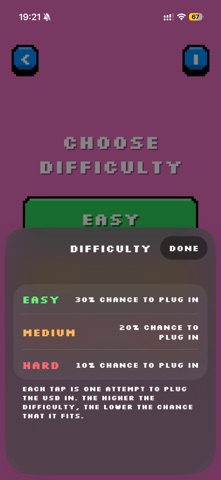
• Easy: 30% chance to plug in
• Medium: 20% chance to plug in
• Hard: 10% chance to plug in
Tap the "i" button on the difficulty screen anytime to check the odds.
FEATURES
• A fun 3D USB drive with hand-made animations
• Retro pixel-art look with a pixel font and chunky buttons
• Three difficulty levels
• Pause and exit whenever you want
• Available in 32 languages
• No ads, no accounts, no internet required
Perfect for a quick laugh, for anyone who has ever failed to plug in a USB three times in a row.
USB SIMULATOR turns that universal struggle into a tiny pixel-art game.
HOW IT WORKS
Tap the screen to try to plug the USB in. Sometimes it slides right in. Most of the time it bumps against the port, flips around, and makes you try the other side. Just like real life.
CHOOSE YOUR PAIN
• Easy: 30% chance to plug in
• Medium: 20% chance to plug in
• Hard: 10% chance to plug in
Tap the "i" button on the difficulty screen anytime to check the odds.
FEATURES
• A fun 3D USB drive with hand-made animations
• Retro pixel-art look with a pixel font and chunky buttons
• Three difficulty levels
• Pause and exit whenever you want
• Available in 32 languages
• No ads, no accounts, no internet required
Perfect for a quick laugh, for anyone who has ever failed to plug in a USB three times in a row.