

USC-Crew is made and published by GetCrew Ltd. AppBrain is an independent app data site and isn't affiliated with GetCrew Ltd. The app name, icon, screenshots and description belong to GetCrew Ltd and are shown as published on the App Store.
AppBrain's verdict
- Last updated
- February 12, 2025
- Size
- 41.9 MB
User feedback
Ratings and reviews on the App StoreComments on USC-Crew for iOS
We don't have enough comments to show example comments. Please check back later.
Store listing
By GetCrew Ltd, from the App Store


Description by GetCrew Ltd Written by the developer, not by AppBrain. Click to read.
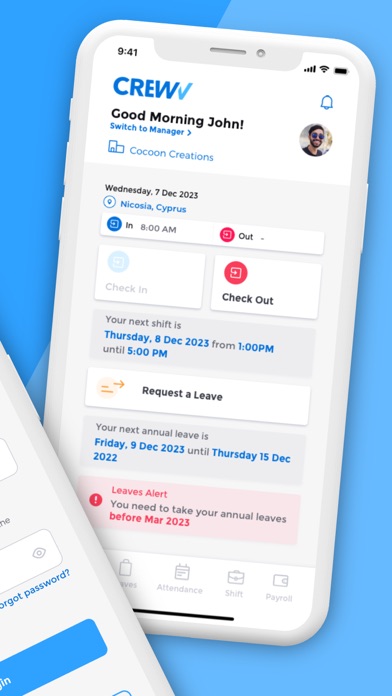
Employees have this dedicated mobile app for all their interactions with their employer. Through this app and depending on the modules enabled by the employer, employees have access to:
1. Employee Dashboard - A dashboard where they can see an overview of their next shift, next holiday, they can check-in / check-out and view any announcements.
2. Leaves - A dedicated absence management page where employees get to instantly see their available allowance for holidays, easily create an absence request also enabling them to upload supporting documents in just a couple taps. They will receive their manager’s decision as soon as they review it! Employees also have access to view their leaves history and all their leave balances reporting.
3. Attendance - Employees can use this to check-in when arriving at work and check-out when leaving, for an accurate timesheet.
4. Shifts - Employees can see in this dedicated section all their upcoming shift assignments, review details and accept them
5. Employee Profile - Employees can view their HR records kept with the employer and request any updates needed in order to complete or update their profiles. Furthermore, employees can ask their manager any questions and receive an official answer through the app.
If an employee is a manager too they get access to a special section within the app to perform the following actions depending on the modules enabled by their employer:
1. Request new shifts for their department and include all relevant details for an accurate assignment
2. Assign shift requests automatically based on the requests submitted
3. Review leave requests from their direct reports, review and accept/decline them.
4. View reporting on their direct reports' leaves history records, upcoming leaves and review their current leave balances.
Safety and technology
Found in the app by AppBrain- Price
- Free
- App size
- 41.9 MB
- Content rating
- High
Technologies used by USC-Crew
Releases
Updates seen on the App Store- Version
- 1.0.3
- Launched
- March 2024
No changelog data
Alternatives
Similar apps and more from GetCrew LtdAlternatives to USC-Crew




More from GetCrew Ltd

Rankings
App Store top chartsApp Store Rankings for USC-Crew
About the app and developer
About USC-Crew
USC-Crew is a business app developed by GetCrew Ltd.
User Ratings
The app has no ratings yet.
App Information
USC-Crew is freely available from the App Store. The app size is 41.88 MB. The latest version available is 1.0.3. The last update was on February 12, 2025.
Technical Requirements
The app has a content rating of High Maturity. The app has been available on the App Store since March 2024.
Developer information for GetCrew Ltd
Address:
Frequently asked questions about USC-Crew
Is USC-Crew free?
Yes. USC-Crew is free on the App Store.
Is USC-Crew still available?
Yes. USC-Crew is on the App Store, and the last update we saw was on February 12, 2025.
How large is USC-Crew?
USC-Crew is 41.88 MB.
Is USC-Crew suitable for children?
App Store gives USC-Crew a high maturity rating. It is meant for adults.
Who made USC-Crew?
USC-Crew was developed by GetCrew Ltd. It is listed in the business category on the App Store.
What are the best alternatives to USC-Crew?
People looking at USC-Crew also look at these business apps: Ventuno Group, exEurobank CY, EU Council, Holden Smith, FaxGo - Send & Receive Fax App.