

Use Your Days
Use Your Days is made and published by Paul Hall. AppBrain is an independent app data site and isn't affiliated with Paul Hall. The app name, icon, screenshots and description belong to Paul Hall and are shown as published on the App Store.
AppBrain's verdict
- Rating on App Store
- 5.00
- 3 ratings
- Last updated
- August 23, 2026
It doesn't have enough ratings yet to judge what users think.
Rankings
App Store top chartsApp Store Rankings for Use Your Days
Competitors
Similar apps and more from Paul HallAlternatives to Use Your Days


More from Paul Hall


Releases
Updates seen on the App Store- Version
- 1.9.1
- Launched
- December 2025
No changelog data
User feedback
Ratings and reviews on the App StoreComments on Use Your Days for iOS
We don't have enough comments to show example comments. Please check back later.
Technology
Found in the app by AppBrain- Price
- Free
- App size
- 3.78 MB
- Content rating
- Everyone
Technologies used by Use Your Days
About the app and developer
About Use Your Days
Use Your Days is a productivity app developed by Paul Hall.
What is the rating of Use Your Days?
Use Your Days is rated 5.00 out of 5 stars, based on 3 ratings.
Is Use Your Days free?
Use Your Days is free. The app size is 3.78 MB. The latest version available is 1.9.1. The last update was on August 23, 2026.
What are the requirements for Use Your Days?
The app has a content rating of Everyone. The app has been available on the App Store since December 2025.
Developer information for Paul Hall
Address:
Store listing
By Paul Hall, from the App Store
Description by Paul Hall Written by the developer, not by AppBrain. Click to read.
Use Your Days helps you track your vacation days, personal time, and all the breaks you deserve, whether your time off is granted upfront or earned gradually, with beautiful countdowns that build excitement for every moment away from work.
See exactly where you stand
-Track remaining PTO at a glance
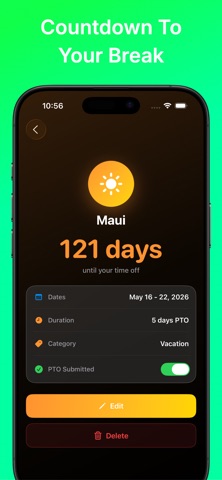
-Watch the countdown to your next break
-Know how many days are left in the year to plan ahead
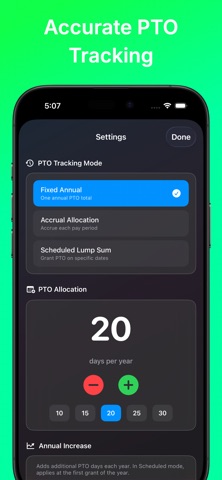
-Track PTO as it accrues each pay period, as a simple annual total, or scheduled lump sum
-Support for weekly, biweekly, semi-monthly, and monthly accrual schedules
-Configure accrual rate, lump sum days, rollover amounts, and banking caps
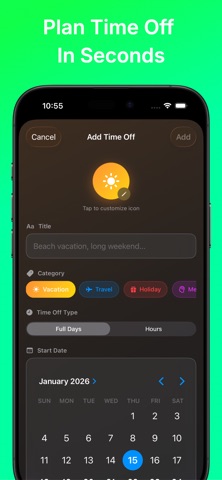
-Toggle between days and hours when adding time off
-Smart weekday-only counting (skip weekends automatically)
-Option to exclude federal holidays from your totals
-View a full history of how your available balance was calculated, including accruals, PTO used, rollovers, and lump sums
Organize your time off your way
-Categorize entries: Vacation, Travel, Mental Health, Family Time, Medical, Personal & more
-Add custom emoji icons to personalize each entry
-Add notes to remember trip details, reservations, or plans
Stay in control of your balance
-Set a maximum banking cap for total PTO days
-Allow negative balances (borrow against future PTO) with a configurable limit
-Automatically roll over unused PTO into the new year
-Year-end PTO projections so you know what you’ll have left
-See warnings when you try to book more PTO than you have available
Track PTO submissions to your employer
-Mark each PTO entry as submitted or not submitted
-With PTO submission tracking enabled, your available balance reflects only submitted PTO
-Perfect for workplaces that require PTO to be submitted as it accrues
Never forget to submit PTO
-Get reminders when it’s time to submit a PTO request
-Choose how far in advance you’re notified
-See visual indicators on PTO entries that still need submission
-App badge shows how many requests need attention
-Tap a notification to jump straight to that PTO entry
See your entire year at a glance
-Interactive Days Left calendar showing all 12 months
-See every PTO day on the exact dates it occurs
-Tap any day to preview what’s happening
Home screen widgets that inspire
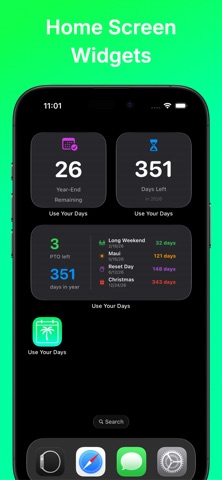
-Full dashboard widget showing available PTO based on current accrual
-Focused widgets: PTO countdown only, days remaining only, or next event countdown
-Small, medium, and large sizes to fit your home screen
Sync everywhere with iCloud
-Your PTO data and settings sync seamlessly across all your Apple devices
-Add time off on your iPhone, see it on your iPad & Mac
Designed to delight
-Haptic feedback throughout
-Beautiful category gradients and modern glass-style UI
-Dark mode support
Time off is part of your compensation. Use it wisely. Use it fully.