

Useful Voice Changer
Useful Voice Changer is made and published by katapu.net. AppBrain is an independent app data site and isn't affiliated with katapu.net. The app name, icon, screenshots and description belong to katapu.net and are shown as published on the App Store.
AppBrain's verdict
- Last updated
- October 15, 2026
Rankings
App Store top chartsApp Store Rankings for Useful Voice Changer
Competitors
Similar apps and more from katapu.netAlternatives to Useful Voice Changer


More from katapu.net





Releases
Updates seen on the App Store- Version
- 1.1.2
- Launched
- April 2026
No changelog data
User feedback
Ratings and reviews on the App StoreComments on Useful Voice Changer for iOS
We don't have enough comments to show example comments. Please check back later.
Technology
Found in the app by AppBrain- Price
- Free
- App size
- 82.7 MB
- Content rating
- High
Technologies used by Useful Voice Changer
About the app and developer
About Useful Voice Changer
Useful Voice Changer is a photo & video app developed by katapu.net.
What is the rating of Useful Voice Changer?
Useful Voice Changer has no ratings yet.
Is Useful Voice Changer free?
Useful Voice Changer is free. The app size is 82.72 MB. The latest version available is 1.1.2. The last update was on October 15, 2026.
What are the requirements for Useful Voice Changer?
The app has a content rating of High Maturity. The app has been available on the App Store since April 2026.
Developer information for katapu.net
Address:
Store listing
By katapu.net, from the App Store


Description by katapu.net Written by the developer, not by AppBrain. Click to read.
This app lets you easily transform the audio in a video you choose and save it as a new video with a different voice.
It's perfect when you want to change the impression of a voice or avoid using the original voice as it is.
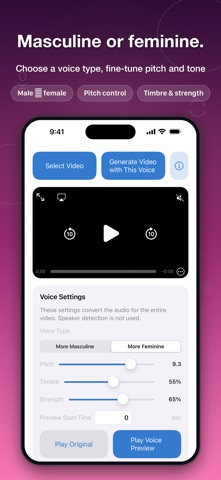
After selecting a video, you can adjust "Voice Type", "Pitch", and "Timbre", then preview the converted audio before creating the video.
You can also set the "Start Time" and listen to the part you care about first, so you can fine-tune the result with confidence.
Converted videos can be saved to your Camera Roll or to Files.
It's useful when you want to change the feel of a talking video, adjust the voice before posting to social media, or keep a video while making the original voice a little less recognizable.
From importing a video to previewing, generating, and saving, everything follows a simple and easy-to-understand flow.
Video and audio processing are performed on your device, so you can review the result locally as you work.
【How to use】
1. Tap "Select Video" and choose the video you want to convert.
2. Adjust "Voice Type", "Pitch", and "Timbre", and set "Start Time" if needed.
3. Tap "Play Voice Preview" to hear the converted audio.
4. Tap "Generate Video with This Voice" to create the converted video.
5. On the confirmation screen after generation, check the result and tap "Save to Camera Roll" or "Save to Files" to save it.
If you want an easy way to change the voice in your videos, give this app a try.